
Scopes
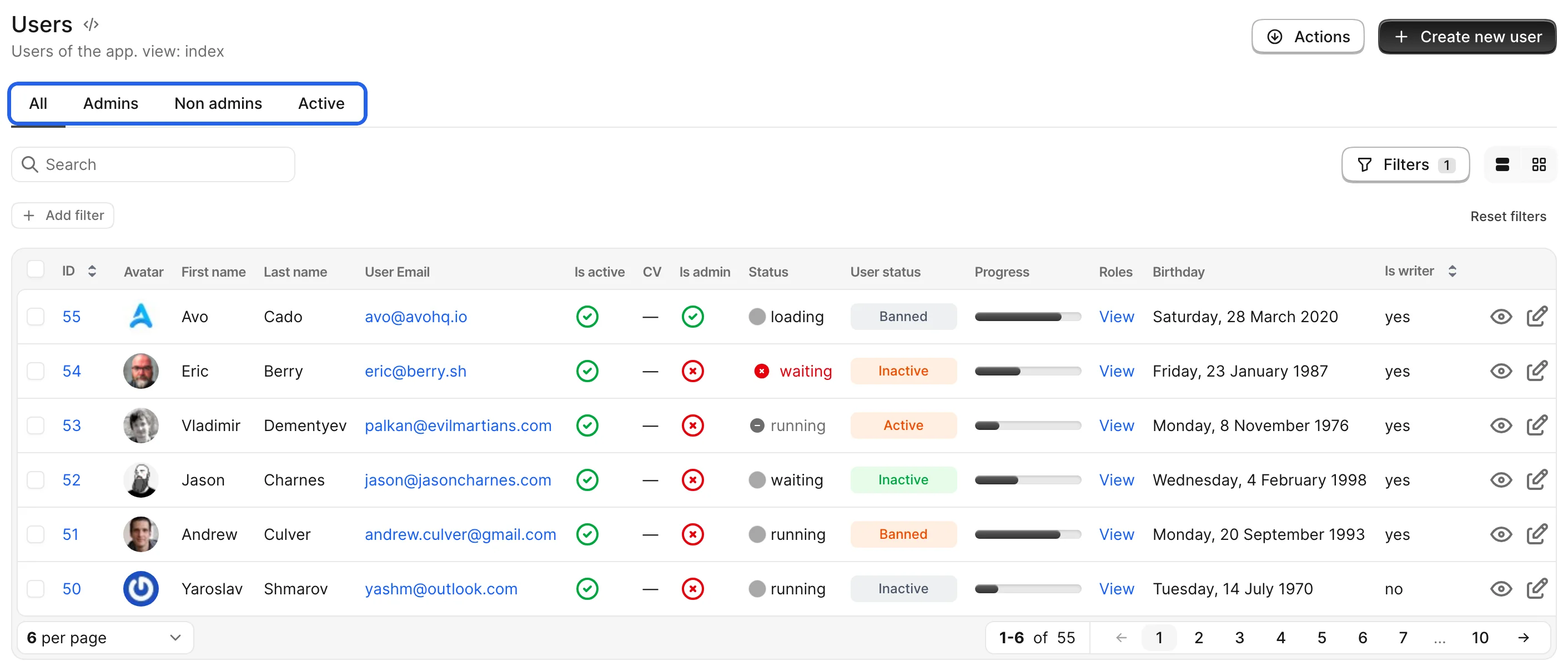
Sometimes you need to segment your data beyond just a few filters. You might have a User resource but frequently need to see all the Active users or Admin users. You can use a filter for that, or add a scope — a one-click segment rendered as a tab bar above the records.
Generate a scope
bin/rails generate avo:scope adminsThe generator creates a scope class in app/avo/scopes. Point its scope option to a scope on your model:
# app/avo/scopes/admins.rb
class Avo::Scopes::Admins < Avo::Scopes::BaseScope
  self.name = "Admins" # Name displayed on the scopes bar
  self.description = "Admins only" # This is the tooltip value
  self.scope = :admins # A scope on the model this resource uses
  self.visible = -> { true } # Control the visibility
end

# app/models/user.rb
class User < ApplicationRecord
  scope :admins, -> { where role: :admin } # This is used in the scope file above
end
If you'd rather not define a model scope, scope also accepts a proc that modifies the query directly.
Register the scope on a resource
Because scopes are reusable, you must manually add each scope to a resource using the scope method inside the scopes method:
# app/avo/resources/user.rb
class Avo::Resources::User < Avo::BaseResource
  def scopes
    scope Avo::Scopes::Admins
  end
end
Set a default scope
Pass default: true when registering a scope to apply it when you navigate to the resource's Index view. It also accepts a proc, so you can pick the default per user:
# app/avo/resources/user.rb
class Avo::Resources::User < Avo::BaseResource
  def scopes
    scope Avo::Scopes::OddId
    # EvenId is the default scope only for admins
    scope Avo::Scopes::EvenId, default: -> { current_user.admin? }
  end
end
Remove the "All" scope
Avo adds an All scope by default. If you don't want it — or you'd rather ship a custom "All" scope of your own — call remove_scope_all inside the scopes method and mark another scope as the default:
# app/avo/resources/user.rb
class Avo::Resources::User < Avo::BaseResource
  def scopes
    remove_scope_all
    scope Avo::Scopes::Everybody, default: true
    scope Avo::Scopes::Admins
  end
end
Show record counts
To display a count badge next to a scope's label, set counter on the scope class:
# app/avo/scopes/active.rb
class Avo::Scopes::Active < Avo::Scopes::BaseScope
  self.counter = :lazy
end
Use :lazy on large tables so the count loads after the page paints instead of slowing down the request, or :hover to load it only when the user hovers over the scope tab; true (or :eager) computes it inline. For finer control — a custom count, showing the badge conditionally, or formatting the number — pass a Hash with count, visible, and format keys. The badge isn't limited to numbers: return a String (text or an emoji) from count and pass it through with a format of just value.
# app/avo/scopes/active.rb
class Avo::Scopes::Active < Avo::Scopes::BaseScope
  self.counter = {
    loading: :lazy,
    count: -> { query.active.count },
    format: -> { "#{value} #{resource.name.pluralize.downcase}" }
  }
end
Control who sees a scope
Use the visible option to show, hide, or authorize a scope per user:
# app/avo/scopes/even_id.rb
class Avo::Scopes::EvenId < Avo::Scopes::BaseScope
  # Only show this scope to admins
  self.visible = -> { current_user.admin? }
end
Dynamic values
Every option accepts a proc instead of a static value, executed using the Avo::ExecutionContext with access to query, resource, scope, and scoped_query. For example, a description that adapts to the resource:
# app/avo/scopes/even_id.rb
class Avo::Scopes::EvenId < Avo::Scopes::BaseScope
  self.description = -> {
    "Only #{resource.name.downcase.pluralize} that have an even ID"
  }
end
Performance note
scoped_query executes the scope when called. If the scope is slow, using it inside a proc impacts every page load. To show record counts, prefer the built-in counter option over computing them in name.
See the execution context reference for what each option's proc has access to.
Limit index columns per scope
A scope normally changes which records appear on the index. It can also change which columns appear while it's active — only on the Index view; the show, new, and edit views keep the resource's normal fields.
There are three ways to do it, in order of precedence:
- Define a
fieldsmethod on the scope to declare the exact index columns from scratch, using the same DSL as a resource'sfields. - Set
field_whitelistto keep the resource's fields but show only the listed ids. - Set
field_blacklistto keep the resource's fields but hide the listed ids.
# app/avo/scopes/published.rb
class Avo::Scopes::Published < Avo::Scopes::BaseScope
  self.scope = -> { query.where(published: true) }

  def fields
    field :id, as: :id
    field :title, as: :text
    field :published_at, as: :date_time
  end
end
Display only
field_whitelist and field_blacklist only change which columns render on the index. They are not an authorization boundary — the data is still loaded and stays visible on the show and edit views and through the API. To actually restrict access, use a policy or a field's visible option.
Full example
# app/avo/scopes/even_id.rb
class Avo::Scopes::EvenId < Avo::Scopes::BaseScope
  self.name = "Even"

  # This will compute the description based on the resource name
  self.description = -> {
    "Only #{resource.name.downcase.pluralize} that have an even ID"
  }

  # This will scope the query to only even IDs
  self.scope = -> { query.where("#{resource.model_key}.id % 2 = ?", "0") }

  # Only show this scope to admins
  self.visible = -> { current_user.admin? }

  # Show a record count badge, loaded lazily so it won't slow down the page
  self.counter = :lazy
end