
Table view
The table view is the default way to display resources in Avo. It provides a powerful, tabular layout that supports searching, sorting, filtering, and pagination out of the box.
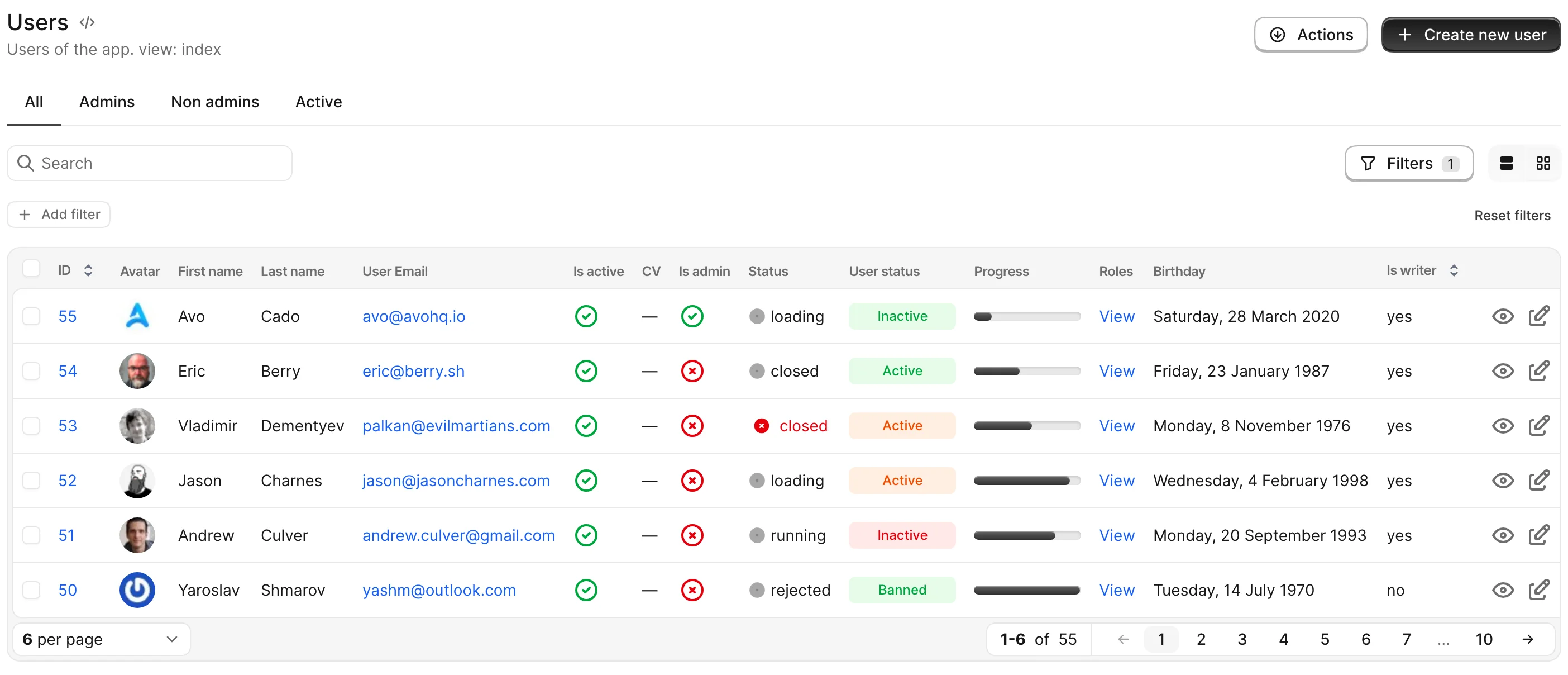
With no configuration, every resource renders as a table with the row controls (show, edit, delete, actions) on the right side of each row and standard row styling. Two hooks let you customize it: row controls placement and row_options for per-row HTML attributes.
Row controls
By default, resource controls are positioned on the right side of record rows. However, if the table contains many columns, these controls may become obscured. In such cases, you may prefer to move the controls to the left side, float them over the row, or reveal them only on hover.
Watch the demo videoGlobal configuration
If you want to change the defaults for every resource, set resource_row_controls_config in the initializer:
# config/initializers/avo.rb
Avo.configure do |config|
  config.resource_row_controls_config = {
    placement: :left,
    float: true,
    show_on_hover: true
  }
end
Resource configuration
If a single resource needs different behavior, set row_controls_config on it — it overrides the global configuration for that resource:
# app/avo/resources/user.rb
class Avo::Resources::User < Avo::BaseResource
  self.row_controls_config = {
    placement: :left
  }
end
Both accept the same keys — placement, float, and show_on_hover. See the API reference for values and defaults.
WARNING
float and show_on_hover are designed to work with placement: :right. Avo doesn't restrict other placements, but the applied styles are intended for :right and unexpected behavior may occur with :left or :both.
Style rows with row_options
self.table_view = { row_options: { ... } } lets you declaratively set HTML attributes on the <tr> element for each record on the index, with optional per-record blocks. Use it to highlight rows, add custom data attributes, set tooltips, or attach Stimulus controllers — all without overriding the row component.
# app/avo/resources/message.rb
class Avo::Resources::Message < Avo::BaseResource
  self.table_view = {
    row_options: {
      class: -> { record.role == "agent" ? "bg-blue-50 dark:bg-blue-950/40" : "" },
      data: { test_id: "message-row" },
      title: -> { "Message from #{record.role}" }
    }
  }
end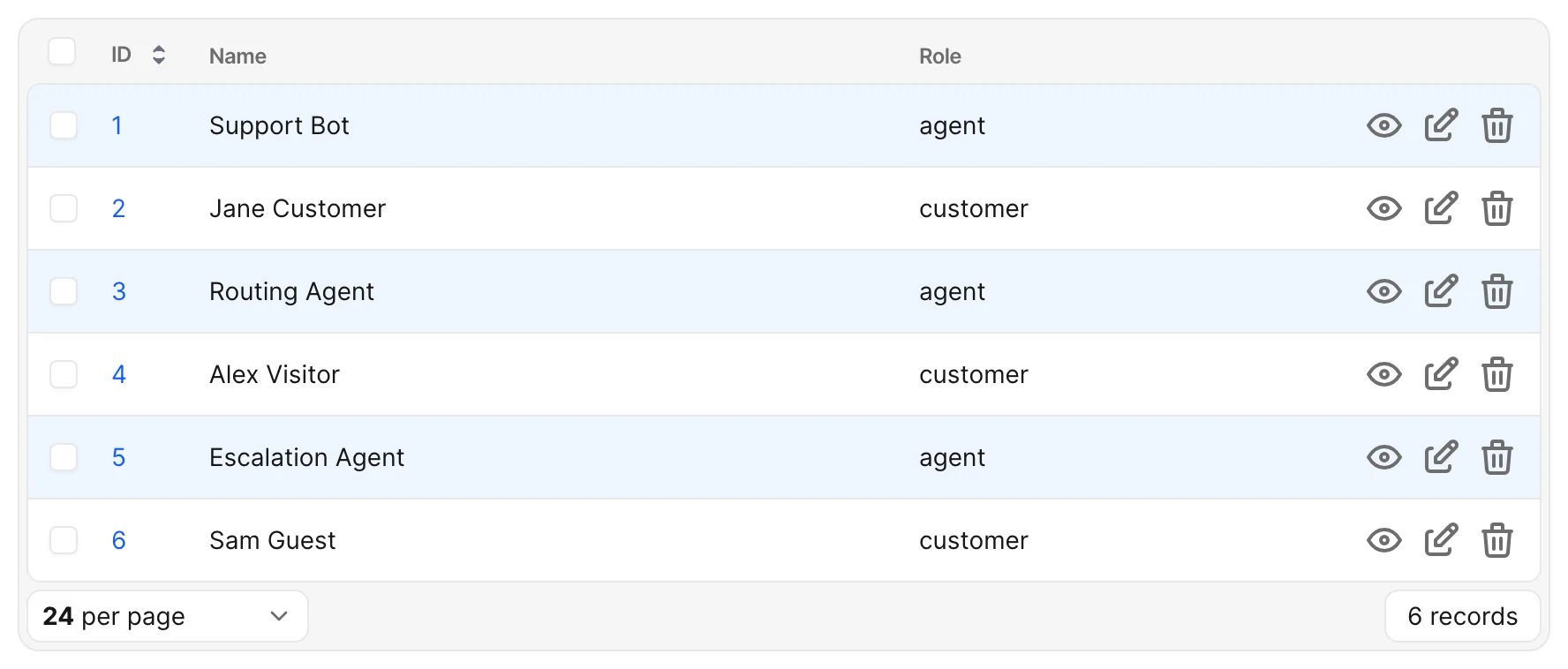
The same configuration applies to both the main index and any has_many association table that lists this resource.
The supported keys (class, data, style, and other passthrough HTML attributes), the merge rules, and the reserved attributes are documented in the API reference.
Configuration shape
row_options accepts a hash whose values may be static or blocks. The whole hash itself can also be a block returning a hash.
# Per-value blocks (most common)
self.table_view = {
  row_options: {
    class: -> { record.archived? ? "opacity-60" : "" },
    data: { kind: "message" }
  }
}

# Top-level block (one evaluation context for many keys)
self.table_view = {
  row_options: -> {
    {
      class: record.archived? ? "opacity-60" : "",
      data: { kind: "message", archived: record.archived?.to_s }
    }
  }
}
Blocks are evaluated once per row, per render, through Avo::ExecutionContext. Inside a block you have access to:
record— the row's record instanceresource— the Avo resource instanceview—:indexon the main index,:has_manyinside an association panel- Standard
Avo::ExecutionContextdefaults (current_user,params,request, view helpers)
WARNING
Attribute values must resolve to a String, Symbol, or Integer (or nil/false to omit the attribute). Booleans like record.archived? raise an ArgumentError — convert them with .to_s first. See value coercion in the API reference.
Examples
Highlight by record state
class Avo::Resources::Order < Avo::BaseResource
  self.table_view = {
    row_options: {
      class: -> {
        case record.status
        when "failed"   then "bg-red-50 dark:bg-red-950/30"
        when "pending"  then "bg-amber-50 dark:bg-amber-950/30"
        when "shipped"  then "bg-emerald-50 dark:bg-emerald-950/30"
        else ""
        end
      }
    }
  }
end
Dim soft-deleted rows
self.table_view = {
  row_options: {
    class: -> { "opacity-60 italic" if record.discarded? }
  }
}
Branch on render context
The view local lets you apply different styling on the main index versus inside an association panel:
self.table_view = {
  row_options: {
    class: -> {
      next "" if view == :has_many        # quieter inside parent show pages
      record.urgent? ? "bg-amber-50 dark:bg-amber-950/30" : ""
    }
  }
}
Conditional return values
Returning nil or false from a block omits the attribute (or, for class:, leaves Avo's classes untouched). This makes ternaries and if modifiers natural:
class: -> { record.archived? ? "opacity-60" : nil }
data:  -> { record.special? ? { status: "active" } : nil }
title: -> { record.note.presence }
Hover and selection co-existence
Avo's row hover and selection styles use Tailwind utilities applied to <tr> (e.g., hover:bg-gray-50). When you set a custom background, you may want hover and selected affordances to remain visible:
- Use semitransparent backgrounds (
bg-blue-50/60,bg-amber-100/40) so Avo's hover overlay still shows through. - Or pair your custom class with explicit
hover:and selection variants:bg-blue-50 hover:bg-blue-100 dark:bg-blue-950/40 dark:hover:bg-blue-900/40.
Dark mode
User-supplied classes are outside Avo's semantic CSS variable system, so dark-mode handling is your responsibility. Two recommended patterns:
- Tailwind
dark:modifiers for utility classes:rubyclass: "bg-blue-50 dark:bg-blue-950/40" - Avo's semantic variables via inline
style:for theme-aware values:rubystyle: "background-color: var(--color-secondary);"
Tailwind class discovery
Tailwind only generates utility classes it can see in your source files. With Avo's Tailwind CSS integration enabled, the compiler scans your Rails app/ directory — including app/avo — so classes written literally inside row_options blocks (like the examples above) are compiled automatically.
Two cases need attention:
Dynamically-built class names (
"role-#{record.role.slug}", concatenated strings) are invisible to the scanner. Register them explicitly with Tailwind v4's@source inline(...)in one of your Avo stylesheets:css/* app/assets/stylesheets/avo/custom.css */ @source inline("{dark:,}bg-{red,amber,emerald}-{50,950/30}");Without the integration (precompiled Avo bundle only), no new utility classes are generated at all — only classes already present in Avo's own bundle will work. Enable the Tailwind CSS integration if you rely on custom classes here.
Performance
Blocks run once per row, per render, after Avo's row cache boundary. For tables with many rows or large per_page values:
- Preload associations referenced from blocks via
self.includes. A naïverecord.user.role.nameis an N+1 across every row. - Keep blocks cheap — they run on every render, not just initial page load.
self.includes = [:role]
self.table_view = {
  row_options: {
    class: -> { "role-#{record.role.slug}" }   # `role` is preloaded
  }
}
Migration from row component overrides
If you previously overrode Avo::Index::TableRowComponent to add a class or data attribute per row, you can usually replace the override with row_options and remove the custom component. The new API runs in Avo's stock render path, so resources without self.table_view configured behave exactly as they did before.
If your override does anything beyond <tr> attribute customization (e.g., changes which cells render), keep the override — row_options only controls the <tr> itself.
Limitations
- No cell-level options yet. A future
cell_optionsAPI will let you customize individual<td>elements via the field DSL. For now,row_optionsonly affects the row container. - No grid analog.
self.grid_viewconfigures the card content, not per-card HTML attributes. - Turbo Stream re-renders. When a row is broadcast-updated via Turbo Stream, the
view:local resolves based on the original render context. Verify in your specs if you depend onviewbranching.