
Basic filters
Basic filters scope the Index query through Ruby classes you write yourself. Each filter is one class: you pick the input type the user sees (checkboxes, a select, a text input, or a date picker), define its options, and write the exact query in the apply method. You then register the filter on every resource that should display it.
# app/avo/filters/featured.rb
class Avo::Filters::Featured < Avo::Filters::BooleanFilter
  self.name = "Featured filter"

  def apply(request, query, values)
    return query if values["is_featured"] && values["is_unfeatured"]

    if values["is_featured"]
      query.where(is_featured: true)
    elsif values["is_unfeatured"]
      query.where(is_featured: false)
    else
      query
    end
  end

  def options
    {
      is_featured: "Featured",
      is_unfeatured: "Unfeatured"
    }
  end
end# app/avo/resources/post.rb
class Avo::Resources::Post < Avo::BaseResource
def filters
filter Avo::Filters::Featured
end
endWith no filters registered, the Filters button simply doesn't render on the Index view.
Every class-level option (self.name, self.visible, …) and overridable method (apply, options, default, react) is documented in the Basic filters API.
Generate a filter
The generator creates the filter file under app/avo/filters/:
bin/rails generate avo:filter featured --type booleanThe --type argument accepts boolean (the default), select, multiple_select, text, and date_time.
Register the filter on a resource
Declare filters inside the resource's filters method using filter:
# app/avo/resources/post.rb
class Avo::Resources::Post < Avo::BaseResource
  def fields
    field :id, as: :id
    field :name, as: :text
  end

  def filters
    filter Avo::Filters::Published
    filter Avo::Filters::Featured
  end
end
The same filter class can be registered on as many resources as you like. If the filter should behave differently per resource, pass arguments.
Pick a filter type
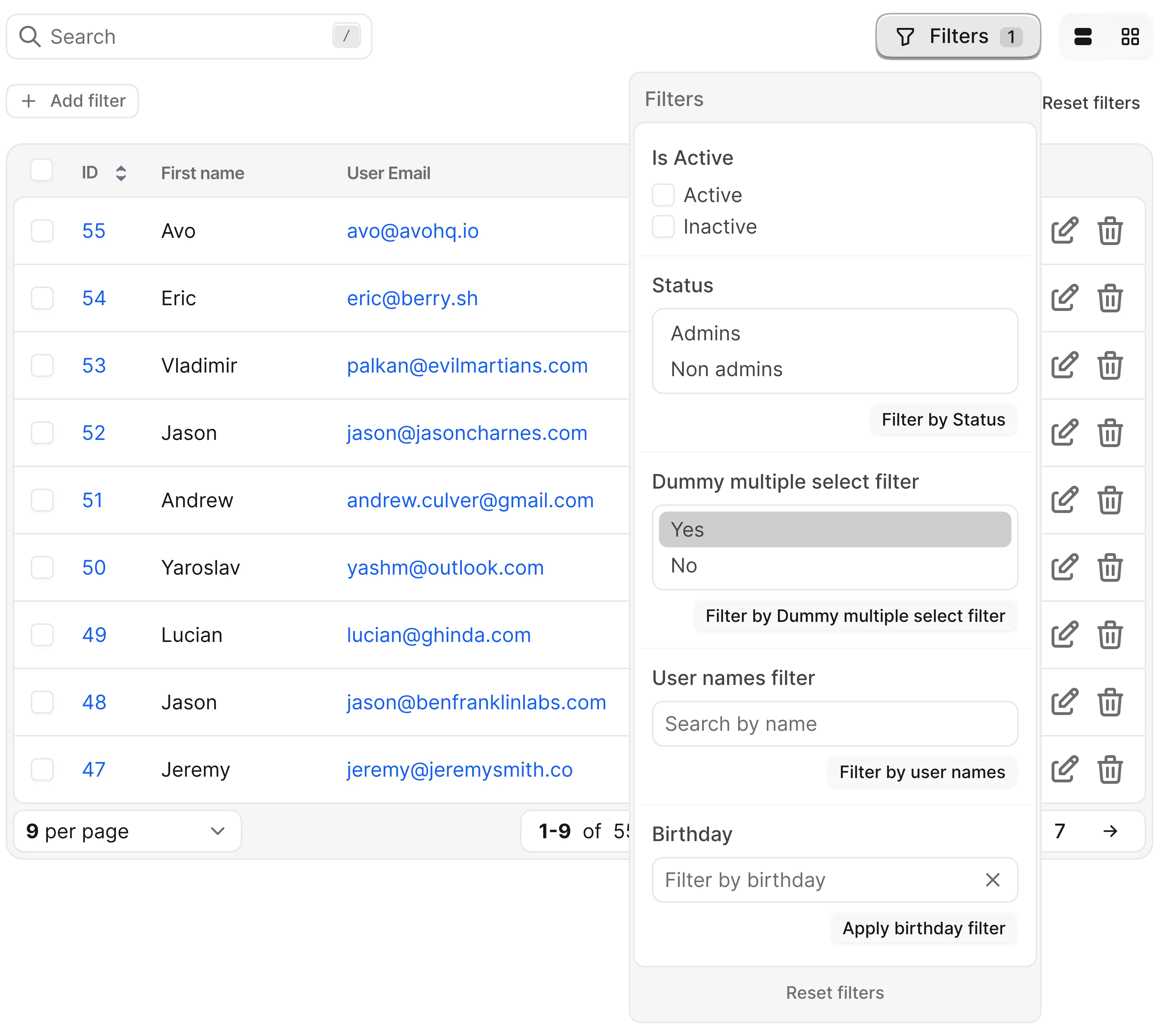
There are five filter types. They differ only in the input the user interacts with and the shape of the value your apply method receives.
Filter values are stringified
Filter state is serialized into the URL, so the value/values your apply method receives is always a string — or a hash with stringified keys. Declare options with symbols if you like, but read values with string keys: values["is_featured"], not values[:is_featured].
Boolean filter
Renders one checkbox per option. values arrives as a hash of true/false flags keyed by option id.
# app/avo/filters/featured.rb
class Avo::Filters::Featured < Avo::Filters::BooleanFilter
  self.name = "Featured filter"

  # values = { "is_featured" => true, "is_unfeatured" => false }
  def apply(request, query, values)
    return query if values["is_featured"] && values["is_unfeatured"]

    if values["is_featured"]
      query.where(is_featured: true)
    elsif values["is_unfeatured"]
      query.where(is_featured: false)
    else
      query
    end
  end

  def options
    {
      is_featured: "Featured",
      is_unfeatured: "Unfeatured"
    }
  end
end
Select filter
Renders a dropdown; value is the single selected option id as a string.
# app/avo/filters/published.rb
class Avo::Filters::Published < Avo::Filters::SelectFilter
  self.name = "Published status"

  # value = "published"
  def apply(request, query, value)
    case value
    when "published"
      query.where.not(published_at: nil)
    when "unpublished"
      query.where(published_at: nil)
    else
      query
    end
  end

  def options
    {
      published: "Published",
      unpublished: "Unpublished"
    }
  end
end
Multiple select filter
Like the select filter, but the user can pick several options; value is an array of strings.
# app/avo/filters/post_status.rb
class Avo::Filters::PostStatus < Avo::Filters::MultipleSelectFilter
  self.name = "Status"

  # value = ["admins", "non_admins"]
  def apply(request, query, value)
    query = query.admins if value.include?("admins")
    query = query.non_admins if value.include?("non_admins")

    query
  end

  def options
    {
      admins: "Admins",
      non_admins: "Non admins"
    }
  end
end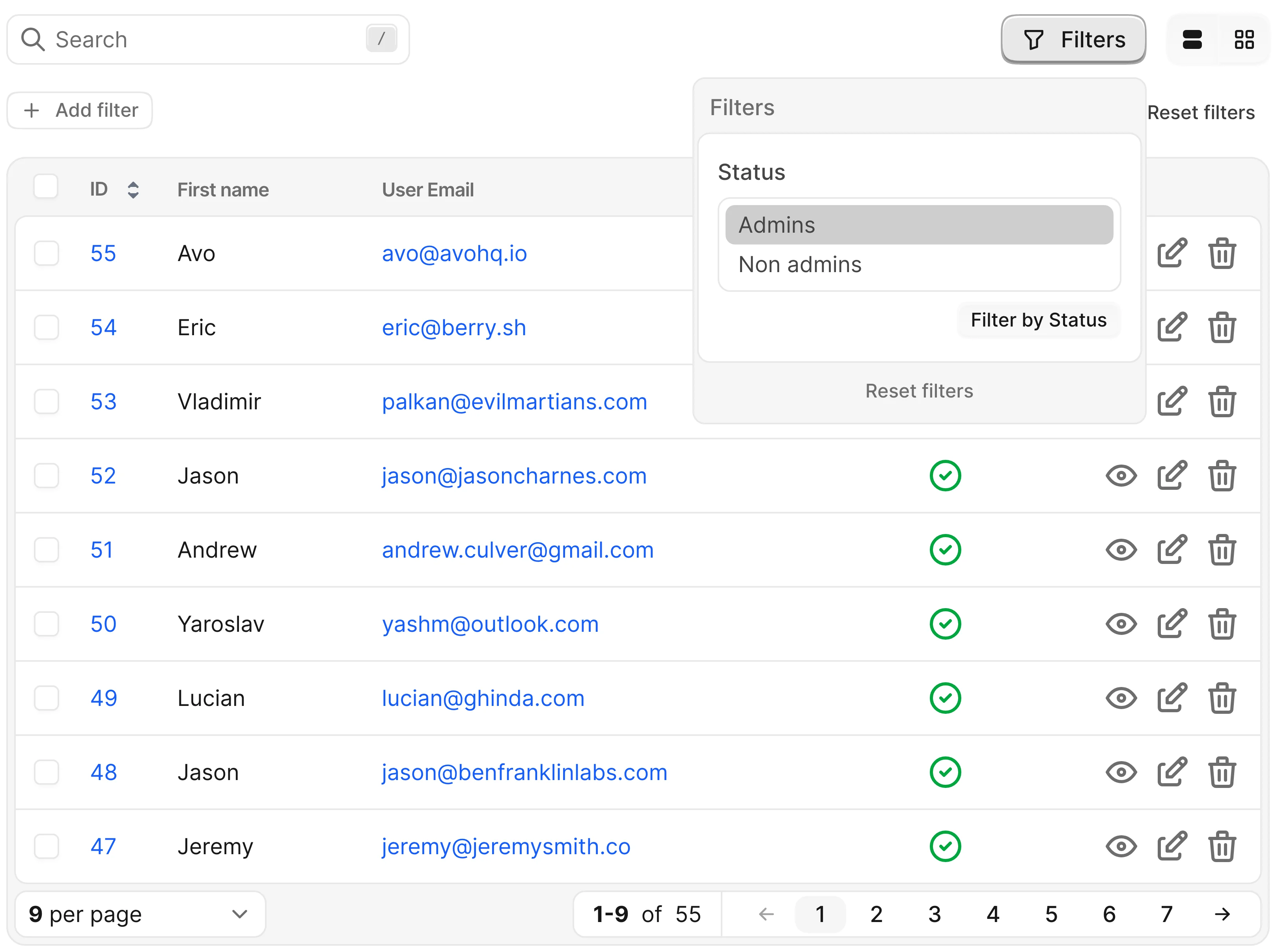
Text filter
Renders a free text input; value is whatever the user typed. No options method needed.
# app/avo/filters/name.rb
class Avo::Filters::Name < Avo::Filters::TextFilter
  self.name = "Name filter"
  self.button_label = "Filter by name"

  # value = "avo"
  def apply(request, query, value)
    query.where("LOWER(name) LIKE ?", "%#{value}%")
  end
end
Date time filter
Renders a flatpickr date/time picker. Set self.type to choose between date, time, or combined input, and self.mode to switch between a single value and a range.
# app/avo/filters/created_at.rb
class Avo::Filters::CreatedAt < Avo::Filters::DateTimeFilter
  self.name = "Created at"
  self.type = :date
  self.mode = :single

  def apply(request, query, value)
    query.where(created_at: Date.parse(value).all_day)
  end
end
In the default :range mode the value arrives as "2024-08-13 to 2024-08-16" — split it with value.split(" to ").
Timezone handling
The selected value is sent exactly as picked, with no timezone adjustment. If you need timezone conversion, handle it in the apply method.
To fine-tune the picker (formats, minute increments, …), override picker_format or picker_options — see the API reference.
Set a default value
To pre-apply a filter on load, return the desired state from the default method. The shape matches what apply receives: a hash for boolean filters, a string or symbol for select filters, an array for multiple select filters.
# app/avo/filters/published.rb
class Avo::Filters::Published < Avo::Filters::SelectFilter
self.name = "Published status"
def apply(request, query, value)
case value
when "published"
query.where.not(published_at: nil)
when "unpublished"
query.where(published_at: nil)
else
query
end
end
def options
{
published: "Published",
unpublished: "Unpublished"
}
end
Populate options dynamically
The options method is plain Ruby — query the database, call an API, or compute values on the fly:
# app/avo/filters/author.rb
class Avo::Filters::Author < Avo::Filters::SelectFilter
  self.name = "Author"

  def apply(request, query, value)
    return query if value.blank?

    query.where(author_id: value)
  end

  def options
    Author.select(:id, :name).each_with_object({}) { |author, options| options[author.id] = author.name }
  end
end
Inside options (and default) you have access to request, params, view_context, current_user, and applied_filters — the currently applied filter values — which enables filters that depend on each other.
Compose filters that depend on each other
Watch the demo videoSay you have a countries filter and a cities filter, and the cities list should only show cities from the selected countries.
# app/models/course.rb
class Course < ApplicationRecord
  def self.countries
    ["USA", "Japan", "Spain", "Thailand"]
  end

  def self.cities
    {
      USA: ["New York", "Los Angeles", "San Francisco", "Boston", "Philadelphia"],
      Japan: ["Tokyo", "Osaka", "Kyoto", "Hiroshima", "Yokohama", "Nagoya", "Kobe"],
      Spain: ["Madrid", "Valencia", "Barcelona"],
      Thailand: ["Chiang Mai", "Bangkok", "Phuket"]
    }
  end
end
Register both filters:
# app/avo/resources/course.rb
class Avo::Resources::Course < Avo::BaseResource
  def filters
    filter Avo::Filters::CourseCountry
    filter Avo::Filters::CourseCity
  end
end
The country filter is straightforward:
# app/avo/filters/course_country.rb
class Avo::Filters::CourseCountry < Avo::Filters::BooleanFilter
  self.name = "Course country filter"

  def apply(request, query, values)
    query.where(country: values.select { |country, selected| selected }.keys)
  end

  def options
    Course.countries.map { |country| [country, country] }.to_h
  end
end
The cities filter reads the countries filter's state from applied_filters and only offers cities from the selected countries:
# app/avo/filters/course_city.rb
class Avo::Filters::CourseCity < Avo::Filters::BooleanFilter
  self.name = "Course city filter"

  def apply(request, query, values)
    query.where(city: values.select { |city, selected| selected }.keys)
  end

  def options
    cities_for_countries countries
  end

  private

  # countries = ["USA", "Japan"]
  def cities_for_countries(countries_array = [])
    countries_array
      .map { |country| Course.cities.stringify_keys[country] }
      .flatten
      .map { |city| [city, city] }
      .to_h
  end

  # applied_filters = {
  #   "Avo::Filters::CourseCountry" => {
  #     "USA" => true,
  #     "Japan" => true,
  #     "Spain" => false,
  #     "Thailand" => false
  #   }
  # }
  def countries
    return [] if applied_filters["Avo::Filters::CourseCountry"].blank?

    applied_filters["Avo::Filters::CourseCountry"]
      .select { |country, selected| selected }
      .keys
  end
end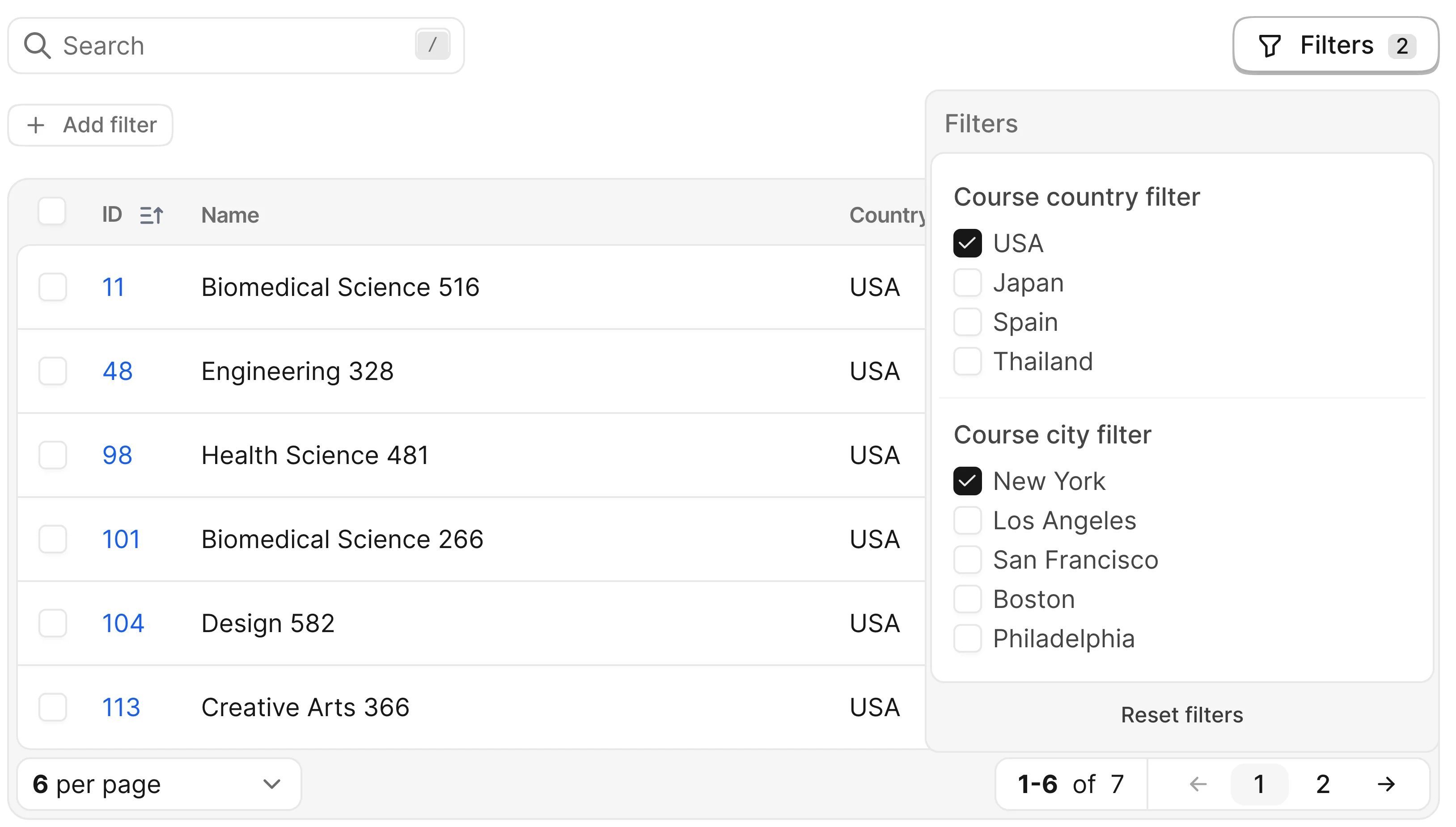
React to other filters
Watch the demo videoGoing one step further, a filter can change its own value when another filter changes. After all filters are applied, Avo calls each filter's react method; return a new value for the current filter (in the same shape apply expects), or nil to leave it untouched.
Continuing the example above — when the user selects a country and hasn't picked a city yet, auto-select the first city on the list:
# app/avo/filters/course_city.rb
class Avo::Filters::CourseCity < Avo::Filters::BooleanFilter
self.name = "Course city filter"
def apply(request, query, values)
query.where(city: values.select { |city, selected| selected }.keys)
end
def react
# Only react when a country is selected and no city has been picked yet
if applied_filters["Avo::Filters::CourseCountry"].present? && applied_filters["Avo::Filters::CourseCity"].blank?
selected_countries = applied_filters["Avo::Filters::CourseCountry"]
.select { |name, selected| selected }
Checking that the current filter is blank? matters: it keeps the user's own selection intact once they've interacted with the filter.
Show a message when there are no options
Watch the demo videoWhen options returns an empty collection — for example, the cities filter before a country is selected — Avo shows a generic "no options" message. Customize it with self.empty_message:
# app/avo/filters/course_city.rb
class Avo::Filters::CourseCity < Avo::Filters::BooleanFilter
  self.name = "Course city filter"
  self.empty_message = "Please select a country to view options."

  # ...
end
Show or hide a filter conditionally
Use self.visible with a block that returns a boolean. The block runs in Avo::ExecutionContext, so you can check current_user, params, the resource, and more:
# app/avo/filters/featured.rb
class Avo::Filters::Featured < Avo::Filters::BooleanFilter
  self.name = "Featured filter"
  self.visible = -> do
    current_user.admin?
  end

  # ...
end
See self.visible for everything available inside the block.
Pass arguments to a filter
To reuse one filter class with different behavior per resource, pass arguments at registration:
# app/avo/resources/fish.rb
class Avo::Resources::Fish < Avo::BaseResource
  def filters
    filter Avo::Filters::Name, arguments: {
      case_insensitive: true
    }
  end
end
The arguments hash is then available in the apply and options methods and inside the self.name, self.button_label, and self.visible blocks:
# app/avo/filters/name.rb
class Avo::Filters::Name < Avo::Filters::TextFilter
self.name = "Name filter"
self.button_label = "Filter by name"
self.visible = -> do
arguments[:case_insensitive]
end
Keep the filters panel open
Watch the demo videoBy default the panel closes each time a filter value changes. To keep it open while the user tweaks several filters, set the self.keep_filters_panel_open option on the resource.
Link to a pre-filtered view
Filter state travels in the encoded_filters URL param as a Base64-encoded JSON payload, so you can redirect users to a pre-filtered Index view from anywhere in your app:
redirect_to avo.resources_users_path(
  encoded_filters: Avo::Filters::BaseFilter.encode_filters({"Avo::Filters::Name" => "Apple"})
)
Avo provides two pairs of helpers — the Rails view helpers encode_filter_params / decode_filter_params (available in views and off view_context) and the standalone Avo::Filters::BaseFilter.encode_filters / Avo::Filters::BaseFilter.decode_filters class methods, usable anywhere.
Open a filter in your editor
In the development environment, each filter's title in the filters panel shows a small </> icon that opens the filter's source file in your editor. See Open a record in your editor for how it works and how to configure it for your editor.