
Fields
Fields are the backbone of a Resource. Through fields you tell Avo what to fetch from the database and how to display it on the Index, Show, and Edit views.
Fields can also be used in Actions to gather user input before running the action.
Avo ships with various simple fields like text, textarea, number, password, boolean, select, and more complex ones like markdown, key_value, trix, tags, and code.
Declaring fields
You add fields to a resource through the fields method using the field DATABASE_COLUMN, as: FIELD_TYPE, **FIELD_OPTIONS notation.
def fields
  field :name, as: :text
end
The first argument (:name here) is the column in the database where Avo looks for information, or a property on your model.
On the Index and Show views, we'll get a new text column of that record's database value. Finally, on the Edit and New views, we will get a text input field that will display & update the name field on that model.
Specific methods for each view
The fields method is used whenever no view-specific method is defined. To specify fields for each view or a group of views, you can use the following methods:
index view -> index_fieldsshow view -> show_fieldsedit / update views -> edit_fieldsnew / create views -> new_fields
You can also register fields for a specific group of views as follows:
index / show views -> display_fieldsedit / update / new / create views -> form_fields
When specific view fields are defined, they take precedence over view group fields. If neither specific view fields nor view group fields are defined, the fields will be retrieved from the fields method.
class Avo::Resources::City < Avo::BaseResource
  # Used on the `index` and `show` views
  def display_fields
    field :id, as: :id
    field :name, as: :text
    field :population, as: :number
    field :created_at, as: :date_time
  end

  # Used on the `new`, `create`, `edit`, and `update` views
  def form_fields
    field :name, as: :text
    field :population, as: :number
  end
end
INFO
On the preview view, Avo gathers fields from the fields, index_fields, show_fields, and display_fields methods combined.
Some fields must be declared even when hidden
When a form submits a value for a field, that field must be declared on the form views so Avo knows its type and can parse the submitted value. This comes up with resource tools that render inputs for fields themselves: declare those fields with hide_on: :forms instead of omitting them.
For instance, if a tool renders an input for features, a key_value field, you must keep field :features, as: :key_value, hide_on: :forms in your form fields. Omit it and Avo will be unable to update that database column.
Field conventions
When we declare a field, we pinpoint the specific database column for that field. Usually, that's a snake case value.
Each field has a label. Avo will convert the snake case name to a humanized version. In the following example, the is_available field will render the label as Is available.
field :is_available, as: :booleanINFO
If having the fields stacked one on top of another is not the right layout, try the sidebar.
A more complex example
class Avo::Resources::User < Avo::BaseResource
  def fields
    field :id, as: :id
    field :first_name, as: :text
    field :last_name, as: :text
    field :email, as: :text
    field :active, as: :boolean
    field :cv, as: :file
    field :is_admin?, as: :boolean
  end
end
The fields method is already hydrated with the current_user, params, request, view_context, and context variables so you can use them to conditionally show/hide fields
class Avo::Resources::User < Avo::BaseResource
  def fields
    field :id, as: :id
    field :first_name, as: :text
    field :last_name, as: :text
    field :email, as: :text
    field :is_admin?, as: :boolean
    field :active, as: :boolean

    if current_user.is_admin?
      field :cv, as: :file
    end
  end
end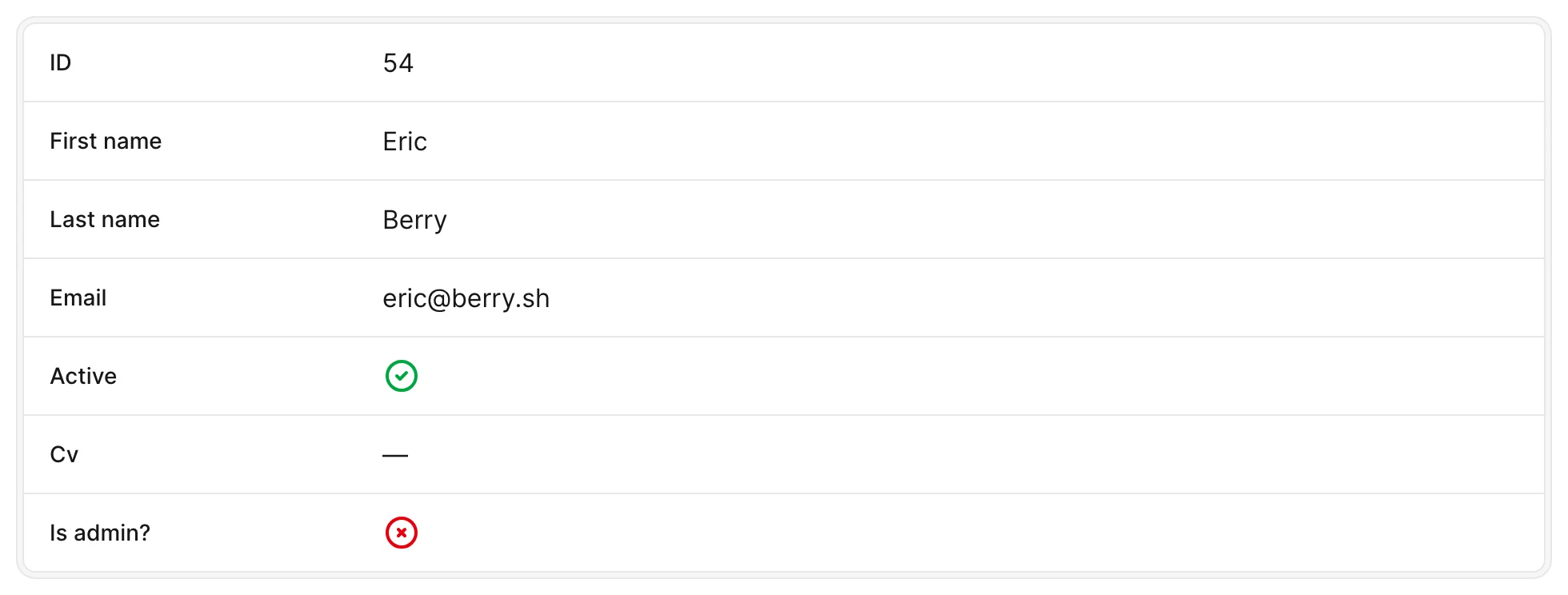
Field types
| Field | Description | Tags |
|---|---|---|
| Area | The Area field is used to display a geographical area on a map. | maps |
| Array | The Array field allows you to display and manage structured array data. | structured |
| Avatar | The Avatar field is a field that displays a user's avatar or initials. | assets |
| Badge | The badge field is used to display an easily recognizable status of a record. | display |
| Belongs to | Lets the user select an associated record from a belongs_to association. | associations |
| Boolean | Renders a checkbox on form views and a green check or red X icon on the Index and Show views. | boolean |
| Boolean group | The BooleanGroup is used to update a Hash with string keys and boolean values in the database. | booleanstructured |
| Checkbox list | The CheckboxList field renders a list of checkboxes for selecting multiple values from a finite set of options. | choice |
| Code | The Code field generates a code editor using codemirror package. | structured |
| Country | Country field generates a Select field on Edit view that includes all ISO 3166-1 countries. | choice |
| Date | The Date field may be used to display date values. | date & time |
| Date time | Displays date and time values, with configurable format, timezone, and picker options. | date & time |
| Easy MDE | Renders the EasyMDE Markdown editor, storing raw Markdown in the database. | rich text |
| External image | Displays an image from a URL stored in the database. | assets |
| File | The File field is the fastest way to implement file uploads in a Ruby on Rails app using Active Storage. | attachments |
| Files | The Files field is similar to File and enables you to upload multiple files at once using the same easy-to-use Active Storage implementation. | attachments |
| Gravatar | The Gravatar field turns an email field from the database into an avatar image if it's found in the Gravatar database. | assets |
| Has and belongs to many | Displays and manages the records of a has_and_belongs_to_many association. | associations |
| Has many | Displays a panel with the associated records below the resource's fields on the Show view. | associations |
| Has one | Displays the associated record's fields unfolded on the Show view. | associations |
| Heading | Displays a heading separator to delimit sections of fields on a resource. | layout |
| Hidden | Renders a hidden input on the New and Edit views. | utility |
| Id | The id field is used to show the record's id. | display |
| Key value | The KeyValue field makes it easy to edit flat key-value pairs stored in JSON format in the database. | structured |
| LocationOpen beta | The Location field is used to display a point on a map. | maps |
| MarkdownBeta | A GitHub-inspired Markdown editor based on the Marksmith editor. | rich text |
| MoneyBeta | The Money field is used to display a monetary value. | number |
| Number | Renders a number input element. | number |
| Password | Renders a password input element. | text |
| Preview | The Preview field adds a tiny icon to each row on the Index view that, when hovered, it will display a preview popup with more information regarding that record. | display |
| Progress bar | Renders a progress bar on the Index and Show views and a range slider on the Edit and New views. | number |
| Radio | The Radio field is used to render radio buttons. | choice |
| Record link | Displays a link to another record. | displayassociations |
| Rhino | Renders the Rhino WYSIWYG editor, based on TipTap, with ActionText and Media Library support. | rich textattachments |
| Select | Renders a select dropdown with configurable options. | choice |
| Stars | The stars field renders a star rating display on Index and Show views, and interactive clickable stars on Edit and New views. | number |
| Status | The Status field renders a colored indicator on index and show views — loading, failed, success, or neutral. | display |
| Tags | Displays and manages a list of tags on a record. | choice |
| Text | Renders a text input element. | text |
| Textarea | The textarea field renders a textarea element. | text |
| Time | The Time field is similar to the DateTime field. | date & time |
| Tip TapDeprecated | The TipTap field is deprecated in favor of the Rhino field. | rich text |
| Trix | Renders the Trix WYSIWYG editor, storing its HTML content in a string or text column. | rich textattachments |