Resources
Avo effortlessly empowers you to build an entire customer-facing interface for your Ruby on Rails application. One of the most powerful features is how easy you can administer your database records using the CRUD UI.
Overview
Similar to how you configure your database layer using the Rails models and their DSL, Avo's CRUD UI is configured using Resource files.
Each Resource maps out one of your models. There can be multiple Resources associated to the same model if you need that.
All resources are located in the app/avo/resources directory.
# app/avo/resources/post.rb
class Avo::Resources::Post < Avo::BaseResource
  def fields
    field :id, as: :id
    field :name, as: :text
  end
end
From this file alone, Avo infers the model (Post), the resource name, the routes, and adds the resource to the sidebar. Everything inferred can be overridden through the resource options.
Generate resources
Alongside a model
bin/rails generate model car make:string mileage:integerRunning this command will generate the standard Rails files (model, controller, etc.) and Avo::Resources::Car & Avo::CarsController for Avo.
The auto-generated resource file will look like this:
# app/avo/resources/car.rb
class Avo::Resources::Car < Avo::BaseResource
  self.includes = []
  # self.search = {
  #   query: -> { query.ransack(id_eq: q, m: "or").result(distinct: false) }
  # }

  def fields
    field :id, as: :id
    field :make, as: :text
    field :mileage, as: :number
  end
end
The auto-generated controller will look like this:
# app/controllers/avo/cars_controller.rb
class Avo::CarsController < Avo::ResourcesController
end
The Avo Resource should always be accompanied by a controller.
If you don't want the Avo counterpart, pass --skip-avo-resource:
bin/rails generate model car make:string kms:integer --skip-avo-resourceWith the resource generator
For an existing model, generate the resource directly:
bin/rails generate avo:resource postThis command will generate the Post resource file in app/avo/resources/post.rb with the following code:
# app/avo/resources/post.rb
class Avo::Resources::Post < Avo::BaseResource
  self.includes = []
  # self.search = {
  #   query: -> { query.ransack(id_eq: q, m: "or").result(distinct: false) }
  # }

  def fields
    field :id, as: :id
  end
end
If the Post model is already well defined with attributes and associations, the resource will be generated with the matching fields:
# == Schema Information
#
# Table name: posts
#
#  id           :bigint           not null, primary key
#  name         :string
#  body         :text
#  is_featured  :boolean
#  published_at :datetime
#  user_id      :bigint
#  created_at   :datetime         not null
#  updated_at   :datetime         not null
#  status       :integer          default("draft")
#
class Post < ApplicationRecord
 enum status: [:draft, :published, :archived]

 validates :name, presence: true

 has_one_attached :cover_photo
 has_one_attached :audio
 has_many_attached :attachments

 belongs_to :user, optional: true
 has_many :comments, as: :commentable
 has_many :reviews, as: :reviewable

 acts_as_taggable_on :tags
endclass Avo::Resources::Post < Avo::BaseResource
self.includes = []
# self.search = {
# query: -> { query.ransack(id_eq: q, m: "or").result(distinct: false) }
# }
def fields
field :id, as: :id
field :name, as: :text
field :body, as: :textarea
field :is_featured, as: :boolean
field :published_at, as: :datetime
field :user_id, as: :number
field :status, as: :select, enum: ::Post.statuses
field :cover_photo, as: :file
field :audio, as: :file
field :attachments, as: :files
field :user, as: :belongs_to
field :comments, as: :has_many
field :reviews, as: :has_many
field :tags, as: :tags
end
endIf you want the resource to use a different model, pass --model-class. For example, to create a MiniPost resource backed by the Post model:
bin/rails generate avo:resource mini-post --model-class postThat command will create a new resource with the same attributes as the post resource above, specifying model_class:
class Avo::Resources::MiniPost < Avo::BaseResource
  self.model_class = "Post"
end
INFO
You can see the result in the admin panel using this URL /avo. The Post resource will be visible on the left sidebar.
For all your models
To generate Avo resources for all models in your application, run:
bin/rails generate avo:all_resourcesThe generator scans your app/models directory, includes only classes that inherit from ActiveRecord::Base, excludes abstract classes (e.g. ApplicationRecord) and non-model files (concerns, POROs, Current, form objects), and runs the avo:resource generator for each match — printing an error message if generation fails for any model.
This is particularly useful when setting up Avo in an existing Rails application or ensuring all your models have corresponding Avo resources.
Fields
Resource files tell Avo what records should be displayed in the UI, but not what kinds of data they hold. You do that using the fields method.
Read more about the fields here.
class Avo::Resources::Post < Avo::BaseResource
self.title = :id
self.includes = []
def fields
field :id, as: :id
field :name, as: :text, required: true
field :body, as: :trix, placeholder: "Add the post body here", always_show: false
field :cover_photo, as: :file, link_to_record: true
field :is_featured, as: :boolean
Routing
Avo will automatically generate routes based on the resource name when generating a resource.
Avo::Resources::Post         -> /avo/resources/posts
Avo::Resources::PhotoComment -> /avo/resources/photo_comments
If you change the resource name, you should change the generated controller name too.
Name and describe records
Avo figures out a record's display name by trying the name, title, and label attributes in order, falling back to id. If that guess is wrong for your model, point self.title to another attribute:
# app/avo/resources/post.rb
class Avo::Resources::Post < Avo::BaseResource
  self.title = :slug
end
If no single attribute works as a title, assign a block instead — you have access to record and resource, so you can compose whatever reads best:
# app/avo/resources/comment.rb
class Avo::Resources::Comment < Avo::BaseResource
  self.title = -> {
    ActionView::Base.full_sanitizer.sanitize(record.body).truncate 30
  }
end
To show a message to your users on the resource's pages, set self.description — a string for all views, or a block when the message depends on the view, record, or current_user:
# app/avo/resources/user.rb
class Avo::Resources::User < Avo::BaseResource
  self.description = "These are the users of the app."
end
You can also set the record's avatar with self.avatar and the sidebar icon with self.icon:
# app/avo/resources/user.rb
class Avo::Resources::User < Avo::BaseResource
  self.avatar = :avatar
  self.icon = "tabler/outline/user"
end
Avoid n+1 queries
If a resource displays associations or attachments, eager load them with self.includes and self.attachments to dodge n+1 performance issues on the Index view:
# app/avo/resources/post.rb
class Avo::Resources::Post < Avo::BaseResource
  self.includes = [:user, :tags]
  self.attachments = [:cover_photo]
end
Use self.single_includes and self.single_attachments when you need the same eager loading on the Show and Edit views.
Control sorting
Records on the Index view are sorted by created_at, descending. Change the column with self.default_sort_column and the direction with self.default_sort_direction:
# app/avo/resources/task.rb
class Avo::Resources::Task < Avo::BaseResource
  self.default_sort_column = :position
  self.default_sort_direction = :asc
end
If your model has a default_scope you don't want applied on the index, unscope it with self.index_query:
# app/avo/resources/project.rb
class Avo::Resources::Project < Avo::BaseResource
  self.index_query = -> { query.unscoped }
end
Customize how records are fetched
If your records are identified by something other than the numeric id — a slug from a custom to_param method, for example — tell Avo how to find them with self.find_record_method:
class Avo::Resources::Post < Avo::BaseResource
  self.find_record_method = -> {
    # `id` is an Array in batch contexts (bulk actions), so return a collection there.
    if id.is_a?(Array)
      id.first.to_i == 0 ? query.where(slug: id) : query.where(id: id)
    else
      id.to_i == 0 ? query.find_by!(slug: id) : query.find(id)
    end
  }
endclass Post < ApplicationRecord
before_save :update_slug
def to_param
slug || id
end
def update_slug
self.slug = name.parameterize
end
endIf you use a gem for custom IDs you likely don't need this at all — Avo detects FriendlyId automatically, and prefixed_ids and hashid-rails work out of the box. See the custom IDs guide for the setup for each gem.
Customize pagination
On large tables, counting all records to render the pagination can get expensive. Switch self.pagination to the :countless type to skip the count entirely:
# app/avo/resources/log_entry.rb
class Avo::Resources::LogEntry < Avo::BaseResource
  self.pagination = {
    type: :countless
  }
end
The slots key controls how many page links are rendered — see the pagination reference for all the combinations.
Control the saving flow
If saving deserves a second thought, set self.confirm_on_save to ask users for confirmation before persisting:
# app/avo/resources/post.rb
class Avo::Resources::Post < Avo::BaseResource
  self.confirm_on_save = true
end
After creating or updating a record, Avo redirects to the Show view. Redirect somewhere else with self.after_create_path and self.after_update_path:
# app/avo/resources/comment.rb
class Avo::Resources::Comment < Avo::BaseResource
  self.after_create_path = :index
  self.after_update_path = :edit
end
For more granular control (custom paths, different responses), use the controller methods instead.
If your forms grow tall, add the Back and Save buttons to the footer too with config.buttons_on_form_footers:
# config/initializers/avo.rb
Avo.configure do |config|
  config.buttons_on_form_footers = true
end
If you use devise and update users without passing a password, stop the validation error with self.devise_password_optional.
Tweak the Index view
Display records as a grid or on a map instead of a table with self.default_view_type:
# app/avo/resources/post.rb
class Avo::Resources::Post < Avo::BaseResource
  self.default_view_type = :grid
end
It also takes a block when the choice depends on the request — see the grid view and map view pages for what each type needs.
A few more knobs for the Index view:
- Hide the selection checkboxes with
self.record_selectorfor resources that will never be selected. - Keep the filters panel open while users change filter values with
self.keep_filters_panel_open. - For STI models, send users who click a parent record to the child record instead with
self.link_to_child_resource.
# app/avo/resources/comment.rb
class Avo::Resources::Comment < Avo::BaseResource
  self.record_selector = false
  self.keep_filters_panel_open = true
end
For resources whose records are slow to load, switch to self.index_view_loading = :lazy so the page shell and controls paint immediately and the records stream in through a Turbo Frame:
# app/avo/resources/order.rb
class Avo::Resources::Order < Avo::BaseResource
  self.index_view_loading = :lazy
end
Search, filters, sorting, pagination, and view switches then stay asynchronous inside that frame while the URL keeps in sync. Loading stays eager on association indexes and on resources with a custom index component.
Record previews
Let users peek at a record from the Index view without opening it. Add a preview field to the resource and mark the fields you want in the popover with show_on: :preview.
Manage sidebar presence and shortcuts
The auto-generated sidebar lists every resource. Hide the ones users shouldn't navigate to directly with self.visible_on_sidebar, and give frequently visited resources a keyboard shortcut with self.hotkey:
# app/avo/resources/team_membership.rb
class Avo::Resources::TeamMembership < Avo::BaseResource
  self.visible_on_sidebar = false
end

# app/avo/resources/post.rb
class Avo::Resources::Post < Avo::BaseResource
  self.hotkey = "g p"
end
INFO
visible_on_sidebar only affects the auto-generated menu. If you use the menu editor, control visibility with its visible block instead.
Link to the record's public page
It's often desirable to give users a link to a record's public path outside the Avo interface. Configure self.external_link with a block returning the URL — your app's path helpers are available:
# app/avo/resources/post.rb
class Avo::Resources::Post < Avo::BaseResource
  self.external_link = -> {
    main_app.post_path(record)
  }
end
Avo will display an external link button on the record that takes the user to that URL.
Swap the view components
Each view is rendered by a ViewComponent (Avo::Views::ResourceIndexComponent, ResourceShowComponent, ResourceEditComponent). Replace any of them per resource with self.components:
# app/avo/resources/user.rb
class Avo::Resources::User < Avo::BaseResource
  self.components = {
    "Avo::Views::ResourceIndexComponent": Avo::Views::Users::ResourceIndexComponent
  }
end
The easiest way to create a compatible component is to eject an existing one. The safely override resource components guide walks through the whole process.
Use multiple resources for the same model
Usually, an Avo Resource maps to one Rails model. So there will be a one-to-one relationship between them. But there will be scenarios where you'd like to create another resource for the same model.
Let's take as an example the User model. You'll have an User resource associated with it.
# app/models/user.rb
class User < ApplicationRecord
end

# app/avo/resources/user.rb
class Avo::Resources::User < Avo::BaseResource
  self.title = :name

  def fields
    field :id, as: :id, link_to_record: true
    field :email, as: :gravatar, link_to_record: true, as_avatar: :circle
    field :first_name, as: :text, required: true, placeholder: "John"
    field :last_name, as: :text, required: true, placeholder: "Doe"
  end
end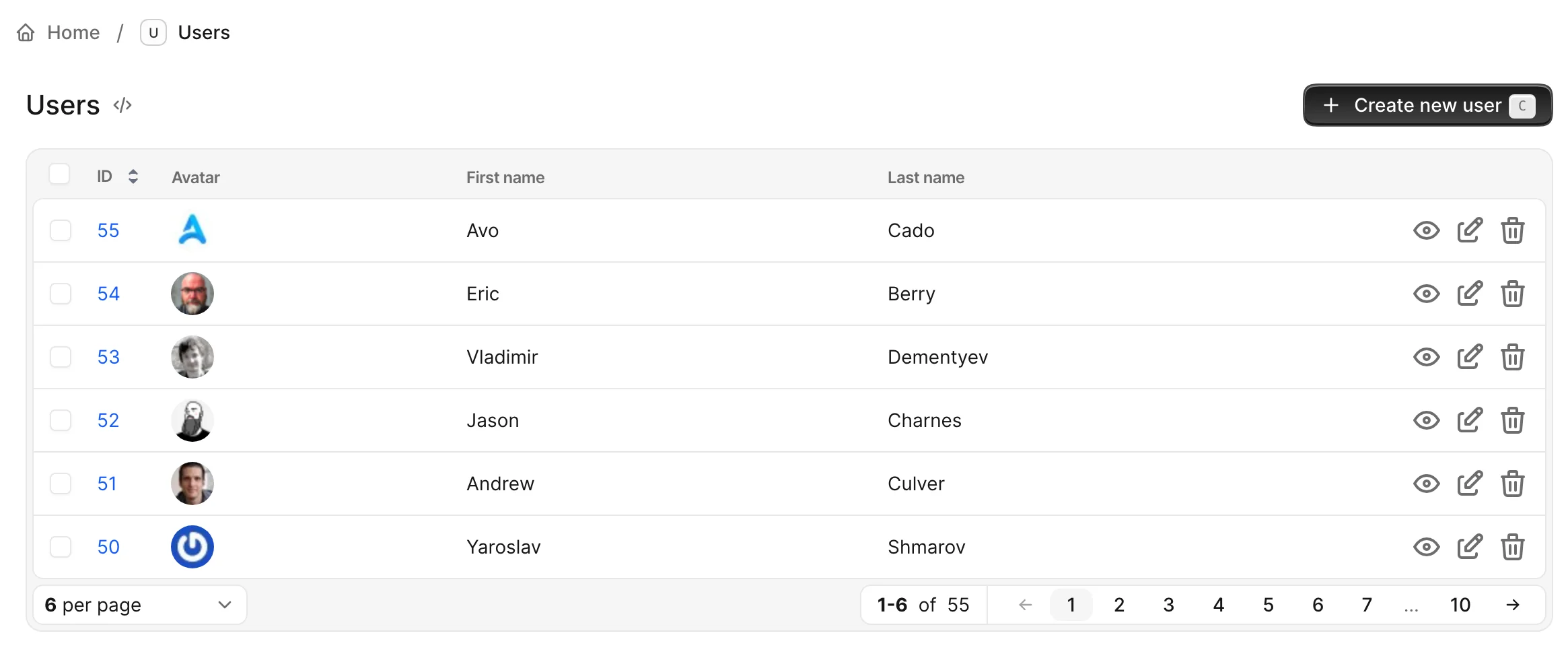
So when you click on the Users sidebar menu item, you get to the Index page where all the users will be displayed. The information displayed will be the gravatar image, the first and the last name.
Let's say we have a Team model with many Users. You'll have a Team resource like so:
# app/models/team.rb
class Team < ApplicationRecord
end

# app/avo/resources/team.rb
class Avo::Resources::Team < Avo::BaseResource
  self.title = :name

  def fields
    field :id, as: :id, link_to_record: true
    field :name, as: :text
    field :users, as: :has_many
  end
end
From that configuration, Avo will figure out that the users field points to the User resource and will use that one to display the users.
But, let's imagine that we don't want to display the gravatar on the has_many association, and we want to show the name on one column and the number of projects the user has on another column. We can create a different resource named TeamUser resource and add those fields.
# app/avo/resources/team_user.rb
class Avo::Resources::TeamUser < Avo::BaseResource
  self.title = :name

  def fields
    field :id, as: :id, link_to_record: true
    field :name, as: :text
    field :projects_count, as: :number
  end
end
We also need to update the Team resource to use the new TeamUser resource for reference.
# app/avo/resources/team.rb
class Avo::Resources::Team < Avo::BaseResource
  self.title = :name

  def fields
    field :id, as: :id, link_to_record: true
    field :name, as: :text
    field :users, as: :has_many, use_resource: Avo::Resources::TeamUser
  end
end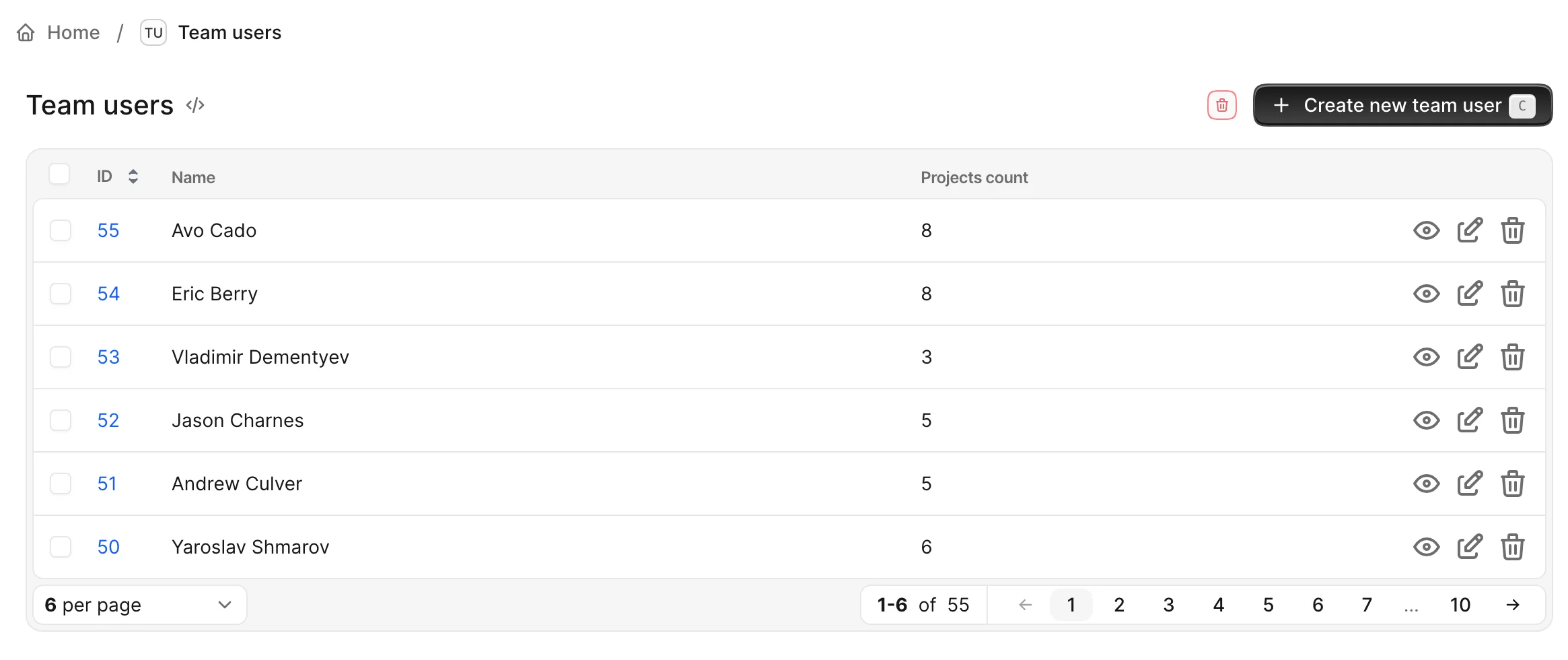
But now, if we visit the Users page, we will see the fields for the TeamUser resource instead of User resource, and that's because Avo fetches the resources in an alphabetical order, and TeamUser resource is before User resource. That's definitely not what we want. The same might happen if you reference the User in other associations throughout your resource files.
To mitigate that, we are going to use the model_resource_mapping option to set the "default" resource for a model.
# config/initializers/avo.rb
Avo.configure do |config|
  config.model_resource_mapping = {
    'User': 'Avo::Resources::User'
  }
end
That will "shortcircuit" the regular alphabetical search and use the User resource every time we don't specify otherwise.
We can still tell Avo which resource to use in other has_many or has_and_belongs_to_many associations with the use_resource option.
Namespaced resources
Resources can be namespaced by nesting them in subdirectories of app/avo/resources, mirroring the namespace with :: in the class name. This is handy for grouping resources that belong to a namespaced model (Galaxy::Planet) or that you just want organized under a common prefix (Billing::Invoice).
# app/avo/resources/galaxy/planet.rb
class Avo::Resources::Galaxy::Planet < Avo::BaseResource
  self.title = :name

  def fields
    field :id, as: :id
    field :name, as: :text
    field :satellites, as: :has_many
  end
end
If the resource's namespace matches its model's namespace (Avo::Resources::Galaxy::Planet → Galaxy::Planet), Avo infers the model class automatically — no self.model_class needed. If it doesn't, set model_class explicitly, same as with a flat resource:
class Avo::Resources::SuperDooperTrooperModel < Avo::BaseResource
  self.model_class = "Super::Dooper::Trooper::Model"
end
Generate a namespaced resource (and its matching namespaced controller) the same way you'd generate a flat one, just with the namespace in the name:
bin/rails generate avo:resource Galaxy::PlanetThat creates app/avo/resources/galaxy/planet.rb (Avo::Resources::Galaxy::Planet) and app/controllers/avo/galaxy/planets_controller.rb (Avo::Galaxy::PlanetsController). Namespaces can go as deep as you need — Universe::Cluster::Star::Comet generates app/avo/resources/universe/cluster/star/comet.rb, and so on.
Namespacing also affects the resource's routes and translation key: Avo::Resources::Galaxy::Planet gets the route path galaxy/planets and the translation key avo.resource_translations.galaxy/planet, following the same underscored, slash-joined convention as the class name.
Views
Please read the detailed views page.
Extending Avo::ResourcesController
You may need to execute additional actions on the ResourcesController before loading the Avo pages. You can create an Avo::BaseResourcesController and extend your resource controller from it.
# app/controllers/avo/base_resources_controller.rb
class Avo::BaseResourcesController < Avo::ResourcesController
  include AuthenticationController::Authentication

  before_action :is_logged_in?
end

# app/controllers/avo/posts_controller.rb
class Avo::PostsController < Avo::BaseResourcesController
end
WARNING
You can't use Avo::BaseController and Avo::ResourcesController as your base controller. They are defined inside Avo.
When you generate a new resource or controller in Avo, it won't automatically inherit from the Avo::BaseResourcesController. However, you have two approaches to ensure that the new generated controllers inherit from a custom controller:
--parent-controller option on the generators
Both the avo:controller and avo:resource generators accept the --parent-controller option, which allows you to specify the controller from which the new controller should inherit. Here are examples of how to use it:
rails g avo:controller city --parent-controller Avo::BaseResourcesController
rails g avo:resource city --parent-controller Avo::BaseResourcesController
resource_parent_controller configuration option
You can configure the resource_parent_controller option in the avo.rb initializer. This option will be used to establish the inherited controller if the --parent-controller argument is not passed on the generators. Here's how you can do it:
# config/initializers/avo.rb
Avo.configure do |config|
  config.resource_parent_controller = "Avo::BaseResourcesController" # "Avo::ResourcesController" is default value
end
Attach concerns to Avo::BaseController
Alternatively you can use this guide to attach methods, actions, and hooks to the main Avo::BaseController or Avo::ApplicationController.
Manually registering resources
In order to have a more straightforward experience when getting started with Avo, we are eager-loading the app/avo/resources directory. That makes all those resources available to your app without you doing anything else.
If you want to manually load them use the config.resources option.
# config/initializers/avo.rb
Avo.configure do |config|
  config.resources = [
    "Avo::Resources::User",
    "Avo::Resources::Fish",
  ]
end
This tells Avo which resources you use and stops the eager-loading process on boot-time. This means that other resources that are not declared in this array will not show up in your app.
Extending Avo::BaseResource
You can customize Avo::BaseResource by creating your own version in your application. This custom resource can include methods and logic that you want all your resources to inherit. Here's an example to illustrate how you can do this:
# app/avo/base_resource.rb
module Avo
  class BaseResource < Avo::Resources::Base
    # Example custom method: make all number fields cast their values to float
    def field(id, **args, &block)
      if args[:as] == :number
        args[:format_using] = -> { value.to_f }
      end

      super(id, **args, &block)
    end
  end
end
All your resources will now inherit from your custom Avo::BaseResource, allowing you to add common functionality across your admin interface. For instance, the above example ensures that all number fields in your resources will have their values cast to floats.
Your resource files will still look the same as they did before.
# app/avo/resources/post.rb
class Avo::Resources::Post < Avo::BaseResource
  # Your existing configuration for the Post resource
end
Modify controls placement and appearance
Configure where row controls appear on the Index view — placement, floating behavior, and hover visibility — using row_controls_config.
See row controls configuration on table view.
Cards
Use the def cards method to add some cards to your resource.
Check cards documentation for more details.
class Avo::Resources::User < Avo::BaseResource
  def fields
    field :id, as: :id
    field :name, as: :text
    field :email, as: :text
    field :roles, as: :boolean_group, options: {admin: "Administrator", manager: "Manager", writer: "Writer"}
  end

  def cards
    card Avo::Cards::ExampleAreaChart, cols: 3
    card Avo::Cards::ExampleMetric, cols: 2
    card Avo::Cards::ExampleMetric,
      label: "Active users metric",
      description: "Count of the active users.",
      arguments: { active_users: true },
      visible: -> { !resource.view.form? }
  end
end