
Dashboards
WARNING
You must manually require the chartkick gem in your Gemfile.
# Create beautiful JavaScript charts with one line of Ruby
gem "chartkick"
There comes the point in your app's life when you need to display the data in an aggregated form like a metric or chart. That's what Avo's Dashboards are all about.
Generate a dashboard
Run bin/rails g avo:dashboard my_dashboard to get a shiny new dashboard.
class Avo::Dashboards::MyDashboard < Avo::Dashboards::BaseDashboard
  self.id = 'my_dashboard'
  self.name = 'Dashy'
  self.description = 'The first dashboard'
  self.grid_cols = 3

  def cards
    card Avo::Cards::ExampleMetric
    card Avo::Cards::ExampleAreaChart
    card Avo::Cards::ExampleScatterChart
    card Avo::Cards::PercentDone
    card Avo::Cards::AmountRaised
    card Avo::Cards::ExampleLineChart
    card Avo::Cards::ExampleColumnChart
    card Avo::Cards::ExamplePieChart
    card Avo::Cards::ExampleBarChart
    divider label: "Custom partials"
    card Avo::Cards::ExampleCustomPartial
    card Avo::Cards::MapCard
  end
end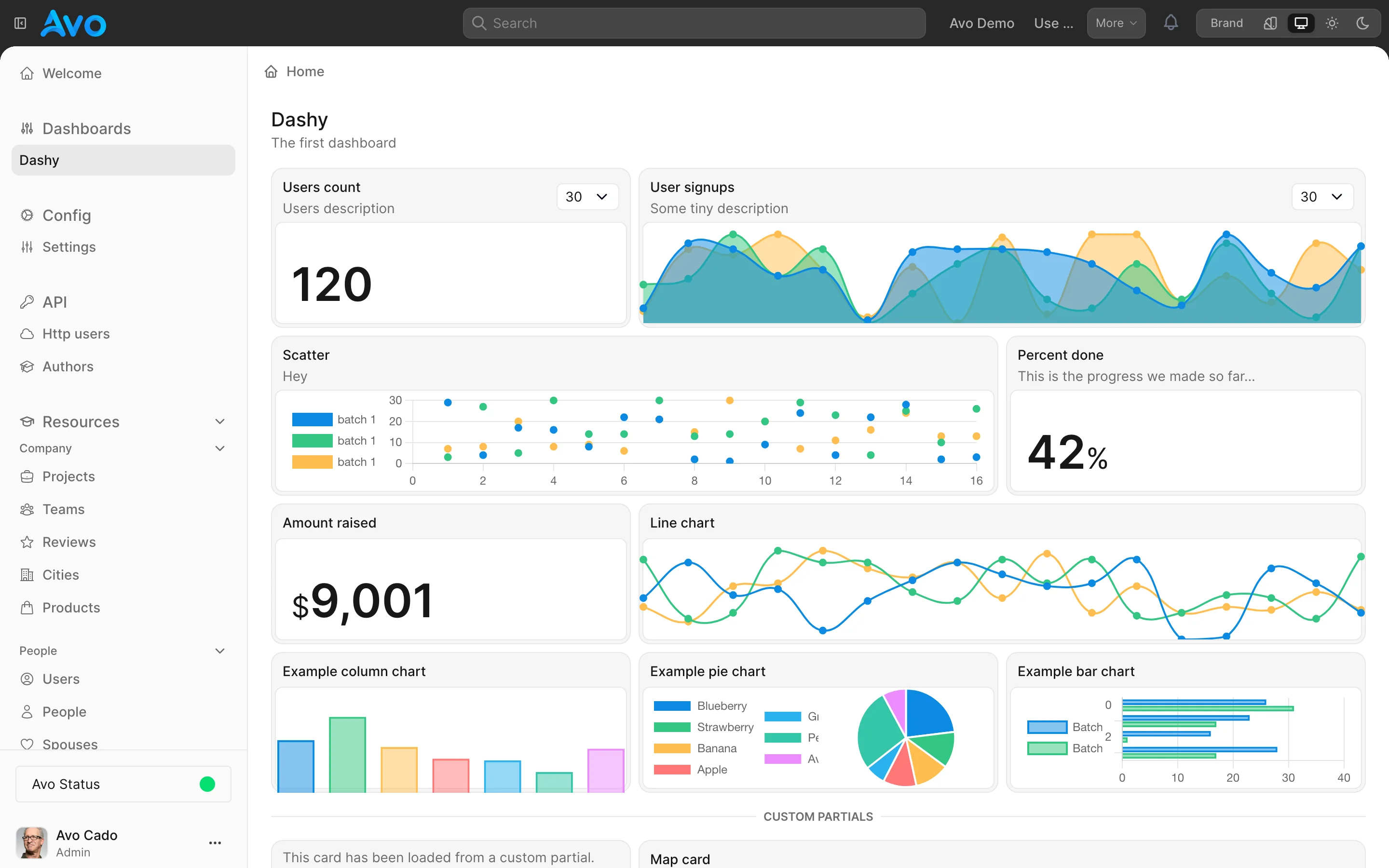
Settings
Each dashboard is a file. It holds information about itself like the id, name, description, and how many columns its grid has.
The id field has to be unique. The name is what the user sees in big letters on top of the page, and the description is some text you pass to give the user more details regarding the dashboard.
Both name and description accept a Proc, evaluated through Avo::ExecutionContext with access to all its attributes plus the dashboard — handy for i18n:
self.name = -> { I18n.t("avo.dashboards.dashy.name") }Use the grid_cols parameter to organize the cards in a grid of 3, 4, 5, or 6 columns. The default is 3.
Global ranges
Cards each carry their own range dropdown, but you can also render a row of range buttons at the top of the dashboard that update every card at once. Pass the day counts you want as global_ranges:
class Avo::Dashboards::Dashy < Avo::Dashboards::BaseDashboard
  self.id = "dashy"
  self.name = "Dashy"
  self.global_ranges = [7, 30, 60, 365]

  def cards
    card Avo::Cards::UsersCount
  end
end
Each entry is a number of days; its button label comes from the avo.<days> translation key. The default is an empty array (no global range bar).
Refresh every card at once
A card can carry its own refresh control. A dashboard can also carry a single control that refreshes all of them together — useful on a screen someone leaves up all day. Turn it on with refresh_button:
class Avo::Dashboards::Dashy < Avo::Dashboards::BaseDashboard
  self.id = "dashy"
  self.name = "Dashy"
  self.refresh_button = true

  def cards
    card Avo::Cards::UsersCount
  end
end
The control appears next to the dashboard's title and reloads each card in place, so the page never navigates — scroll position and every card's selected range survive the refresh.
It's off by default, as the per-card control is. Refreshing a whole dashboard runs every card's query at once, so it's worth opting in deliberately on dashboards with expensive cards.
Setting it here does not turn on the per-card controls; the two are independent, and a dashboard button reloads every card whether or not the cards carry one.
Cards
Dashboards host cards — metrics, charts, tables, lists, and custom content. You declare them in the cards method, as shown in the generated dashboard above.
Cards aren't dashboard-specific; the same card classes render on resources too. For everything about building and configuring them, see the Cards guide and the Cards API reference.
You can also drop a divider between cards to group them, as the generated dashboard does with divider label: "Custom partials".
Override card arguments from the dashboard
We found ourselves in the position to add a few cards that were the same card but with a slight difference. Ex: Have one Users count card and another Active users count card. They both count users, but the latter has an active: true condition applied.
Before, we'd have to duplicate that card and modify the query method slightly but end up with duplicated boilerplate code. For those scenarios, we created the arguments attribute. It allows you to send arbitrary arguments to the card from the parent.
class Avo::Dashboards::Dashy < Avo::Dashboards::BaseDashboard
  self.id = "dashy"
  self.name = "Dashy"

  def cards
    card Avo::Cards::UsersCount
    card Avo::Cards::UsersCount, arguments: {
      active_users: true
    }
  end
end
Now we can pick up that option in the card and update the query accordingly.
class Avo::Cards::UsersCount < Avo::Cards::MetricCard
  self.id = "users_metric"
  self.label = "Users count"

  # You have access to context, params, range, current parent, and current card
  def query
    scope = User

    if arguments[:active_users].present?
      scope = scope.active
    end

    result scope.count
  end
end
That gives you an extra layer of control without code duplication and the best developer experience.
Control the base settings from the parent
Evidently, you don't want to show the same label, description, and other details for that second card from the first card. Therefore, you can control the label, description, cols, rows, visible, and refresh_every arguments from the parent declaration. See registration overrides for the full list.
class Avo::Dashboards::Dashy < Avo::Dashboards::BaseDashboard
  self.id = "dashy"
  self.name = "Dashy"

  def cards
    card Avo::Cards::UsersCount
    card Avo::Cards::UsersCount,
      label: "Active users",
      description: "Active users count",
      cols: 2,
      rows: 2,
      visible: -> { true },
      refresh_every: 2.minutes,
      arguments: {
        active_users: true
      }
  end
end
Dashboards visibility
You might want to hide specific dashboards from certain users. You can do that using the visible option. The option can be a boolean true/false or a block where you have access to the params, current_user, context, and dashboard.
If you don't pass anything to visible, the dashboard will be available for anyone.
class Avo::Dashboards::ComplexDash < Avo::Dashboards::BaseDashboard
  self.id = "complex_dash"
  self.name = "Complex dash"
  self.description = "Complex dash description"
  self.visible = -> do
    current_user.is_admin?
    # or
    params[:something] == 'something else'
    # or
    context[:your_param] == params[:something_else]
  end

  def cards
    card Avo::Cards::UsersCount
  end
end
Dashboards authorization
You can set authorization rules for dashboards using the authorize block.
class Avo::Dashboards::Dashy < Avo::Dashboards::BaseDashboard
  self.id = 'dashy'
  self.authorize = -> do
    # You have access to current_user, params, request, context, and view_context.
    current_user.is_admin?
  end
end