
Has One
The HasOne association shows the unfolded view of your has_one association. It's like peaking on the Show view of that associated record. The user can also access the Attach and Detach buttons.
field :admin, as: :has_one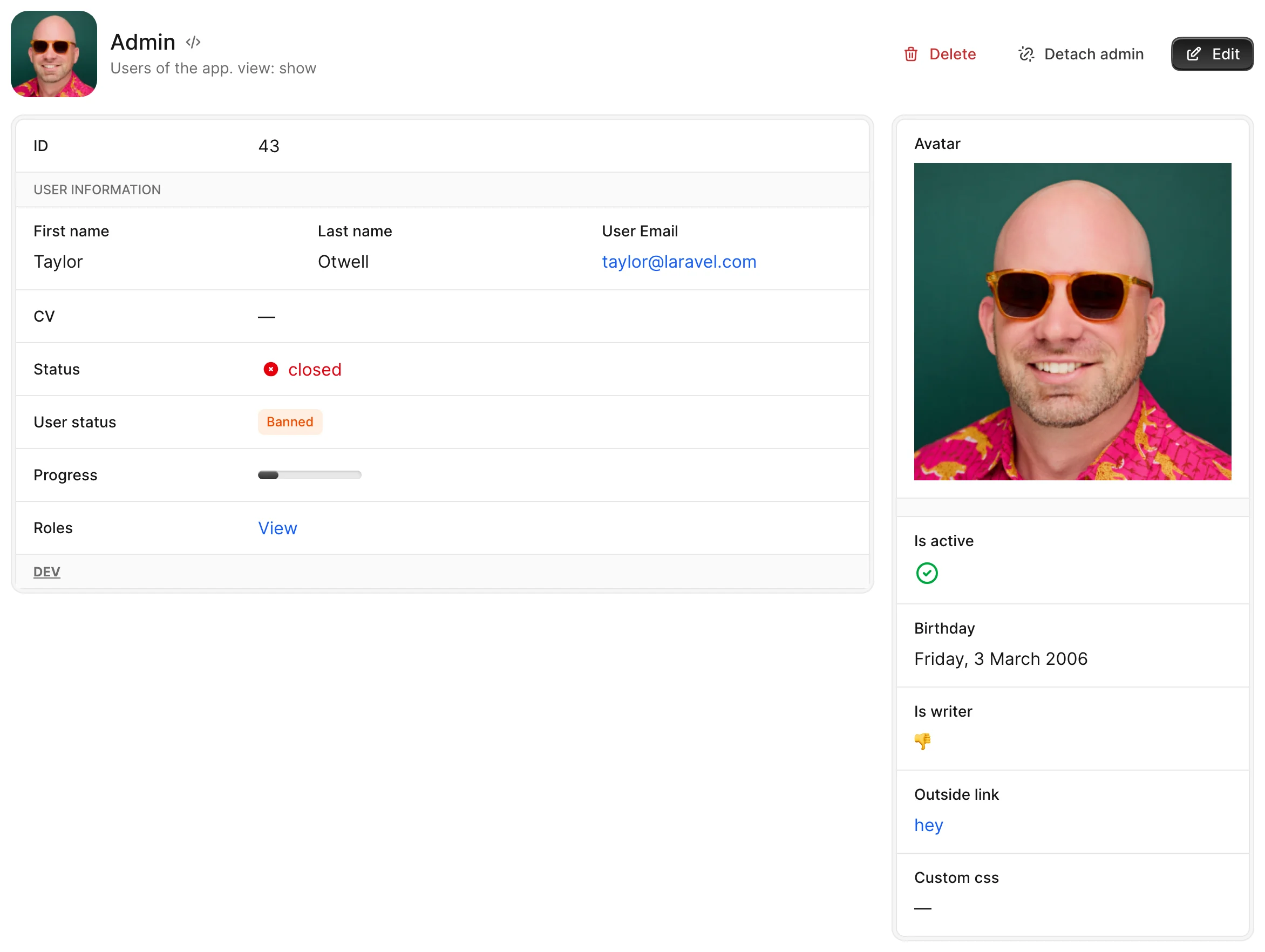
Options
-> searchable
Turns the attach field/modal from a <select> into a search-as-you-type picker.
class Avo::Resources::CourseLink < Avo::BaseResource
  def fields
    field :links,
      searchable: true
  end
end
See Searchable associations for setup requirements, the hash form (searchable: { query:, item:, enabled: }), proc locals, and precedence rules.
Default value
false
Possible values
true, false, Hash
-> attach_scope
Scope out the records the user sees on the Attach modal.
Default value
nil
Possible values
field :user,
  as: :belongs_to,
  attach_scope: -> { query.non_admins }
Pass in a block where you attach scopes to the query object and parent object, which is the actual record where you want to assign the association. The block is executed in the ExecutionContext.
WARNING
The attach_scope will not filter the records in the listing from has_many or has_and_belongs_to_many associations. Use scope or a Pundit policy Scope for that.
field :members,
  as: :has_one,
  attach_scope: -> { query.where.not(team_id: parent.id) }
In this example, in the attach_scope, we ensure that when attaching members to a team, only those who are not already members will appear in the list of options.
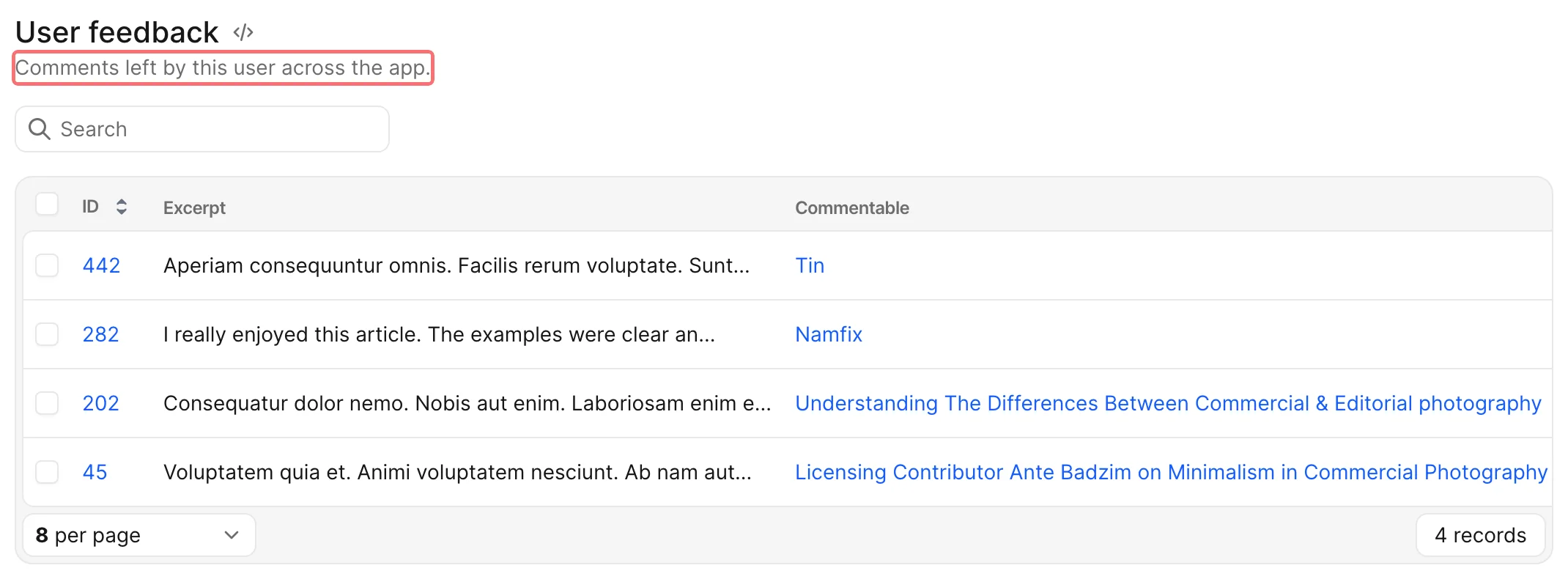
-> description
Changes the text displayed under the association name.
Default value
nil
Possible values
Any string or any zero arity lambda function.
Within lambda, you have access to query and all attributes of Avo::ExecutionContext.
Evaluated on page load, even with loading: :manual
The description lambda is evaluated to render the association header — including the placeholder shown for a loading: :manual association. So a lambda that touches the database (e.g. -> { "#{query.count} posts" }) runs on every page load, before the user clicks Load. If you reached for loading: :manual to defer that query, keep the description cheap (or omit it) — only the framed content is fetched on demand.
-> loading
Controls how the association's content frame is loaded on the Show page.
By default an association loads its content as soon as its turbo-frame is revealed (the lazy behavior). The loading option lets you defer that fetch until the user explicitly asks for it, which is useful for heavy associations you don't want to load on every page view.
The default for every association is set globally via config.associations (loading: :lazy out of the box). Set loading: on a field to override that default per association.
Possible values
| Value | Behavior |
|---|---|
:manual | Renders a placeholder with a Load button. Nothing is fetched until the user clicks it. Once opened, the frame is remembered for 15 minutes by default (see auto_load_for). |
{ mode: :manual } | Same as :manual. |
{ mode: :manual, auto_load_for: 5.minutes } | Manual with a custom sliding memory window — once opened, the frame auto-loads (no placeholder, no button) on return visits for the given duration. |
{ mode: :manual, auto_load_for: 0 } | Manual with no memory — the placeholder returns on every visit (0 or nil opts out). |
:lazy / { mode: :lazy } | Native lazy loading (loads when the frame is revealed). |
Manual loading
field :orders, as: :has_many, loading: :manualThe placeholder shows the association title, the (optional) description, and a Load button. On click, the real content is fetched into the frame. If the request fails (500, 404, network error), an inline error with a Retry button is rendered inside the frame instead of redirecting to the global failed-to-load page.
For a has_one association whose value is nil, the existing attach/create empty state is shown instead of a placeholder.
Remembering an opened frame
Once the user opens a manual frame, Avo remembers it for 15 minutes by default and skips the placeholder on return visits — the frame auto-loads directly. Pass auto_load_for to change that window:
field :orders, as: :has_many, loading: { mode: :manual, auto_load_for: 5.minutes }The window is a sliding memory, not a delay: a short-lived cookie scoped per record + frame remembers the opened frame, and every return visit within the window refreshes it. Once the window lapses, the placeholder + Load button return.
Set auto_load_for: 0 (or nil) to opt out entirely — the placeholder then returns on every visit:
field :orders, as: :has_many, loading: { mode: :manual, auto_load_for: 0 }The default window is configurable globally via config.associations.
Keep the description cheap with loading: :manual
The description lambda is evaluated to render the placeholder, before the user clicks Load — so a description that touches the database (e.g. -> { "#{query.count} orders" }) defeats the purpose of deferring the load. Branch on the loading_type attribute to skip the expensive work on the placeholder:
field :orders, as: :has_many, loading: :manual,
  description: -> { loading_type == :manual ? "Orders" : "#{query.count} orders" }
loading_type is :manual while the placeholder is shown and nil in every other render context.
-> use_resource
Sets a different resource to be used when displaying (or redirecting to) the association table.
Default value
nil. When nothing is selected, Avo infers the resource type from the reflected association.
Possible values
Avo::Resources::Post, Avo::Resources::PhotoComment, or any Avo resource class.
The value can be the actual class or a string representation of that class.
# the class
Avo::Resources::Post

# the string representation of the class
"Avo::Resources::Post"
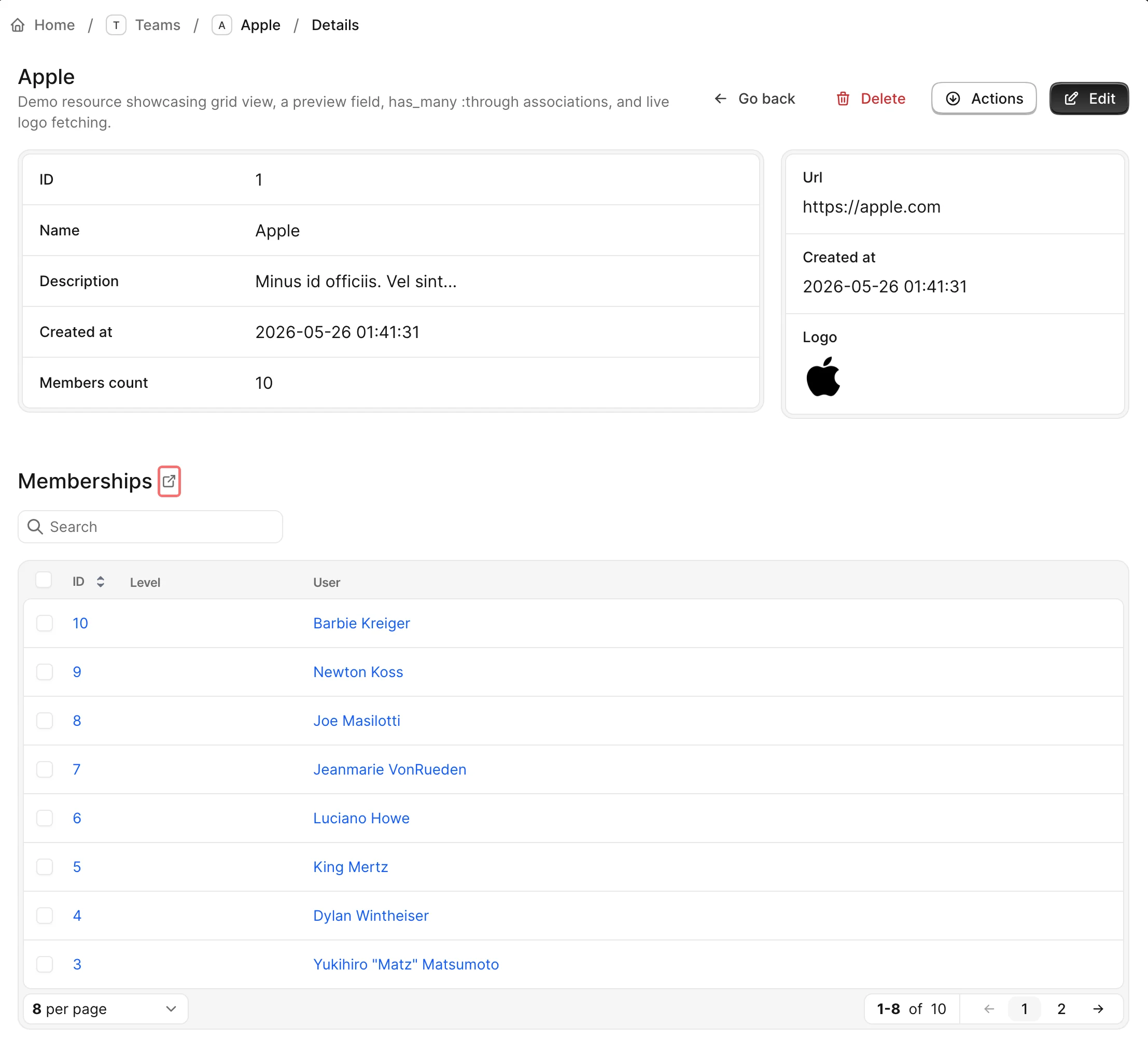
-> linkable
Use this option to make the association title clickable. That link will open a new page with the same view.
This feature doesn't go deeper than this. It just helps you see the association table easier in a separate page.
Has One Through
The HasOne association also works when the underlying Rails association goes through a join model. There's no through option on the field — Avo reads it off the association itself.
# app/models/team.rb
class Team < ApplicationRecord
  has_one :admin_membership, -> { where level: :admin }, class_name: "TeamMembership"
  has_one :admin, through: :admin_membership, source: :user
end# app/avo/resources/team.rb
field :admin, as: :has_oneAttach and Detach operate on the join record for you, always through the association itself, so any scope you put on it is respected:
- Attaching creates the join record through the association, which stamps the scope's attributes on it — the example above writes
level: "admin"without you having to say so. - Attaching over an existing record replaces the join record instead of adding a second one, matching how Rails treats a singular association.
- Detaching destroys only the join record the association points at. Other join rows linking the same two records — a
level: "member"row for the same user, say — are left alone.
INFO
Because a singular association owns exactly one join record, detaching is checked against the record named in the URL. If the page you're looking at is stale and someone else has attached a different record in the meantime, the detach is a no-op rather than removing whatever happens to be attached now.
-> attach_fields
If the join model has extra columns you want to fill in while attaching, declare them with attach_fields and they'll show up in the attach modal.
field :admin,
  as: :has_one,
  attach_fields: -> {
    field :notes, as: :text
  }
The values land on the join record (TeamMembership above), alongside anything the association's scope writes. When you attach over an existing record, the fields are written to the same join row that gets replaced.
WARNING
attach_fields only persists on a has_one :through association. On a plain has_one there's no join record to write to, so the fields have nowhere to land.
Show on edit screens
By default, the has_one field is only visible in the show view. To make it available in the edit view as well, include the show_on: :edit option. This ensures that the has_one show view component is also rendered within the edit view.
Nested in Forms
You can use "Show on edit screens" to make the has_one field available in the edit view. However, this will render it using the show view component.
To enable nested creation for the has_one field, allowing it to be created and / or edited alongside its parent record within the same form, use the nested option which is a hash with configurable option.
The avo-nested gem
Nested association forms are provided by the avo-nested gem. Add it to your Gemfile using the same private gem source as your other Avo paid gems:
gem "avo-nested", source: "https://packager.dev/avo-hq/"Run bundle install. If you have not set up packager.dev access yet, see Gem server authentication.
Keep in mind that this will display the field’s resource as it appears in the edit view.
-> nested
Enables this field as a nested form in the specified views.
Default value
{}
Possible values
A hash with the following options:
on:Views in which to enable nesting. Accepted values:limit:(Only forhas_manyandhas_and_belongs_to_manyfields) Hides the "Add" button when the specified limit is reached.
TIP
Setting nested: true is a shortcut for nested: { on: :forms }.
Example
# app/avo/resources/book.rb
class Avo::Resources::Book < Avo::BaseResource
  def fields
    # Shortcut for full nesting
    field :author, as: :has_one, nested: true

    # Explicit nesting on new only
    field :author, as: :has_one, nested: { on: :new }

    # Explicit nesting on edit only
    field :author, as: :has_one, nested: { on: :edit }

    # Explicit nesting on both new and edit
    field :author, as: :has_one, nested: { on: :forms }

    # Limit nested creation (for has_many or has_and_belongs_to_many only)
    field :authors,
      as: :has_one,
      nested: { on: [:new, :edit], limit: 2 }
  end
end
-> Reloadable
The reloadable option adds a reload icon next to the association title so users can easily reload just that turbo-frame instead of doing a full page reload.
Usage
To enable the reloadable feature, you have two options:
- Direct Boolean Value:
Provide a boolean value directly to the reloadable option. This sets a default behavior where the reloadable feature is either enabled or disabled based on this boolean value.
field :reviews, as: :has_one, reloadable: true- Dynamic Conditions with a Block:
For more dynamic behavior, you can provide a block to the reloadable option. Within this block, you can specify conditions under which the reloadable should be displayed.
field :reviews, as: :has_one,
  reloadable: -> {
    current_user.is_admin?
  }
In the above example, the reloadable will be visible if the current_user is an admin.
ExecutionContext
The reloadable block executes within the ExecutionContext, granting access to all default methods and attributes.
