
Map view
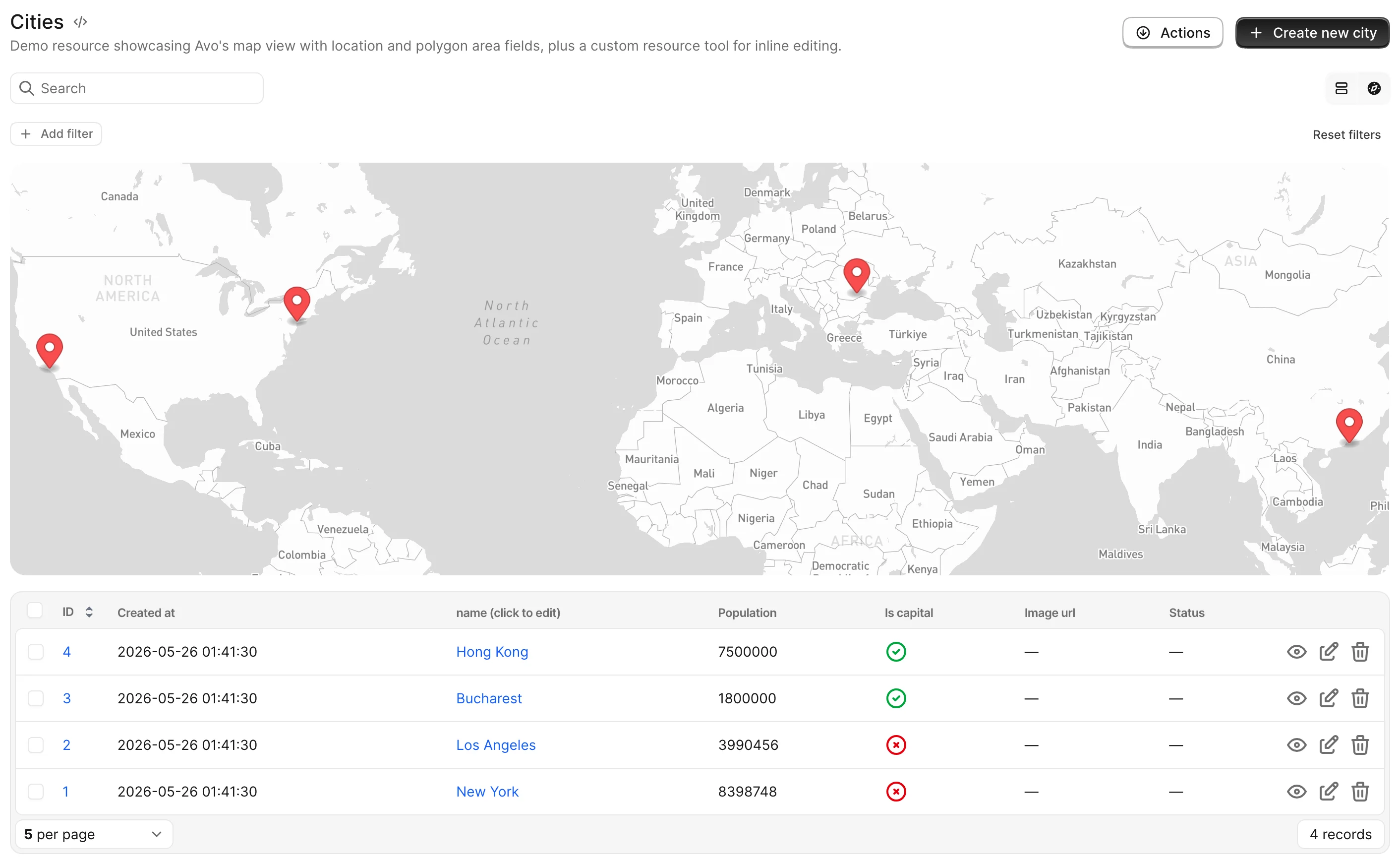
Some resources that contain geospatial data can benefit from being displayed on a map. For resources to be displayed to the map view they require a coordinates field, but that's customizable.
Enable map view
To enable map view for a resource, you need to add the map_view class attribute to a resource. That will add the view switcher to the Index view.
class Avo::Resources::City < Avo::BaseResource
  # ...
  self.map_view = {
    mapkick_options: {
      controls: true
    },
    record_marker: -> {
      {
        latitude: record.coordinates.first,
        longitude: record.coordinates.last,
        tooltip: record.name
      }
    },
    map: {
      position: :left
    },
    table: {
      visible: true
    }
  }
end
WARNING
You need to add the mapkick-rb (not mapkick) gem to your Gemfile and have the MAPBOX_ACCESS_TOKEN environment variable with a valid Mapbox key.
-> mapkick_options
The options you pass here are forwarded to the mapkick gem.
- Type: Hash
- Default:
{}— Avo setsstyleto"mapbox://styles/mapbox/light-v11"unless you provide one
INFO
Avo always sets the map's height (based on the layout) — a height you pass here is overwritten.
-> record_marker
This block is being applied to all the records present in the current query to fetch the coordinates of off the record.
You may use this block to fetch the coordinates from other places (API calls, cache queries, etc.) rather than the database.
This block has to return a hash compatible with the PointMap items. Has to have latitude and longitude and optionally tooltip, label, or color. Markers missing latitude or longitude are skipped.
- Type: Proc, evaluated per record in the
ExecutionContext - Default: reads
record.coordinates.firstas latitude andrecord.coordinates.lastas longitude
-> map
Controls where the map sits relative to the adjacent table.
self.map_view = {
  # ...
  map: {
    position: :left
  }
}- Type: Hash with key
position - Default:
nil - Values:
positionaccepts:left,:right,:top, or:bottom— the table takes the remaining side.:left/:rightrender the two side by side;:top/:bottomstack them.
-> table
This is the configuration for the adjacent table.
self.map_view = {
  # ...
  table: {
    visible: true
  }
}- Type: Hash with key
visible - Default:
nil— no table is rendered - Values:
visibleacceptstrueorfalse. Position the table throughmap.position.
-> extra_markers
Allows you to define extra markers. The extra_markers block is executed in the ExecutionContext and should return an array of hashes.
For each extra marker, you can specify a label, tooltip, and color.
self.map_view = {
  # ...
  extra_markers: -> do
    [
      {
        latitude: 37.780411,
        longitude: -25.497047,
        label: "Açores",
        tooltip: "São Miguel",
        color: "#0F0"
      }
    ]
  end,
  # ...
}
- Type: Proc returning an Array of Hashes
- Default:
nil
Make it the default view
To make the map view the default way of viewing a resource on Index, we have to use the default_view_type class attribute.
class Avo::Resources::City < Avo::BaseResource
  self.default_view_type = :map
end
To change the default for all resources, set config.default_view_type = :map in config/initializers/avo.rb. Both the global and per-resource settings accept a block, evaluated through Avo::ExecutionContext, if the choice depends on the request.