
Audit Logging
Avo's Audit Logging feature provides a seamless way to track and visualize user activity and changes within your applications. It integrates with a versioning backend — either paper_trail (recommended) or audited — offering flexible installation and customization options.
Captures user activities on Avo resources and actions, recording details such as the author and the performed event.
The installation process will automatically generate the necessary migrations, resources, and controllers that power activity tracking. Additionally paper_trail will be installed if it is not already present in your project.
Choosing a versioning backend
Activity tracking works with either paper_trail or audited, but you must have exactly one of them — with both installed (or neither) the associations aren't registered and nothing is tracked. paper_trail is the recommended default and the one the installer sets up; the change-log diff and the revert action are paper_trail-only.
Requirements
- An Avo Enterprise license — audit logging is an Enterprise feature
- Custom controls — the generated activity resources use
show_controlsandindex_controls - Authorization — the generated activity models use the authorization helpers (
authorizable_ransackable_attributes/authorizable_ransackable_associations) paper_trailis installed automatically if not already present
Installation
INFO
When installing avo-audit_logging on an application, we strongly recommend following this documentation page step-by-step without skipping sections, as it was designed with that approach in mind.
1. Install the gem
Start by adding the following to your Gemfile:
# Gemfile
gem "avo-audit_logging", source: "https://packager.dev/avo-hq/"
Then
bundle install2. Run the installer
bin/rails generate avo:audit_logging installBesides the migrations, resources and controllers, it adds the commented config.audit_logging options inside the Avo.configure block of config/initializers/avo.rb:
# config/initializers/avo.rb
Avo.configure do |config|
  # ...

  ## == Audit logging add-on ==
  # config.audit_logging.enabled = false
  # config.audit_logging.author_model = "User"
  # config.audit_logging.payload_modifier = -> { payload.merge("app" => "billing") }
end
3. Migrate
At this stage, all migrations, resources, and controllers required for the audit logging feature are set up and ready, it's time to migrate:
bin/rails db:migrateAlready installed? Upgrade instead
A first install writes one migration, with every column this version knows about. An app that installed an earlier version needs only what came after it:
bin/rails generate avo:audit_logging upgrade
bin/rails db:migrate
Today that is the activity origin columns and the targeted column, which marks the record an activity was about. install does the same thing — it looks at your db/migrate and writes only what is missing, never touching a migration you have already run — so re-running it is safe too; upgrade is the same code path under a name that says so.
Using as: :diff in your own resources?
avo-audit_logging >= v4.4.1 The gem draws changesets itself and no longer installs avo-diff_field. If your own resources have fields with as: :diff, add the gem to your Gemfile to keep them:# Gemfile
gem "avo-diff_field"Enable and configure audit logging
Enable it globally
After installation, audit logging is disabled by default. To enable it, set config.audit_logging.enabled to true inside the Avo.configure block of your avo.rb initializer.
# config/initializers/avo.rb
Avo.configure do |config|
  # config.audit_logging.enabled = false
  config.audit_logging.enabled = true
end
WARNING
The separate Avo::AuditLogging.configure do |config| ... end block still works but is deprecated and will be removed in Avo 5. Move its options into Avo.configure under config.audit_logging. See the upgrade guide.
INFO
Setting this configuration to false will disable the audit logging feature entirely, overriding any other specific settings. We'll cover those specific settings in the next steps.
WARNING
Setting this configuration to false will not prevent previously registered activity from being displayed.
To control the display behavior when this configuration is set to false, you can wrap the relevant fields or tools within an Avo::AuditLogging.configuration.enabled? condition, like this:
# app/avo/resources/user.rb
class Avo::Resources::User < Avo::BaseResource
  def fields
    field :id, as: :id, link_to_record: true
    field :email, as: :text, link_to_record: true
    field :products, as: :has_many
    if Avo::AuditLogging.configuration.enabled?
      field :avo_authored, as: :has_many, name: "Audit log"
    end
  end
end
Configure author models
INFO
If User is your only author model, you can skip this step as it will be automatically set by default.
Avo must determine the potential author models to correctly establish associations in the background. This setup enables the retrieval of all activities associated with a specific author via the avo_authored association. To designate a single model as an author, use config.audit_logging.author_model; for multiple models, use config.audit_logging.author_models.
# config/initializers/avo.rb
Avo.configure do |config|
  config.audit_logging.enabled = true

  # A single author model:
  config.audit_logging.author_model = "Account"

  # …or, for multiple author models:
  # config.audit_logging.author_models = ["User", "Account"]
end
Enable specific resources and actions
At this stage, the audit logging feature should be enabled, but activities are not yet being saved. By default, only resources and actions that are explicitly enabled for auditing will be tracked.
To enable audit logging for specific resources or actions, use the self.audit_logging class attribute.
# app/avo/resources/product.rb
class Avo::Resources::Product < Avo::BaseResource
  self.audit_logging = {
    activity: true
  }

  def fields
    field :id, as: :id, link_to_record: true
    field :name, as: :text, link_to_record: true
    field :price, as: :number, step: 1
    # ...
  end

  def actions
    action Avo::Actions::ChangePrice
  end
end# app/avo/actions/change_price.rb
class Avo::Actions::ChangePrice < Avo::BaseAction
self.name = "Change Price"
self.audit_logging = {
activity: true
}
def fields
field :price, as: :number, default: -> { resource.record.price rescue nil }
end
def handle(query:, fields:, current_user:, resource:, **args)
query.each do |record|
record.update!(price: fields[:price])
end
end
endThe activity key also supports a lambda to dynamically determine if the activity should be logged.
Within this block, you gain access to all attributes of Avo::ExecutionContext along with the payload, action, records and activity_class.
A common use case is to configure audit logging for specific users, for example if you have a User model and a method audit_avo_activity? on it that returns a boolean that indicates if activities should be logged for the user:
# app/avo/resources/product.rb
class Avo::Resources::Product < Avo::BaseResource
  self.audit_logging = {
    activity: -> { current_user.audit_avo_activity? }
  }
end
All resources and actions with audit logging activity enabled are being tracked now.
But these activities aren't visible yet, right? Let's look at how to display them in the next step.
Display logged activities
Show activities on a specific record
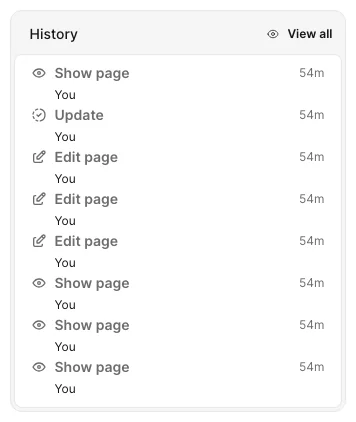
The Avo::ResourceTools::Timeline tool, provided by the avo-audit_logging gem, is designed for use in the sidebar. It offers a compact view of activities that have occurred on a specific resource, presenting them in a streamlined format:
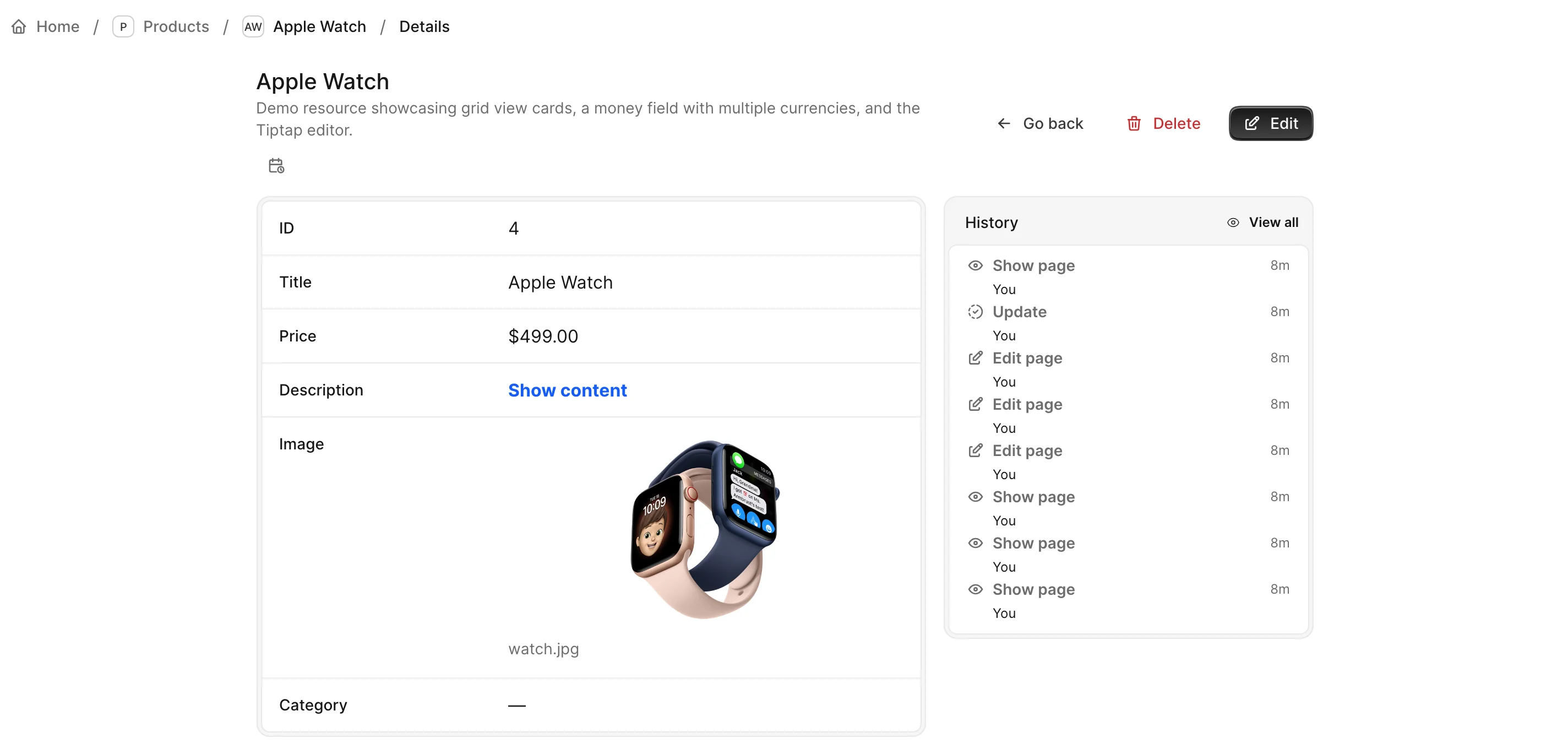
To enable this feature, configure the resource to include the resource tool in a sidebar:
# app/avo/resources/product.rb
class Avo::Resources::Product < Avo::BaseResource
  self.audit_logging = {
    activity: true
  }

  def fields
    panel do
      card do
        field :id, as: :id, link_to_record: true
        field :name, as: :text, link_to_record: true
        field :price, as: :number, step: 1
      end

      sidebar do
        tool Avo::ResourceTools::Timeline
      end
    end

    field :avo_activities, as: :has_many
  end

  def actions
    action Avo::Actions::ChangePrice
  end
end
View and navigate activity logs
Each entry shows a compact relative time — hover over an entry to reveal its full date and time. Clicking an entry opens a detailed page, with the payload when the entry has one.
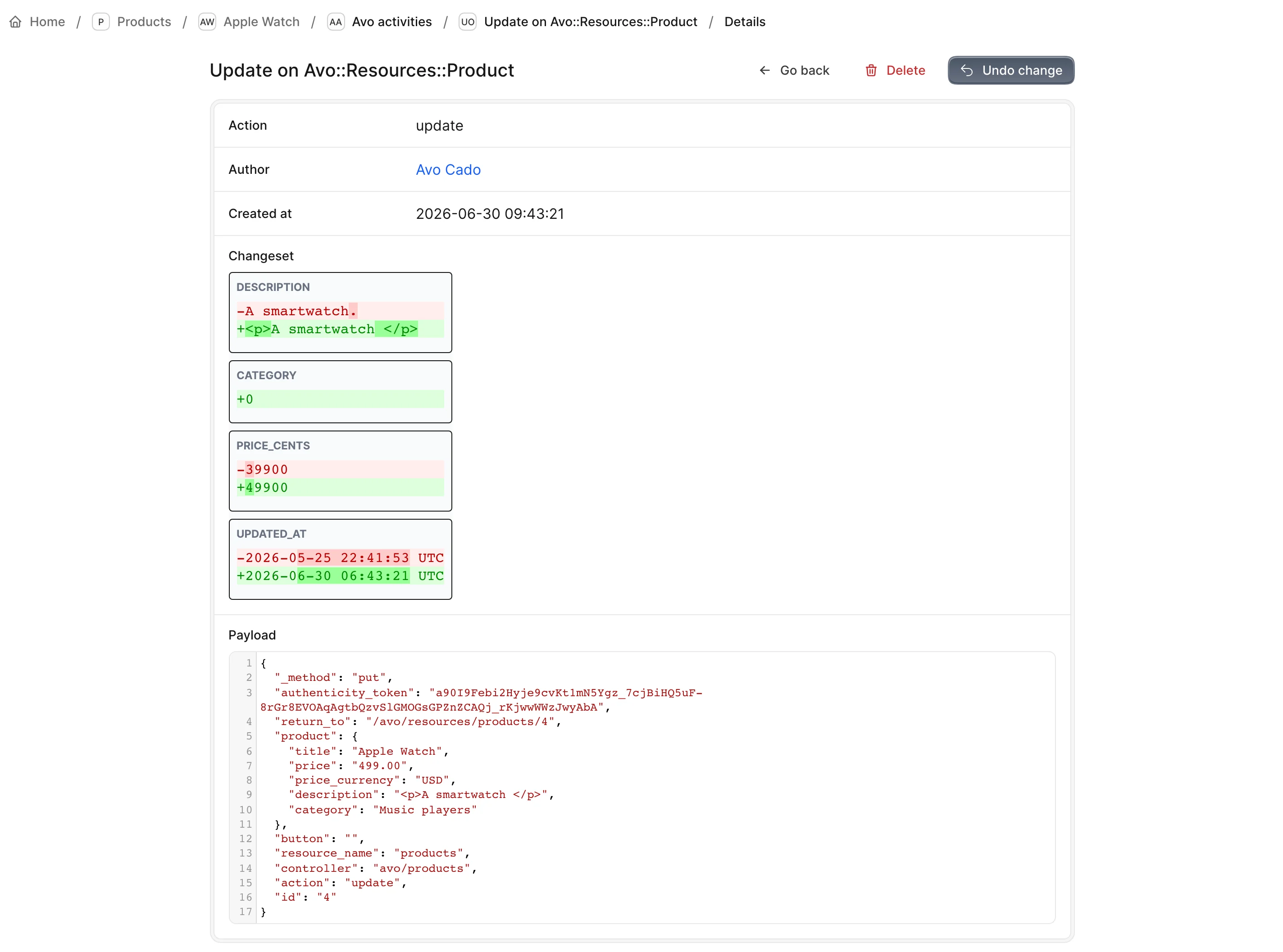
Sinceavo-audit_logging >= v4.4.1 The activity's page is headed by what happened, with the History card's icon and label, such as Update or an action's own name like Change Price. Under it is the record it changed, linked, or 3 records when it changed several, and when, such as Happened about 3 hours ago, with the exact time on hover.A change to one record fills the Changeset panel: a row for each field it touched, with Before and After side by side, and its Undo change button next to Delete. A deleted record shows the values it had, and a created one the values it was created with. IDs and timestamps sit last, in smaller rows. When a later save changed one of these fields again, a Now column shows the values the record has today, the changed ones highlighted. Undo change puts the whole record back as it was before the change, so its confirmation names every field changed since, including ones this change never touched (Price has changed since). Tags under the title say who made the change (By Ada Lovelace, linked), what it came through when it wasn't the panel (Through MCP connection), and which section it belongs to (In Products). Below, Payload holds what Avo received with the request, pretty-printed when it's JSON, for a developer tracing exactly what was sent. When an edit's save also changed other records, such as through a callback, the page still leads with the record you edited, a Changed 4 records note under the title takes you down to the others, and Impacted records lists them with "Saving Desk lamp also changed these 3 records." An action run on several records lists them all under Impacted records, each with its own changeset and Undo. A change made through the AI chat or an MCP client lists the other records its save changed the same way. A row opens the impacted record's own page, named after the record, with its changeset and the same Undo change. Entries recorded before the targeted column existed don't know which record was edited, so a change to several records shows them all under Impacted records. The browser tab and the breadcrumbs read Update on Desk lamp, or Update on Desk lamp and 2 more.
Keep secrets out of the payload
Sinceavo-audit_logging >= v4.3.2 Avo masks the payload with your app's filter_parameters, the list Rails uses for your log file, and with the columns the record's model filters, which include its encrypts columns. A password typed into a form is stored as [FILTERED], at any depth, whether the entry came from the panel, an action, an AI client or your own Avo::AuditLogging.record call. To mask another key, add it to that list. New Rails apps list :email there, so emails show as [FILTERED] in the payload too, while the change log still shows them.The list matches keys, as it does in your logs. Keys inside a value stored as a JSON string, such as a key-value field's, aren't matched. The change log comes from PaperTrail and isn't masked, so keep a sensitive column out of it with PaperTrail's skip option.
If a block you added to filter_parameters raises, the entry is saved without its payload and the error's class goes to the Rails log, so the request still finishes and nothing unmasked is stored.
The AI assistant adds code, state and token to that list, and the MCP server adds code and its OAuth tokens, so with those installed a field with one of those names shows as [FILTERED] too.
Entries written before this version keep what they stored, and their pages still show it. Run this once in a console to mask them:
Rails.application.eager_load!
filters = Rails.application.config.filter_parameters | ActiveRecord::Base.descendants.flat_map(&:filter_attributes)
filter = ActiveSupport::ParameterFilter.new(filters)

Avo::AuditLogging::Activity.where.not(payload: nil).find_each do |activity|
  payload = JSON.parse(activity.payload)
  activity.update_column(:payload, filter.filter(payload).to_json) if payload.is_a?(Hash)
rescue JSON::ParserError
  next # A row written by hand may not hold JSON.
end
Change what an entry stores
Sinceavo-audit_logging >= v4.3.2 Set a proc to change what an entry's payload stores, such as adding your app's name to every entry or hiding a value from one resource's payloads. config.audit_logging.payload_modifier covers every entry, and payload_modifier: covers the entries logged under that resource or action:# config/initializers/avo.rb
Avo.configure do |config|
config.audit_logging.payload_modifier = -> { payload.merge("app" => "billing") }
end# app/avo/resources/product.rb
class Avo::Resources::Product < Avo::BaseResource
self.audit_logging = {
activity: true,
payload_modifier: -> { ActiveSupport::ParameterFilter.new(["internal_note"]).filter(payload) }
}
endWhen both are set, the global proc runs first and the resource's receives its result, so a resource can fine-tune what the app set. Within a proc, you gain access to all attributes of Avo::ExecutionContext along with payload, action, records and activity_class. It runs however the entry was written: the panel, the API, the MCP server, the AI assistant, outside_avo and Avo::AuditLogging.record.
- Keys are strings.
payloadis a copy with string keys, sopayload.except(:token)removes nothing, and editing the copy doesn't change the record or the request. An entry with no payload, such as one fromoutside_avo, starts as{}. - The shape depends on what wrote the entry. The panel nests form fields under the model's key (
payload["product"]["name"]), soexceptdoesn't reach them, and an action run repeats a field in several places.ActiveSupport::ParameterFiltermatches a key at any depth and stores its value as[FILTERED]. A proc also runs on page visits, wherepayload["product"]isnil. recordsis always an array of the records themselves, holding the form's unsaved values on a panel update, so read them and don't change or reload them. It's empty onindex,newand a create that failed to save.current_userandrequestcan beniloutside a request.- An action run is logged under the action, so it runs the global proc and the action's own
payload_modifier, not its resource's. Its payload holds the record's columns underresource.record, so a value only the resource's proc hides is stored there. Hide it in the global proc, the action's own orfilter_parametersas well. - The proc's last value is the whole payload, so
payload.delete("note")stores what it removed. End withpayload, or useexcept. Return a hash, or the type of payload the proc received:Avo::AuditLogging.recordcan pass an array or a string, wherepayload.mergeraises unless the proc checkspayload.is_a?(Hash). - A failing proc costs only the payload. An empty result stores no payload. If a proc raises or returns anything else,
nilincluded, the entry and the change are kept without a payload, later procs don't run, and the error's class goes to the Rails log. - Keep it small. A proc shouldn't write audited records, and under
outside_avoit runs inside the save's transaction, so a slow call holds that save's locks.
WARNING
A proc runs when the entry is written, so what it removes is gone from the payload for good. It changes the payload only: the change log comes from PaperTrail and still shows the column, so also list it in has_paper_trail skip: [:internal_note]. A resource's proc can add back a key the global one removed, so use filter_parameters for a value that must never be stored, because that masking runs after both procs.
Enable change logs and revert changes
By default, update activities do not display a change log, and there is no way to revert changes. This is because PaperTrail has not yet been enabled on the model. The change log and revert action are paper_trail-only — if you're using audited, activities are still tracked, but this section doesn't apply. To enable it, simply add has_paper_trail to the model:
# app/models/product.rb
class Product < ApplicationRecord
  has_paper_trail

  belongs_to :user, optional: true

  validates_presence_of :price
end
Once enabled, the changelog will be visible, along with an action to revert changes.
Sinceavo-audit_logging >= v4.4.1 When the save you undo also changed other records, such as through a callback, the confirmation lists them under Also put back. Tick the ones to restore along with it. Each takes the same permission as undoing it on its own, and they all go back together or not at all.With authorization enabled, reverting asks the record's policy: update? on the record, found through its policy scope, or create? to bring back a destroyed record. Users the policy refuses don't see the revert action. The changeset diff and the payload leave out fields the user's field policy withholds.
Missing changeset field
If the changeset field in the versions table consistently appears as nil, ensure you add the following configuration in your application.rb file:
# config/application.rb
config.active_record.yaml_column_permitted_classes = [Symbol, Date, Time, ActiveSupport::TimeWithZone, ActiveSupport::TimeZone]
Show all activity by an author
We've already covered how to view all activity on a specific record. Now, let's display a table within Avo::Resources::User to view all tracked activity for a particular user.
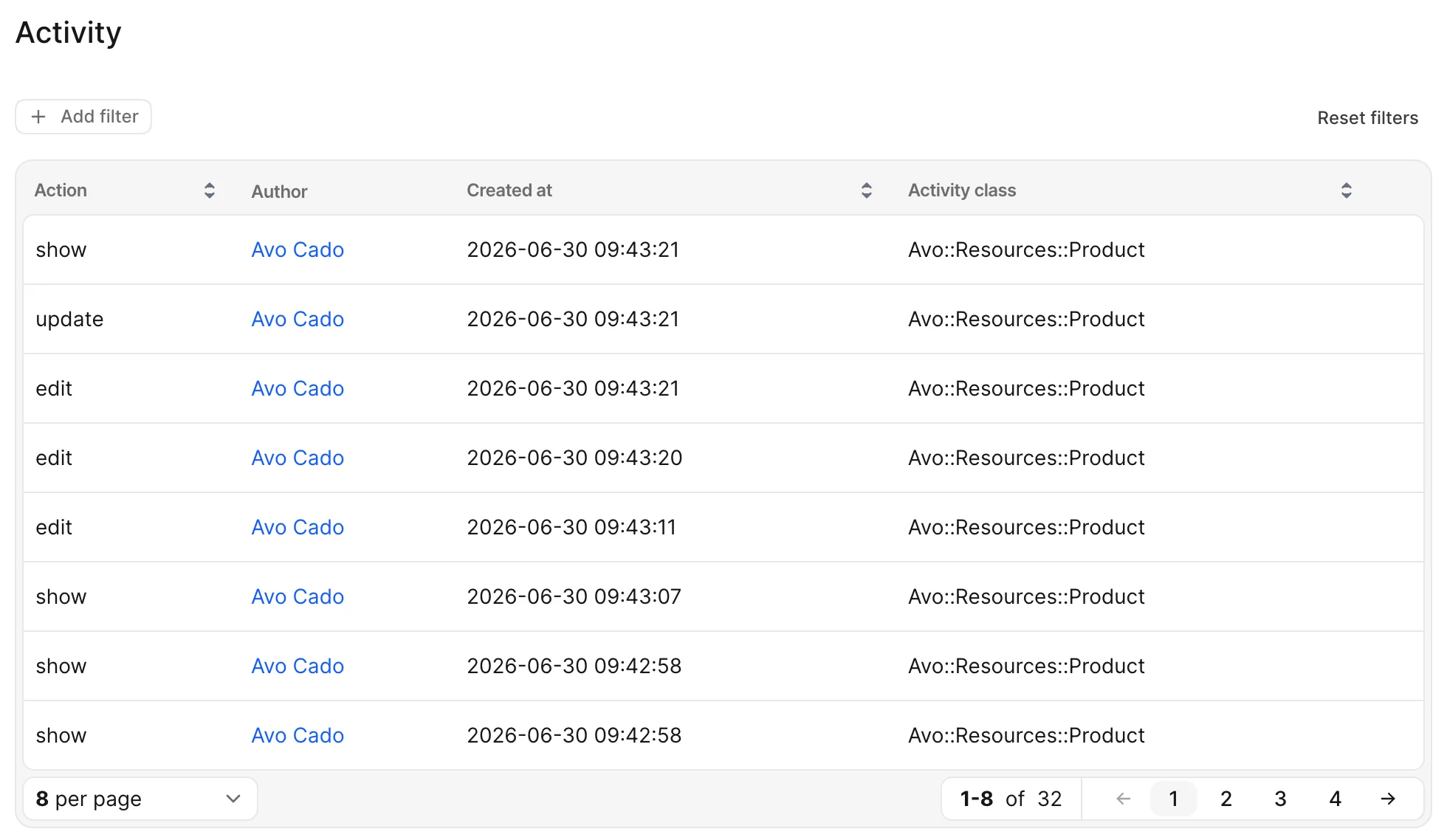
WARNING
If you're using a model other than User, make sure you have already configured the author models.
# app/avo/resources/user.rb
class Avo::Resources::User < Avo::BaseResource
  def fields
    field :id, as: :id, link_to_record: true
    field :email, as: :text, link_to_record: true
    field :products, as: :has_many
    field :avo_authored, as: :has_many, name: "Audit log"
  end
end
Show an overview of all activities
We've covered how to view activities for specific records and how to view all actions made by a particular author. However, having an overview of all the activities in one place can also be useful. This can be achieved by configuring the menu to include a section with an entry for all activities.
# config/initializers/avo.rb
Avo.configure do |config|
  config.main_menu = -> {
    section "AuditLogging", icon: "presentation-chart-bar" do
      resource :avo_activity
    end
  }
endavo-audit_logging >= v4.4.1 The page is called Audit log. It opens on the Changes tab, which leaves out page visits (Index page, Show page and the like), and All lists every entry. The tab needs avo-scopes; without it the list shows everything. Activity tables on other pages, such as a user's own activity, open on All. Its columns read when, what and who from the left: Created at, Action and Author. The Action column shows the same label and icon as the History card, such as Update, or the action's own name for an action run. The Section column names the resource or action as your menu does, such as Products or Change Price. Long names are cut to one line, with the whole name on hover, and an entry on several records lists them when you hover the icon next to 3 records. A row that changed one record has a preview icon that shows the change. A page visit, or a change to several records, has none: open the activity to see each change.With Dynamic Filters installed, the bar keeps Created at, Action, Author and Origin in place, in the order of the columns. Author lists everyone with an entry, deleted users included, and Origin offers one choice per kind: Background job covers every job, and UI covers changes made in the panel. Section and Record are under Add filter. On an author's own table, such as the one on a user's page, there is no Author filter: every row there is theirs. With the new filter dropdown and inline_filters on, Created at sits in the bar with Today, 7 days, 30 days and This month.
To call the page something else, set its name in your locale file. one names a single entry and other names the page. The table on a connection's, a token's or a chat's page takes the same name.
avo-audit_logging >= v4.4.1 The audit log reads in the nineteen languages Avo itself ships: its columns, action names, the activity's page, the History card and Undo. The words are under avo.audit_logging in the gem's config/locales, one file per language, and your own locale file wins over them. Any other language reads them in English until you add them.Dates and distances such as 4 days ago use Rails' own words for the language. Rails ships those in English only, so add the rails-i18n gem to read them in your language too. The names of your own resources, actions and model fields are yours to translate.
# config/locales/en.yml
en:
  avo:
    resource_translations:
      avo_activity:
        one: "Activity"
        other: "Activity log"
Change the date format
Sinceavo-audit_logging >= v4.4.1 The list shows the date like September 10, 2024, 11:24:17. To change it, set created_at_format, which takes the same Luxon tokens as the format option of the date_time field.# config/initializers/avo.rb
Avo.configure do |config|
config.audit_logging.activity_resource = {created_at_format: "yyyy-LL-dd TT"}
endWhere an activity came from
Most activities come from somebody clicking in the panel, and those carry no origin — a marker on every row would say nothing — so the Origin field reads UI for them, and the record's timeline says nothing. Anything else names itself, so you can tell a change your team made from a change something else made on their behalf.
Three of Avo's own add-ons name themselves, each after the record the entry points back to:
| Add-on | origin | Reads as | Links to |
|---|---|---|---|
| MCP server | mcp_connection | through MCP connection | The connection |
| REST API | api_token — or api when your own scheme let the request in without a token | through API token / through API | The token |
| Avo AI | ai_chat | through AI chat | The chat |
In every case the author is still the person: the admin who authorized the connection, the token's owner, the chat's owner — whose permissions the change was made with. The record's timeline says through MCP connection on the author's own line — "Ada Lovelace through MCP connection" — and the activity's own page carries an Origin field whose whole text links to the connection.
Two columns hold it:
| Column | Holds |
|---|---|
origin | A short name for what acted — "mcp_connection", "api_token", "ai_chat", or a name of your own. nil for the panel. |
origin_record | Optional, polymorphic: the thing that acted. Linked from the activity's page where it still exists. |
Filter the activity index by Origin to see everything one kind of actor did, UI included, or scope a query directly:
Avo::AuditLogging::Activity.from_origin("mcp_connection")   # everything MCP clients did
Avo::AuditLogging::Activity.originating_from(connection)    # everything one actor did
Mark your own origins
Anything of yours that records activities through Avo — an importer, a background job, a rake task — can name itself the same way. Wrap the work:
# app/jobs/nightly_import_job.rb
class NightlyImportJob < ApplicationJob
  def perform(import)
    Avo::AuditLogging::Origin.with("nightly_importer", record: import) do
      # anything in here that records an activity records it as the importer's
      import.run!
    end
  end
end
The origin lasts exactly as long as the block and cannot leak into the next request or job. The panel labels it from avo.audit_logging.origins.<name> where you define one, and humanizes the name where you don't — "nightly_importer" renders as Nightly importer:
# config/locales/en.yml
en:
  avo:
    audit_logging:
      origins:
        nightly_importer: "Nightly import"
INFO
Activities recorded before you upgraded have no origin, and neither do activities recorded by an app that hasn't run the new migration yet. Both keep working — they just read as the panel's own.
Rename the origin labels
Sinceavo-audit_logging >= v4.4.1 To change what an origin reads as, set config.audit_logging.origin_labels. It takes any origin in the table below, or a name of your own, and every label you leave out stays as it is.# config/initializers/avo.rb
Avo.configure do |config|
config.audit_logging.origin_labels = {
ui: "Admin panel",
job: "Scheduled task",
nightly_importer: "Nightly import"
}
end| Key | Default label | What acted |
|---|---|---|
ui | UI | A person in the panel |
mcp_connection | MCP connection | An AI client through the MCP server |
api_token | API token | A request through the REST API with a token |
api | API | A request through the REST API without a token |
ai_chat | AI chat | Avo AI |
job | Background job | A job, for a change made outside Avo |
request | App | Your app's own pages, for a change made outside Avo |
console | Developer console | The Rails console, for a change made outside Avo |
rake | Script | A rake task, for a change made outside Avo |
model | System | Anything else, for a change made outside Avo |
These labels win over your locale file and are the same in every language. If your app uses several languages, set them under avo.audit_logging.origins in each locale file instead.
Record activity from your own code
Sinceavo-audit_logging >= v4.3.2Changes made outside the panel, such as in a background job, an importer, or a service object, aren't logged on their own unless the resource logs changes made outside Avo. Record them with Avo::AuditLogging.record:
# app/services/price_updater.rb
class PriceUpdater
  def call(product, price, user)
    product.update!(price: price)

    Avo::AuditLogging.record(
      action: :update,
      record: product,
      author: user,
      payload: {price: price}
    )
  end
end
Avo finds the record's resource and links the activity to the record, so it shows up on the record's timeline like a change made in the panel. payload can be any hash; Avo stores it as JSON, with secrets masked.
Without an origin:, the entry reads UI in the Origin field, as if a person made the change in the panel. Pass one to say what acted, such as origin: "price_updater".
Like the panel, it only records for resources that opted in with self.audit_logging, and it asks your activity block and actions the same way. It returns the activity, or nil when audit logging is switched off or the opt-in says no. It raises ArgumentError when the record's model has no Avo resource, or when the record hasn't been saved yet. The activity and its link to the record are saved together, or not at all.
The actions switches cover the panel's own actions: index, new, create, edit, update, show, destroy, attach, detach and handle. Any other action, such as :publish, returns nil unless you add it to your resource's actions (actions: {publish: true}) or pass force: true.
Inside your activity block, current_user is the author: you pass, so a job gets the same answer the panel would give that user. With no author: it falls back to the signed-in user, which is nil in a job, so make the block handle nil if you record without an author. To record regardless of the opt-in, pass force: true:
Avo::AuditLogging.record(
  action: :update,
  record: product,
  author: user,
  force: true
)
force skips only the resource's opt-in. Nothing is recorded while audit logging is switched off globally.
Record changes no person made
A background job or an importer usually has no user behind it. Leave out author, and let the origin say what made the change. You don't need a placeholder user:
# app/jobs/nightly_import_job.rb
class NightlyImportJob < ApplicationJob
  def perform(import)
    Avo::AuditLogging::Origin.with("nightly_importer", record: import) do
      import.products.each do |product|
        product.update!(price: import.price_for(product))

        Avo::AuditLogging.record(
          action: :update,
          record: product,
          payload: {price: product.price}
        )
      end
    end
  end
end
The record's timeline names the origin as the author, so these entries read Nightly importer. You can pass origin: (and origin_record:) to Avo::AuditLogging.record instead of wrapping the work in Origin.with; origin_record: without origin: raises ArgumentError. With no author and no origin, it raises ArgumentError, because the entry would not say who or what made the change. It raises the same way in an app that hasn't run the origin migration yet, because the origin couldn't be stored.
Log changes made outside Avo
Sinceavo-audit_logging >= v4.3.2Calling Avo::AuditLogging.record yourself works when you know where the changes happen. To log every create, update, and delete on a model wherever it happens (a job, an importer, another API, the console), set outside_avo: true on its resource:
# app/avo/resources/product.rb
class Avo::Resources::Product < Avo::BaseResource
  self.audit_logging = {
    activity: true,
    outside_avo: true
  }
end
It's off by default. It needs PaperTrail on the model, because the entry is written when PaperTrail writes the change's version:
# app/models/product.rb
class Product < ApplicationRecord
  has_paper_trail
end
Each change gets its own entry, linked to its version, so its page shows the change log and the revert action like a change made in the panel. A create's page shows what the record was created with, and no revert, since there's nothing to go back to. The entry is saved in the same transaction as the change, so a change that's rolled back leaves no entry. The payload is empty unless a payload modifier adds to it, because what changed is in the change log.
The resource that sets outside_avo is the one whose settings are asked and whose timeline shows the entries, even when another resource uses the same model. In the panel or through the API, a change the panel logs links its version to the panel's own entry, as before. A version written while the panel logs the request, even a show visit, links to that entry. A change made where the panel logs nothing, such as an action that doesn't opt in, is logged by outside_avo under the signed-in user.
The resource's opt-in is asked the same way the panel asks it. The create, update, and destroy switches in actions turn single events off, and your activity block runs for each change. In a job or the console current_user is nil, so make the block handle nil. A block that raises logs the error and records nothing.
PaperTrail decides what counts as a change, so its own options apply: only:, ignore:, if:, and unless: on has_paper_trail, and PaperTrail.request(enabled: false) { ... } around an import you don't want in the log. An update that changed only created_at or updated_at, such as a touch from a belongs_to ..., touch: true child or an attached file, records nothing.
A few PaperTrail settings change what the log can show:
- A version whose event you renamed with
paper_trail_eventkeeps that name whenoutside_avologs it on its own, so it needs its own switch inactions, such asactions: {import: true}. An entry the panel records links it like any other version, and so does a create the AI chat or an MCP client records. An update or delete those two record leaves a renamed version to be logged on its own, and so does a create when your versions table has noobjectcolumn. A renamed delete has no revert action. - The change log needs PaperTrail's
object_changescolumn, which its installer adds with--with-changes. Without it, entries have no change log, and a touch can't be told from a real update, so it's logged too. - With
version_limit, an entry whose version PaperTrail pruned keeps no change log.
When the change is made through Avo (the panel, the API, the AI chat, or an MCP client), the author is the user Avo acted for. A change made through the AI chat or an MCP client also names the chat or the connection, as Avo's own entries for them do. Elsewhere the entry has no author. It carries the origin set with Origin.with when there is one, and otherwise names what was running when the record was saved:
| Saved in | The timeline shows |
|---|---|
| A job (Active Job) | Background job (Import products) |
| Your own controllers, not Avo's | App (Orders) |
rails console | Developer console |
A rake task, such as db:seed | Script (db:seed) |
| Anything else | System |
A job's own saves name it, its rescue_from handlers included, but not saves on threads it starts. A save after a job your controller ran inline with perform_now names the controller. Hover the name to see the full job, controller, or task, such as ImportProductsJob or Admin::OrdersController#update. The origin is stored the same way (job:ImportProductsJob, request:Admin::OrdersController#update, console, rake:db:seed, or model), which is what from_origin takes. A rake task is stored by name only, without the arguments in brackets, since those can hold a password. To word the labels for your admins, set them in your locale file:
# config/locales/en.yml
en:
  avo:
    audit_logging:
      origins:
        job: "Scheduled task"
        request: "Storefront"
On a resource that sets outside_avo, the panel's create, the AI chat, and MCP clients claim the saves they record. Each entry they record links the version of its own change (a create's, the destroy, or the first update), so it has the change log. Every other version written during the claim is logged by outside_avo on its own, as it would be outside one: another record a callback changes, an earlier save of the same record, or the records an action changes when the action doesn't opt in. That holds even when the writer raises after saving.
avo-audit_logging >= v4.4.1 A version of a model that doesn't set outside_avo, such as a stock movement an action creates, joins the entry as one of its Impacted records, as it does in the panel. That takes a claim that recorded one entry. With several, Avo can't tell whose the change is, and leaves it out.When your own code records a change with Avo::AuditLogging.record on a resource that sets outside_avo, claim the save the same way, or the change is logged twice:
Avo::AuditLogging::Recorder.claiming do
  product.update!(price: price)
  Avo::AuditLogging.record(action: :update, record: product, author: user, payload: {price: price})
end
An STI subclass is logged under its own resource when that one sets outside_avo, and otherwise under its base class's resource when that one does. A model with PaperTrail but no Avo resource is skipped. If recording fails, the error is logged and the change is kept.
Writes PaperTrail doesn't version aren't logged: update_column, update_columns, update_all, insert_all, upsert_all, delete, delete_all, and dependent: :delete_all. Use update! and destroy where the log has to see the change, or record.paper_trail.update_columns(...) to skip callbacks and still write a version. A model that has PaperTrail version its destroys after the delete (paper_trail.on_destroy(:after)) has its deletes skipped, because the row is gone by then.
Pause logging for a block of code
Sinceavo-audit_logging >= v4.3.2Bulk imports, data backfills, and test setup can write thousands of activities you don't need. Wrap that work in Avo::AuditLogging.disabled to record nothing inside the block:
# lib/tasks/backfill.rake
task backfill_prices: :environment do
  Avo::AuditLogging.disabled do
    Product.find_each do |product|
      product.update!(price: product.price * 100)
    end
  end
end
Nothing is recorded inside the block from any source: the panel, Avo::AuditLogging.record (which returns nil), changes made outside Avo, the API, the AI chat, or MCP, and PaperTrail or Audited versions written inside it aren't linked to an activity. A model change counts as inside the block when it was saved inside it, even if its transaction commits after the block ends. Logging resumes when the block ends, even if it raises. The pause covers the block's code and any fibers it starts, such as Async tasks. Other requests, threads and processes keep recording, including a thread started inside the block.
A background job enqueued inside the block runs later, outside it, so its changes are logged. Wrap the job's own work in Avo::AuditLogging.disabled if they shouldn't be.
To switch logging off everywhere, for example in the test environment, set config.audit_logging.enabled = false.
Falcon and other fiber-based servers
Set config.active_support.isolation_level = :fiber, as Rails asks for these servers, so each request keeps its own current user and origin. A fiber or thread you start yourself doesn't inherit them, so a change saved there has no author.
Read an activity in code
Sinceavo-audit_logging >= v4.3.2Most activities are about one record. Read it, and the classes behind the activity, straight from the activity:
activity = Avo::AuditLogging::Activity.latest.first

activity.record               # => #<Product id: 123>
activity.record_type          # => "Product"
activity.record_id            # => 123
activity.records              # => every linked record

activity.resource_class       # => Avo::Resources::Product
activity.model_class          # => Product
activity.record_policy_class  # => ProductPolicy
nil means there's nothing to return: no linked record, a deleted record, or a class your app has since removed.
activity_class and record_type answer different questions. activity_class is the Avo resource the change went through, such as Avo::Resources::Product, or the action class for an action run. record_type is the model of the record that changed, such as Product. For an action run, resource_class is nil and model_class comes from the linked records, so a record of an STI subclass gives its base class. record_policy_class is the resource's authorization_policy when it sets one, and otherwise the policy Pundit finds for the model. It isn't called policy_class because Pundit reads that method to authorize the activity itself.
When an activity has several records
Select 5 products on the index and run ChangePrice. That's one activity linked to 5 records, so there's no single record for activity.record to return. The first one linked would be whichever row was ticked first, so the same action on the same 5 products could name a different product each time, and a notification built on activity.record.name would mention one product and leave out the other 4.
That's why record and record_id only return a value when one record is linked, and return :multiple when there are several. records returns them all:
# ChangePrice on 5 products
activity.record       # => :multiple
activity.record_id    # => :multiple
activity.record_type  # => "Product"
activity.records      # => all 5
record_type still answers when every linked record has the same type, and returns :multiple when they differ, as on an attach, which links two models. model_class and record_policy_class come from the resource when there is one, and follow the same rule on an action run.
WARNING
:multiple is truthy and has no record methods, so check for it before reading the record. activity.record&.name raises on a run over several records.
Always read the first record
The first record may be enough for what you're building, as long as you're fine with it depending on the order the rows were ticked. For one read, activity.records.first gives you the first one that still exists. To make record and record_id always return the first one, override them in an initializer:
# config/initializers/avo.rb
Rails.configuration.to_prepare do
  Avo::AuditLogging::Activity.class_eval do
    def record = first_pivot&.reachable_record
    def record_id = first_pivot&.record_id
    def record_type = first_pivot&.record_type

    private def first_pivot = activity_pivots.min_by(&:id)
  end
end
record_type is in the override so it stays the type of the record record_id names. Without it, an activity on two models pairs one id with :multiple. to_prepare applies the override again after each code reload in development. records, model_class and record_policy_class don't change. The activity page follows the override: its Record field links to that record instead of showing how many.
Control who sees which activities
Sinceavo-audit_logging >= v4.3.2Activities are ordinary Avo records, so your authorization policies decide who sees them. Avo doesn't ship a policy for them, because it can't know how your app handles access. Without an authorization client, everyone who can open the panel sees every activity.
The examples below use Pundit. With another client, answer the same questions in its policy classes.
Show each user only their own activity
These two policies let each user see the activities they made, and nobody change them. They assume the ApplicationPolicy from rails generate pundit:install, which answers false to anything a policy doesn't define.
# app/policies/avo/audit_logging/activity_policy.rb
class Avo::AuditLogging::ActivityPolicy < ApplicationPolicy
  def index? = true
  def show? = record.author == user

  # Lets them run Undo, which also asks the audited record's policy for `update?`.
  def act_on? = show?

  # The Impacted records tab on an activity's page.
  def view_activity_pivots? = show?

  # With `explicit_authorization` off, Avo allows any association method a policy leaves out.
  %i[attach detach create edit update destroy reorder].each do |action|
    define_method("#{action}_activity_pivots?") { false }
  end

  class Scope < ApplicationPolicy::Scope
    def resolve = scope.where(author_id: user.id, author_type: user.class.name)
  end
end# app/policies/avo/audit_logging/activity_pivot_policy.rb
class Avo::AuditLogging::ActivityPivotPolicy < ApplicationPolicy
def index? = true
def show? = Pundit.policy!(user, record.activity).show?
class Scope < ApplicationPolicy::Scope
def resolve = scope.where(activity: Pundit.policy_scope!(user, Avo::AuditLogging::Activity))
end
endThe second policy covers the Impacted records list and follows the first, so that's the only one you edit. user is whoever your config.current_user_method returns, so this works whatever your app calls its people.
To let admins see everything, change show? and resolve. admin? stands for whatever your app checks:
def show? = user.admin? || record.author == user

class Scope < ApplicationPolicy::Scope
  def resolve = user.admin? ? scope.all : scope.where(author_id: user.id, author_type: user.class.name)
end
The History card on a record's page and the options in the activity list's filters follow the same policies. With the policies above, a user who opens a record someone else also changed sees only their own entries on its card.
Show the history of the records a user can see
To follow your other policies instead, ask them about the records an activity changed. Change show? and resolve in the activity policy, and add a line for each model you log:
def show? = record.records.any? { |audited| Pundit.policy!(user, audited).show? }

class Scope < ApplicationPolicy::Scope
  def resolve
    products = Pundit.policy_scope!(user, Product).select(:id)
    visible = Avo::AuditLogging::ActivityPivot.where(record_type: "Product", record_id: products)

    scope.where(id: visible.select(:activity_id))
  end
end
An activity on several records shows up when the user may see one of them, and its payload can hold data about the others. An activity whose records were all deleted is hidden. The History card shows every entry on a record the user may see.
Disable specific actions logging
By default, when audit logging is enabled for a resource or action, all actions, such as index visits, show visits, edit, update, etc. are logged.
If you prefer not to log all of these actions, configure the actions key within the self.audit_logging class attribute.
Let's turn off edit and show logging for the Avo::Resources::Product:
# app/avo/resources/product.rb
class Avo::Resources::Product < Avo::BaseResource
  self.audit_logging = {
    activity: true,
    actions: {
      edit: false,
      show: false
    }
  }

  def fields
    panel do
      card do
        field :id, as: :id, link_to_record: true
        field :name, as: :text, link_to_record: true
        field :price, as: :number, step: 1
      end

      sidebar do
        tool Avo::ResourceTools::Timeline
      end
    end
    # ...
    field :avo_activities, as: :has_many
  end

  def actions
    action Avo::Actions::ChangePrice
  end
end
The default value for actions is:
{
  index: true,
  new: true,
  create: true,
  edit: true,
  update: true,
  show: true,
  destroy: true,
  attach: true,
  detach: true,
  handle: true
}
Conclusion
With Avo's Audit Logging, you gain a powerful tool to track and visualize user actions and record changes seamlessly across your application. By carefully following the setup steps and configuring logging to fit your needs, you can establish a robust and transparent audit system, enhancing accountability and preserving data integrity.
Happy auditing!