
Actions
Actions let you run custom operations on one or many records — or no records at all — straight from the UI. Deactivate a user, send a notification, export a CSV, trigger a background job: anything you can express in Ruby can become an entry in the Actions dropdown, optionally with a confirmation modal and a form that collects extra input before running.
An action is a plain Ruby class with a handle method, registered on one or more resources:
# app/avo/actions/toggle_inactive.rb
class Avo::Actions::ToggleInactive < Avo::BaseAction
  self.name = "Toggle Inactive"

  def handle(query:, **args)
    query.each do |record|
      record.update! inactive: !record.inactive
    end

    succeed "Toggled status for #{query.count} records"
  end
end

# app/avo/resources/user.rb
class Avo::Resources::User < Avo::BaseResource
  def actions
    action Avo::Actions::ToggleInactive
  end
end
With no extra configuration the action shows up in the Actions dropdown on the Index and Show views (it's hidden on New by default), asks "Are you sure you want to run this action?" in a confirmation modal, runs handle with the selected records, shows a green success notification, and reloads the page.
What happens when an action runs
- Record selection. On the
Indexview the user selects one or more records (bulk); on theShowview or row controls the current record is the target. Standalone actions skip this phase. - Trigger. The user picks the action from the Actions dropdown or a custom control.
- Confirmation modal (optional). A modal shows the action's message and any fields to fill out. The user runs or cancels. Set
confirmationtofalseto skip this phase and execute immediately. - Execution. Your
handlemethod runs with the records, field values, current user, and request. You give feedback and pick a response.
Generate an action
bin/rails generate avo:action toggle_inactiveThis creates app/avo/actions/toggle_inactive.rb with a commented-out skeleton for visible, fields, and handle. Pass --standalone to generate an action that doesn't need selected records, and use a namespace to group related actions:
# Standalone action
bin/rails generate avo:action generate_monthly_report --standalone

# Namespaced action -> app/avo/actions/admin/approve_user.rb
bin/rails generate avo:action admin/approve_user
Register the action on a resource
Declare the actions available on a resource inside its actions method:
# app/avo/resources/user.rb
class Avo::Resources::User < Avo::BaseResource
  def actions
    # User status actions
    action Avo::Actions::ActivateUser
    action Avo::Actions::DeactivateUser

    divider label: "Communication"

    action Avo::Actions::SendWelcomeEmail, icon: "heroicons/outline/envelope"
  end
end
Pass icon to show an icon next to the action in the dropdown, and use divider to separate actions into logical groups, with an optional label.
If you want to send custom data to the action, pass arguments — a hash (or a proc that returns one) that becomes available everywhere in the action class:
class Avo::Resources::User < Avo::BaseResource
  def actions
    action Avo::Actions::ToggleInactive,
      arguments: {
        special_message: true
      }

    # Or as a proc to make it dynamic
    action Avo::Actions::ToggleInactive,
      arguments: -> do
        {
          special_message: resource.view.index? && current_user.is_admin?
        }
      end
  end
endclass Avo::Actions::ToggleInactive < Avo::BaseAction
def handle(**args)
if arguments[:special_message]
succeed "I love 🥑"
else
succeed "Success response ✌️"
end
end
endWARNING
When using Pundit policies, access to actions is restricted with the act_on? method. If you think you should see an action and you don't, check the policy. More info here.
INFO
You may use the custom controls feature to show actions outside the dropdown, as standalone buttons.
Collect input with fields
An action can define fields, shown to the user in the action's modal. They work the same way as fields on resources. When the action runs on a single record the fields are hydrated from that record; otherwise they're plain form inputs. The submitted values arrive in handle as the fields argument.
# app/avo/actions/toggle_inactive.rb
class Avo::Actions::ToggleInactive < Avo::BaseAction
  def fields
    field :notify_user, as: :boolean
    field :message, as: :textarea
  end
end
Check out the Fields page for everything fields can do.
Write the handle method
handle is where your business logic lives. It receives keyword arguments:
query— the selected record(s); a single record is wrapped in an array for consistency (recordsis an alias)fields— the values submitted through the action's form fieldscurrent_user— the currently authenticated userresource— the Avo resource that triggered the actionrequest— the currentActionDispatch::Request
# app/avo/actions/toggle_inactive.rb
class Avo::Actions::ToggleInactive < Avo::BaseAction
  self.name = "Toggle Inactive"

  def fields
    field :notify_user, as: :boolean
    field :message, as: :textarea
  end

  def handle(query:, fields:, current_user:, resource:, request:, **args)
    query.each do |record|
      record.update! inactive: !record.inactive

      record.notify(fields[:message]) if fields[:notify_user]
    end

    succeed "Successfully toggled status for #{query.count} records"
  end
end
Give feedback to the user
After the action runs, respond with one or more notifications: succeed (green), inform (blue), warn (orange), or error (red). With no explicit feedback, Avo shows an "Action ran successfully" info notification.
def handle(**args)
  succeed "Success response ✌️"
  warn "Warning response ✌️"
  inform "Info response ✌️"
  error "Error response ✌️"
end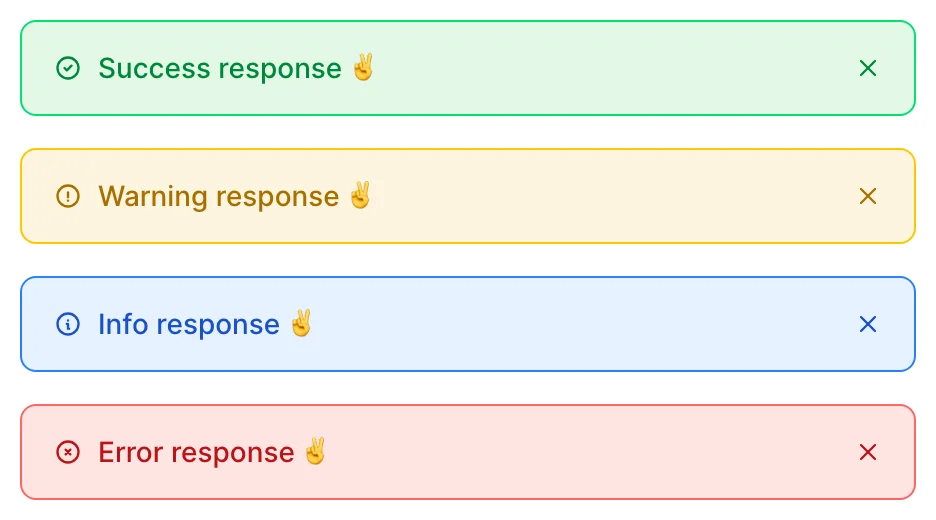
Each method takes an optional timeout in milliseconds — or :forever to keep the notification open until the user dismisses it:
succeed "Task completed successfully", timeout: 5000
warn "Important warning - requires attention", timeout: :forever
If you don't want any notification — a redirect scenario, for example — use silent.
Control what happens after execution
Besides feedback, handle picks how the UI responds. The default is a full-page reload. You can instead:
redirect_toa different pathdownloada generated filekeep_modal_opento show errors while preserving the user's inputclose_modal(aliasdo_nothing) to close the modal and leave the page as isreload_recordsto refresh only the affected table rows or grid cardsnavigate_to_actionto chain into another actionappend_to_responseto add your own turbo stream responses
See the API reference for each response's behavior and signature.
Build a multi-step flow
Because navigate_to_action can pass arguments along, you can chain actions into a wizard: the first action collects which fields to update, the second renders only those fields and performs the update.
class Avo::Actions::City::PreUpdate < Avo::BaseAction
  self.name = "Update"

  def fields
    field :name, as: :boolean
    field :population, as: :boolean
  end

  def handle(query:, fields:, **args)
    navigate_to_action Avo::Actions::City::Update,
      arguments: {
        cities: query.map(&:id),
        render_name: fields[:name],
        render_population: fields[:population]
      }
  end
endclass Avo::Actions::City::Update < Avo::BaseAction
self.name = "Update"
self.visible = -> { false }
def fields
field :name, as: :text if arguments[:render_name]
field :population, as: :number if arguments[:render_population]
end
def handle(fields:, **args)
City.find(arguments[:cities]).each do |city|
city.update! fields
end
succeed "City updated!"
end
endYou can try this flow on the avodemo: select a record, run the "Update" action, choose the fields, and update them in the follow-up action.
Customize the modal
The modal's texts can each be a string or a block — blocks run in Avo::ExecutionContext with access to resource, record, view, arguments, and query:
name— the action's display name in the dropdown and modaldescription— a short explanation under the name in the modal headermessage— the confirmation messageconfirm_button_label/cancel_button_label— the button labels
# app/avo/actions/release_fish.rb
class Avo::Actions::ReleaseFish < Avo::BaseAction
  self.name = "Release fish"
  self.description = "Release the fish back into the ocean"
  self.message = -> {
    record.present? ? "Are you sure you want to release #{record.name}?" : "Are you sure you want to release the fish?"
  }
  self.confirm_button_label = "Release fish"
  self.cancel_button_label = "Cancel release"
end
If the action is safe to run without asking, set confirmation to false and it executes immediately on trigger. To stop the modal from closing when the user clicks outside it, set close_modal_on_backdrop_click to false.
Run an action without records
Standalone actions aren't tied to selected records — global reports, maintenance tasks, background jobs. They stay enabled in the Actions dropdown even with nothing selected and can live alongside regular actions on the same resource.
Generate one with the --standalone flag, or set the attribute on an existing action:
# app/avo/actions/global_report.rb
class Avo::Actions::GlobalReport < Avo::BaseAction
  self.name = "Generate Global Report"
  self.standalone = true
end
TIP
Standalone actions pair well with fields to collect the input the operation needs.
Control visibility and authorization
By default actions show on every view except New. Use visible to change where an action appears — for example, only on the Index view:
# app/avo/actions/global_report.rb
class Avo::Actions::GlobalReport < Avo::BaseAction
  self.visible = -> { view.index? }
end
To restrict who can run an action, use authorize. Unauthorized actions are hidden, and the controller re-evaluates the check on execution, so a bad actor can't run one by crafting a request:
class Avo::Actions::GlobalReport < Avo::BaseAction
  self.authorize = -> { current_user.is_admin? }
end
Both accept a boolean or a block executed in Avo::ExecutionContext.
Trigger an action from a link
You may want a link somewhere in the UI — a field on the Index view, a dashboard card — that opens an action's modal directly. Call the action class's link_arguments method with a resource instance; it returns the [path, data] pair a proper action link needs:
# app/avo/resources/city.rb
class Avo::Resources::City < Avo::BaseResource
  def fields
    field :name, as: :text, name: "Name (click to edit)", only_on: :index do
      path, data = Avo::Actions::City::Update.link_arguments(
        resource: resource,
        arguments: {
          cities: Array[resource.record.id],
          render_name: true
        }
      )

      link_to resource.record.name, path, data: data
    end
  end
endIf you don't have an instantiated resource at hand — a custom partial on a dashboard, say — build one yourself, with or without a record:
path, data = Avo::Actions::City::Update.link_arguments(
  resource: Avo::Resources::City.new(record: city)
)

link_to "Update city", path, data: data
The arguments are encrypted and Base64-encoded before being put in the URL, so it's safe to pass sensitive data.
Read params from the page that triggered the action
The action's modal is rendered in a new request, so query params present on the Index or Show page aren't directly available. To read them — for example to prefill a field — parse request.referer:
# app/avo/actions/dummy_action.rb
class Avo::Actions::DummyAction < Avo::BaseAction
  def fields
    field :some_field, as: :hidden, default: -> {
      # Parse the URL of the page that triggered the action
      parent_params = URI.parse(request.referer).query
        .split("&")
        .map { |param| param.split("=") }
        .to_h
        .with_indifferent_access

      (parent_params[:hey] == "ya") ? :yes : :no
    }
  end
end
With this in place, visiting https://example.com/avo/resources/users?hey=ya and running the action sets the field's default based on the hey param.
StimulusJS
Actions play well with custom Stimulus controllers. Follow the JavaScript guide for more information.