
Custom controls
Avo displays a default set of buttons (controls) on the Index, Show, and Edit views and at the end of each table row. Custom controls let you take over any of those areas — relabel or remove the default buttons and add your own links, action buttons, and dropdowns.
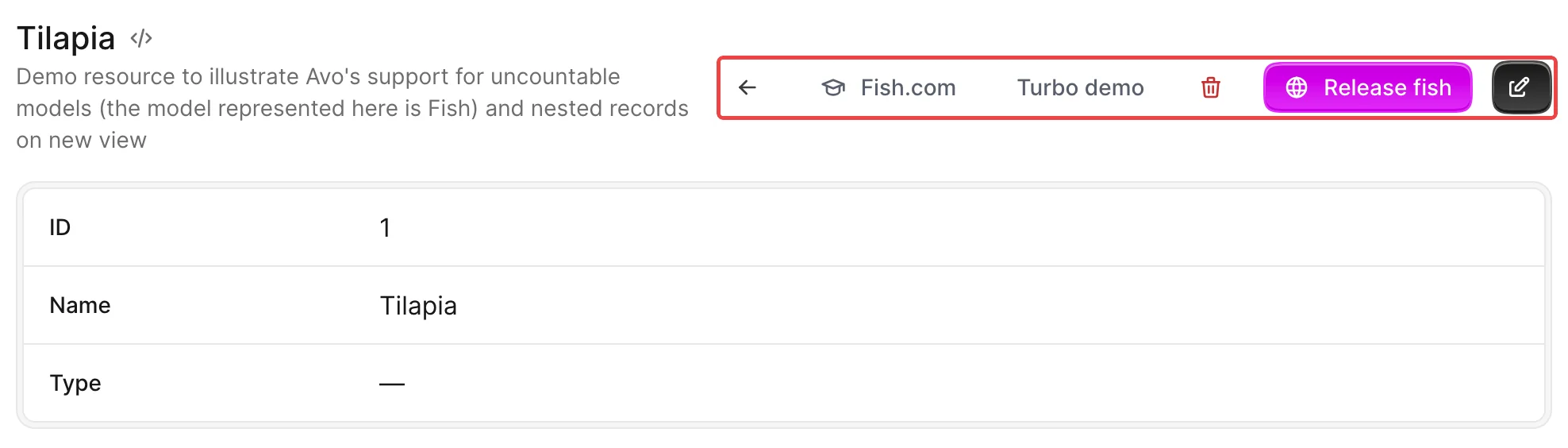
Take over an area by assigning a block to the matching resource class attribute — show_controls, edit_controls, index_controls, or row_controls:
# app/avo/resources/fish.rb
class Avo::Resources::Fish < Avo::BaseResource
  self.show_controls = -> do
    link_to "View on site", "https://fish.com", target: :_blank
    default_controls
  end
end
Any area you don't customize keeps its default controls:

Inside a block you can mix the built-in controls (like back_button or actions_list) with your own link_to links and action buttons. See the API reference for every control and the options each one accepts.
Customize the show controls
On the Show view the default configuration is back_button, delete_button, detach_button, actions_list, and edit_button. Assign a show_controls block and declare the controls you want, in the order you want them:
# app/avo/resources/fish.rb
class Avo::Resources::Fish < Avo::BaseResource
  self.show_controls = -> do
    back_button label: "", title: "Go back now"
    link_to "Fish.com", "https://fish.com", icon: "heroicons/outline/academic-cap", target: :_blank
    link_to "Turbo demo", "/admin/resources/fish/#{params[:id]}?change_to=new-content",
      class: "custom-class",
      data: {
        turbo_frame: "fish_custom_action_demo"
      }
    delete_button label: "", title: "Delete this fish"
    detach_button label: "", title: "Detach this fish"
    actions_list label: "Runnables", exclude: [Avo::Actions::ReleaseFish], style: :primary, color: :slate
    action Avo::Actions::ReleaseFish, style: :primary, color: :fuchsia, icon: "heroicons/outline/globe"
    edit_button label: ""
  end
end
Customize the edit controls
On the Edit and New views the default configuration is back_button, delete_button, actions_list, and save_button. Assign an edit_controls block — it applies to both views, so use view to differentiate when needed:
# app/avo/resources/fish.rb
class Avo::Resources::Fish < Avo::BaseResource
  self.edit_controls = -> do
    back_button label: "", title: "Go back now"
    link_to "Fish.com", "https://fish.com", icon: "heroicons/outline/academic-cap", target: :_blank
    delete_button label: "", title: "Delete this fish"
    detach_button label: "", title: "Detach this fish"
    actions_list exclude: [Avo::Actions::ReleaseFish], style: :primary, color: :slate, label: "Runnables"
    action Avo::Actions::ReleaseFish, style: :primary, color: :fuchsia, icon: "heroicons/outline/globe" if view != :new
    save_button label: "Save Fish"
  end
end
Customize the index controls
On the Index view the default configuration is attach_button, actions_list, and create_button. Assign an index_controls block:
# app/avo/resources/fish.rb
class Avo::Resources::Fish < Avo::BaseResource
  self.index_controls = -> do
    link_to "Fish.com", "https://fish.com", icon: "heroicons/outline/academic-cap", target: :_blank
    actions_list exclude: [Avo::Actions::DummyAction], style: :primary, color: :slate, label: "Runnables" if Fish.count > 0
    action Avo::Actions::DummyAction, style: :primary, color: :fuchsia, icon: "heroicons/outline/globe" if Fish.count > 0
    attach_button label: "Attach one Fish"
    create_button label: "Create a new and fresh Fish"
  end
end
Customize the row controls
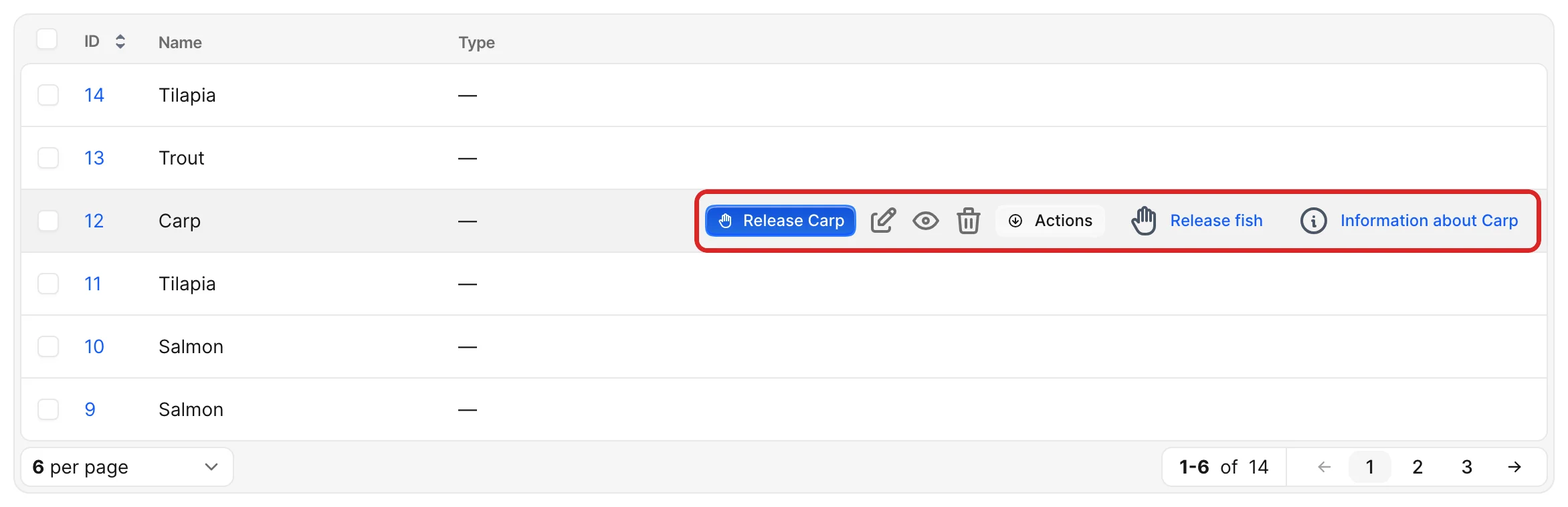
At the end of each table row on the Index view the default configuration is order_controls, show_button, edit_button, detach_button, and delete_button. Assign a row_controls block:
# app/avo/resources/fish.rb
class Avo::Resources::Fish < Avo::BaseResource
  self.row_controls = -> do
    action Avo::Actions::ReleaseFish, label: "Release #{record.name}", style: :primary, color: :blue,
      icon: "heroicons/outline/hand-raised" unless params[:view_type] == "grid"
    edit_button title: "Edit this Fish now!"
    show_button title: "Show this Fish now!"
    delete_button title: "Delete this Fish now!", confirmation_message: "Are you sure you want to delete this Fish?"
    actions_list style: :primary, color: :slate, label: "Actions" unless params[:view_type] == "grid"
    action Avo::Actions::ReleaseFish, title: "Release #{record.name}", icon: "heroicons/outline/hand-raised", style: :icon
    link_to "Information about #{record.name}", "https://en.wikipedia.org/wiki/#{record.name}",
      icon: "heroicons/outline/information-circle", target: :_blank, style: :icon
  end
end
The same controls are displayed on the grid view items too — check params[:view_type] (as above) to show a control on only one of the two view types.
Keep the default controls
If you just want to add a link before or after the default controls, you don't have to re-declare them all — call default_controls where you want them to appear:
# app/avo/resources/post.rb
class Avo::Resources::Post < Avo::BaseResource
  self.show_controls = -> do
    # This link will be added before all other controls.
    link_to "View on site", post_path(record), target: :_blank
    default_controls
  end
end
What you can put in a control
Beyond the built-in buttons, a control block accepts your own links and action buttons — and because a link_to forwards its data, class, and target to the rendered <a>, you can drive Turbo and Stimulus straight from a control.
Links
link_to takes a label and any path — an external URL, a Rails path helper, a mailto:, whatever you need:
self.show_controls = -> do
  # External URL in a new tab
  link_to "Docs", "https://avohq.io/docs", icon: "heroicons/outline/book-open", target: :_blank

  # Rails path helper for the current record
  link_to "View on site", post_path(record), icon: "heroicons/outline/globe-alt"

  # mailto: link
  link_to "Email author", "mailto:#{record.author.email}", icon: "heroicons/outline/envelope"

  # Icon-only — the label becomes the tooltip
  link_to "Open in Stripe", "https://dashboard.stripe.com/customers/#{record.stripe_id}",
    icon: "heroicons/outline/credit-card", style: :icon

  default_controls
end
Built-in controls
Relabel, restyle, or reorder the built-in buttons — back_button, edit_button, show_button, delete_button, and the rest:
self.show_controls = -> do
  back_button label: "", title: "Back"          # icon-only
  edit_button label: "Edit this fish"
  delete_button label: "", icon: "heroicons/outline/trash",
    confirmation_message: "Delete this fish for good?"
end
Actions
Pull an action out as its own button, pass it arguments, and keep the rest in the dropdown:
self.show_controls = -> do
  # A single action as a button
  action Avo::Actions::ReleaseFish, style: :primary, color: :fuchsia, icon: "heroicons/outline/globe"

  # Send data to the action
  action Avo::Actions::ExportSelection, arguments: { format: :csv }

  # Everything else stays in the dropdown
  actions_list exclude: [Avo::Actions::ReleaseFish], label: "More"

  default_controls
end
Turbo triggers
A link_to forwards its data hash to the <a>, so any data-turbo-* attribute works. Load a response into a Turbo Frame, or turn a link into a POST/DELETE button:
self.show_controls = -> do
  # Render the response into a Turbo Frame already on the page
  link_to "Preview", preview_fish_path(record),
    icon: "heroicons/outline/eye",
    data: { turbo_frame: "fish_preview" }

  # A link that submits as a POST, with a confirmation dialog
  link_to "Archive", archive_fish_path(record),
    icon: "heroicons/outline/archive-box",
    data: { turbo_method: :post, turbo_confirm: "Archive this fish?" }

  default_controls
end
JavaScript triggers
The same data pass-through lets you wire a control to a Stimulus controller — set the controller, action, and any value attributes, and Avo renders them on the link:
self.show_controls = -> do
  link_to "Copy API key", "#",
    icon: "heroicons/outline/clipboard",
    data: {
      controller: "clipboard",
      action: "clipboard#copy",
      clipboard_text_value: record.api_key
    }

  default_controls
end
Load the controller through your asset pipeline so Stimulus picks it up.
Group links and actions in a dropdown
If you have too many controls for the bar, group your custom links and actions in a list dropdown:
# app/avo/resources/fish.rb
class Avo::Resources::Fish < Avo::BaseResource
  self.index_controls = -> do
    list label: "Custom Index List", icon: "heroicons/outline/cube-transparent", style: :primary, color: :slate, title: "A custom list" do
      link_to "Google", "https://google.com", icon: "heroicons/outline/academic-cap"
      action Avo::Actions::Sub::DummyAction, icon: "heroicons/outline/globe"
      link_to "Fish.com", "https://fish.com", icon: "heroicons/outline/fire", target: :_blank
    end
  end
end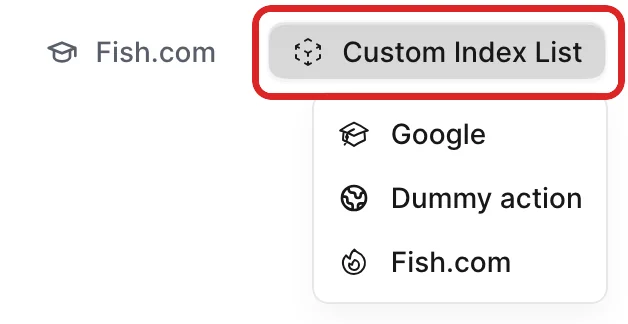
Within the list block you can use link_to, action, and divider — the built-in button controls are not allowed there.
Conditionally show controls
Actions have a visible block that controls their visibility, but a control declared with action ignores it. Because the controls declaration is a block, use regular if/else statements instead:
# app/avo/resources/fish.rb
class Avo::Resources::Fish < Avo::BaseResource
  self.show_controls = -> do
    back_button label: "", title: "Go back now"

    # visibility conditional
    if record.released?
      action Avo::Actions::ReleaseFish, style: :primary, color: :fuchsia, icon: "heroicons/outline/globe"
    end

    edit_button label: ""
  end
end
INFO
The exception is actions declared inside a list dropdown — those do respect the action's visible block.