
Asset handling
Avo ships with its own precompiled CSS and JavaScript, so it works out of the box with no build step on your side. When you want to load your own styles or scripts — for custom tools, custom fields, resource tools, or any UI you extend — Avo hooks into your app's existing asset pipeline and serves them alongside its own assets.
This guide covers loading your own assets. For adding interactivity with Stimulus, see the JavaScript guide; for using Tailwind utility classes in your custom UI, see the TailwindCSS integration.
Supported asset pipelines
| Asset pipeline | Avo compatibility |
|---|---|
| Importmap | ✅ Fully supported |
| Propshaft | ✅ Fully supported |
| Sprockets | ✅ Fully supported |
| jsbundling (esbuild / rollup / webpack) | ✅ Fully supported |
How Avo ships its own assets
We chose to impact your app and your deploy process as little as possible. Avo's assets are bundled and published with the gem, so there's nothing extra to compile when you deploy — Avo doesn't require NodeJS or any special environment in your deploy pipeline.
Under the hood Avo builds its own styles with TailwindCSS and bundles its scripts with jsbundling and esbuild. That build happens on our side, not yours.
Add your own CSS and JavaScript
Avo just needs to know which files to load. How you produce those files depends on the pipeline your app already uses — pick the section that matches your setup.
With Importmap
Importmap is the default in modern Rails. Run:
bin/rails generate avo:js:installThat command will:
- create
app/javascript/avo.custom.jsas your JS entrypoint; - eject the
_head.html.erbpartial and load the entrypoint from it (javascript_importmap_tags "avo.custom") so Avo picks it up; - pin
avo.customin yourconfig/importmap.rbsoimportmap-railsserves it.
With jsbundling and esbuild
A JS bundler gives you more power (npm packages, imports, source maps). Avo uses jsbundling with esbuild internally, and can wire your entrypoint into the same setup:
bin/rails generate avo:js:install --bundler esbuildThat command will:
- create
app/javascript/avo.custom.jsas your entrypoint; - eject the
_head.html.erbpartial and load the entrypoint from it (javascript_include_tag "avo.custom", withdefer: true).
Your esbuild build script bundles everything under app/javascript into app/assets/builds, which Sprockets or Propshaft then serves — including avo.custom.js.
With rollup or webpack
Avo supports other bundlers too; we just don't ship a generator for them. If you've configured jsbundling with rollup or webpack for your own assets, wire avo.custom.js into that build the same way, then load it from an ejected _head.html.erb. If you get a setup working, open a PR to help the next person.
Manually (Sprockets or Propshaft)
To add compiled CSS/JS by hand, create the files and load them from the _pre_head.html.erb partial:
bin/rails generate avo:eject --partial :pre_headCreate avo.custom.js under app/javascript and avo.custom.css under app/assets/stylesheets, then reference them:
<%# app/views/avo/partials/_pre_head.html.erb %>
<%= javascript_include_tag "avo.custom", defer: true %>
<%= stylesheet_link_tag "avo.custom", media: "all" %>
Your asset pipeline picks these up and serves them inside Avo.
WARNING
When you use javascript_include_tag, pass defer: true so the browser loads your script with the same strategy as Avo's and the files run in the right order.
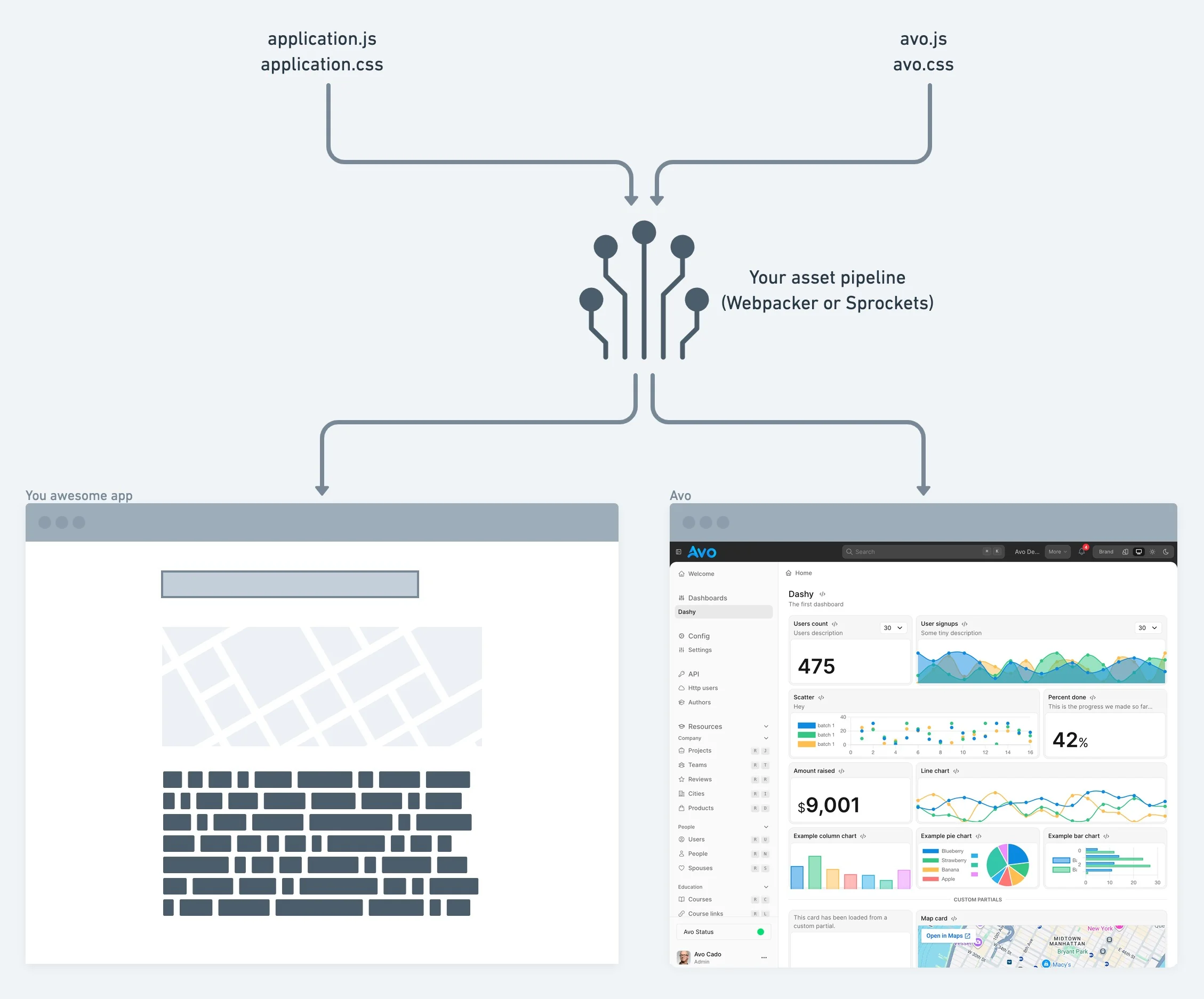
Load order and overriding Avo's styles
Avo renders assets into <head> in this order — anything later wins the cascade over anything earlier:
_pre_head.html.erb— your assets- Avo's own CSS (
avo/application.css) and JS (avo/application.js) avo-overrides.css/avo-overrides.js— the no-build override files, loaded right after Avo's own (see Override styles and scripts)_head.html.erb— your assets- Brand palette overrides — when you set
appearance.neutral_colors/accent_colors, Avo emits an inline:root<style>here, wrapped in@layer baseso it beats Avo's defaults while a user-picked theme still wins
Add your custom styles to _pre_head.html.erb so Avo's defaults load after them and the interface stays consistent. Use _head.html.erb when you deliberately want your rules to win the cascade over Avo's.
INFO
A separate color_theme_override script also runs in <head>, but it isn't an asset hook — it applies the visitor's color-scheme and theme classes to <html> before first paint (cookie handling and auto dark mode). It toggles classes, not stylesheets.
Add custom styles or Tailwind classes
Avo ships precompiled styles, so most apps don't need a build step. But when you write your own CSS or use Tailwind utility classes in custom tools, custom fields, ejected components, or other extended UI, those classes may not exist in Avo's precompiled bundle.
When Avo detects tailwindcss-ruby, it automatically enables the TailwindCSS integration and builds an app-level Avo stylesheet with zero (or close to zero) configuration — your custom styles under app/assets/stylesheets/avo/ and any Tailwind classes discovered in your templates are compiled into Avo's stylesheet. See the TailwindCSS integration guide for setup, scan paths, and opting out.
For quick, no-build tweaks — restyling with CSS variables or a small Stimulus behavior — reach for avo-overrides.css / avo-overrides.js instead. See Override styles and scripts.
Exclude Avo's assets from a CDN
If you serve assets through a Content Delivery Network (CDN) and want to keep Avo's paths off it, exclude the /avo path from your asset host:
# config/initializers/avo.rb (or wherever you set asset_host)
config.action_controller.asset_host = Proc.new do |source|
  # Exclude assets under the "/avo" path from the CDN
  next nil if source.start_with?("/avo")

  # Serve everything else from the CDN
  ENV.fetch("ASSET_HOST")
end
Adjust the path and environment variable to match your app.
Add assets from a plugin
Building a plugin or injecting assets from library code (rather than your own app) is a different job — use Avo.asset_manager, which registers stylesheets, scripts, and Stimulus controllers into Avo's layout for you.