
Performance
Avo uses the application's cache system to enhance performance. The cache system is especially beneficial when dealing with resource index tables and license requests.
Cache store selection
Avo picks its cache store based on the environment:
- Production — Avo uses
Rails.cache, unless it's one ofActiveSupport::Cache::MemoryStoreorActiveSupport::Cache::NullStore. In that case it falls back to the:file_storewith a cache path oftmp/cache. - All other environments (development, test, and any custom environment) — Avo uses the
:file_storewith a cache path oftmp/cache.
MemoryStore in production
Our recommendation is to not use MemoryStore in production because it will not be shared between multiple processes (when using Puma). That's why Avo rejects it and falls back to the :file_store.
Custom selection
You can force Avo to use a particular store.
# config/initializers/avo.rb
config.cache_store = -> {
  ActiveSupport::Cache.lookup_store(:solid_cache_store)
}

# or

config.cache_store = ActiveSupport::Cache.lookup_store(:solid_cache_store)
The cache_store configuration option expects a cache store object. The lambda syntax can be useful if different stores are desired on different environments.
Row caching
Avo caches each record on the Index view (and each item on the Grid view) for improved performance.
-> cache_resources_on_index_view
Controls whether Avo caches the rows on the Index view. Set it to false to disable row caching entirely.
# config/initializers/avo.rb
config.cache_resources_on_index_view = false- Type: Boolean
- Default: caching is enabled in every environment except development.
-> cache_hash
The cache_hash method is used to compute the cache key for each row.
More about this on the resource options page.
Caching caveats
Because Avo caches each record on the Index view, some side-effects may occur. We'll try to outline some of them below and keep this page up to date as we find them or as they get reported to us.
These are things that may happen to regular Rails apps, not just in the Avo context.
Rows may not be automatically updated when certain associations change
There are two things you could do to prevent this:
Option 1: Use touch: true on association
Example with Parent Model and Association
  class Post < ApplicationRecord
    has_many :comments, dependent: :destroy
  end
Example with Child Model and Association with touch: true
  class Comment < ApplicationRecord
    belongs_to :post, touch: true
  end
Option 2: override cache_hash method on resource to take associations in consideration
Avo, internally, uses the cache_hash method to compute the hash that will be remembered by the caching driver when displaying the rows.
You can take control and override it on that particular resource to take the association into account.
  class Avo::Resources::User < Avo::BaseResource
    def fields
      # your fields
    end

    def cache_hash(parent_record)
      # record.post will now be taken under consideration
      result = [record, file_hash, record.post]

      if parent_record.present?
        result << parent_record
      end

      result
    end
  end
root_path change won't break the cache keys
When the rows are cached, the links from the controls, belongs_to and record_link fields, and maybe others will be cached along.
The best solution here is to clear the cache with this ruby command Rails.cache.clear. If that's not an option then you can try to add the root_path to the cache_hash method in your particular resource.
Solid Cache
Avo seamlessly integrates with Solid Cache. To setup Solid Cache follow these essential steps
Add this line to your application's Gemfile:
gem "solid_cache"And then execute:
$ bundleOr install it yourself as:
$ gem install solid_cacheAdd the migration to your app:
$ bin/rails solid_cache:install:migrationsThen run it:
$ bin/rails db:migrateTo set Solid Cache as your Rails cache, you should add this to your environment config:
# config/environments/production.rb

config.cache_store = :solid_cache_store
Check Solid Cache repository for additional valuable information.
Log ViewComponent loading times and allocations
Sometimes, you may want to track the loading times and memory allocations of ViewComponents, similar to how you do with partials. Follow these two steps to enable this functionality.
1. Enable ViewComponent Instrumentation
First, you need to enable instrumentation for ViewComponents. Add the following configuration to your application.rb or development.rb file:
# application.rb or development.rb
config.view_component.instrumentation_enabled = true
2. Add Logging
Next, set up logging to capture the performance data. Create or update the config/initializers/view_component.rb file with the following code:
# config/initializers/view_component.rb
module ViewComponent
  class LogSubscriber < ActiveSupport::LogSubscriber
    define_method :'!render' do |event|
      info do
        message = +"  Rendered #{event.payload[:name]}"
        message << " (Duration: #{event.duration.round(1)}ms"
        message << " | Allocations: #{event.allocations})"
      end
    end
  end
end

ViewComponent::LogSubscriber.attach_to :view_component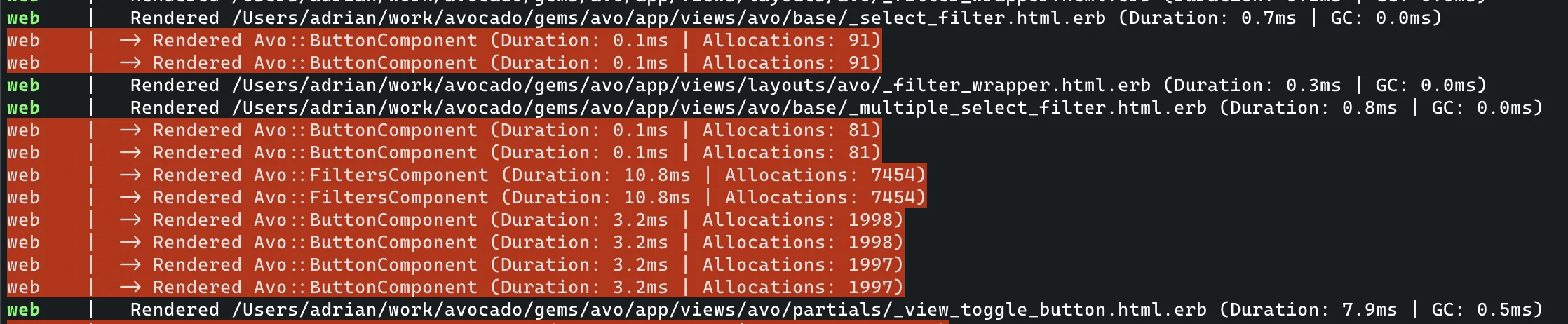
WARNING
Enabling this logging can negatively impact your application's performance. We recommend using it in the development environment or disabling it in production once you have completed debugging.