
Record reordering
Record reordering lets your users arrange records in a specific order — like reordering Slides inside a Carousel or MenuItems inside a Menu — using ordering buttons or drag and drop on the Index view.
Configure it through the ordering class attribute on the resource. The actions are plain lambdas, so they pair naturally with an ordering gem like acts_as_list or with your own positioning logic.
# app/avo/resources/course_link.rb
class Avo::Resources::CourseLink < Avo::BaseResource
  self.ordering = {
    visible_on: :index,
    actions: {
      higher: -> { record.move_higher },
      lower: -> { record.move_lower },
      to_top: -> { record.move_to_top },
      to_bottom: -> { record.move_to_bottom },
    }
  }
end
Without any ordering configuration, no reordering controls are rendered. Note that visible_on has no implicit default — if you omit it, the buttons won't show anywhere, so always set it to :index, :association, or both.
Set up reordering with acts_as_list
Install and configure the gem as instructed in its readme. Please ensure you give all records position attribute values, so the gem works fine.
Then add the configuration from the snippet above. The record inside each action is the instantiated model, and move_higher, move_lower, move_to_top, and move_to_bottom are provided by acts_as_list. If you're not using that gem, put your own position-changing logic inside the lambdas — each one also has access to resource, options, and params; the full contract is in the actions reference.
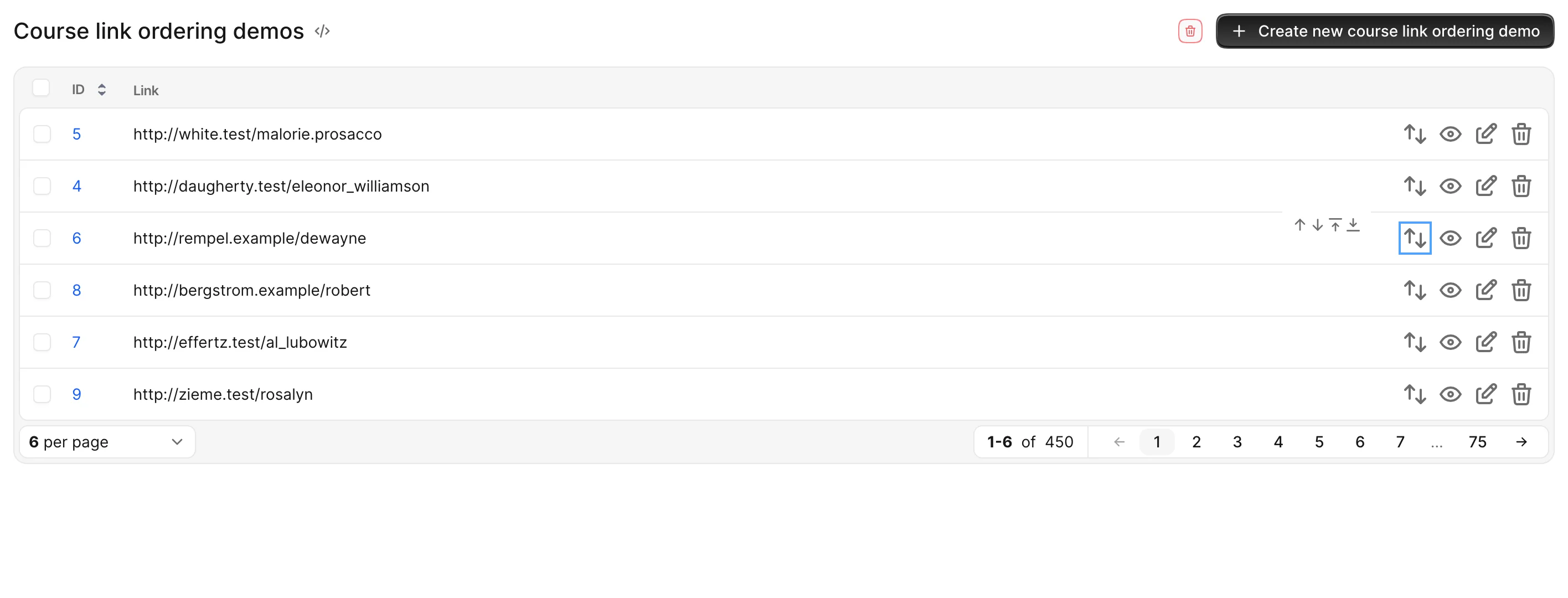
That configuration generates a button with a popover containing the ordering buttons.
Always show the order buttons
If the resource you're updating requires reordering often, keep the buttons visible at all times with display_inline: true.
# app/avo/resources/course_link.rb
class Avo::Resources::CourseLink < Avo::BaseResource
  self.ordering = {
    display_inline: true,
    visible_on: :index,
    actions: {
      higher: -> { record.move_higher },
      lower: -> { record.move_lower },
      to_top: -> { record.move_to_top },
      to_bottom: -> { record.move_to_bottom },
    }
  }
end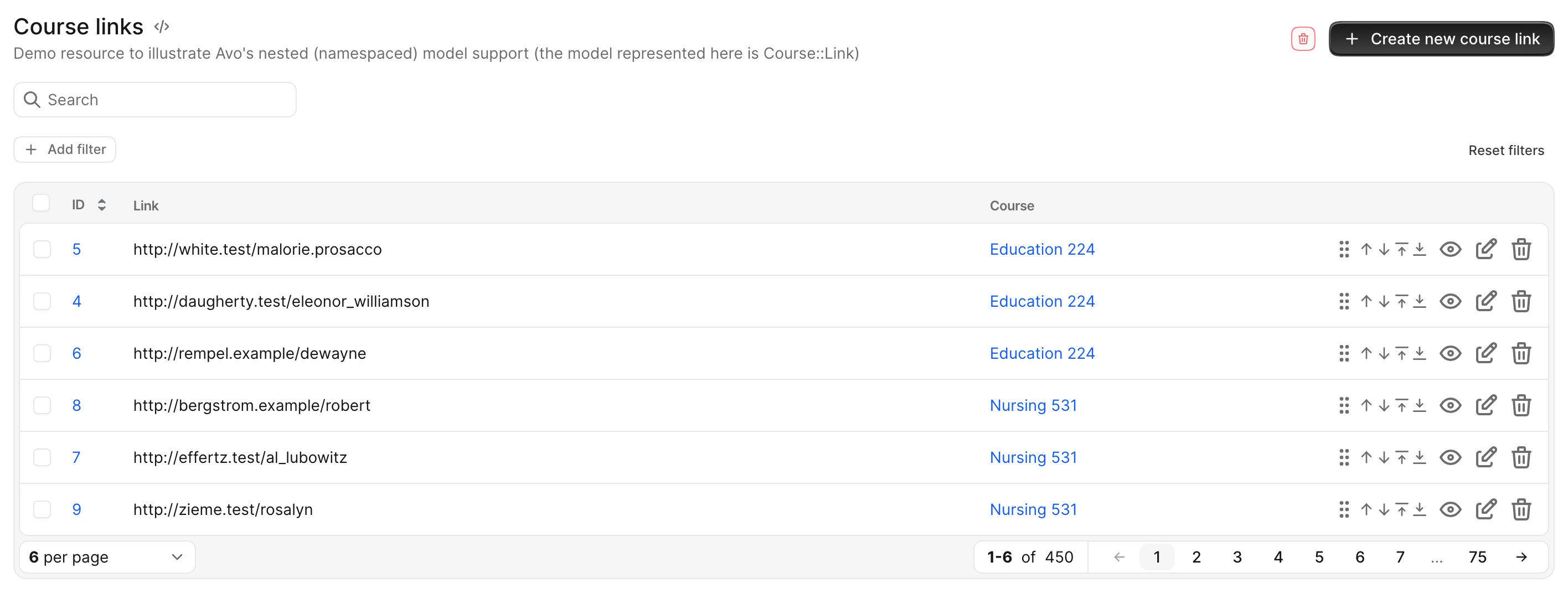
Choose where the buttons appear
visible_on controls which views render the reordering controls.
If you want them on the resource's Index view, use :index:
# app/avo/resources/course_link.rb
class Avo::Resources::CourseLink < Avo::BaseResource
  self.ordering = {
    visible_on: :index,
  }
end
If the order only makes sense in the scope of a parent record — like ordering MenuItems for a Menu or Slides for a Carousel — use :association so the buttons show up only in the has_many association view:
# app/avo/resources/course_link.rb
class Avo::Resources::CourseLink < Avo::BaseResource
  self.ordering = {
    visible_on: :association,
  }
end
Use [:index, :association] to show them in both places.
Sort the Index view by position
Naturally, you'll want the Index view to list records in their position order. You may do that in two ways:
- Add a
default_scopeto your model. If you're only using this ordering scheme in Avo, this is not the recommended way — it applies the scope to every query for that model, which you probably don't want. - Use
index_queryto alter the query only in Avo.
# app/avo/resources/course_link.rb
class Avo::Resources::CourseLink < Avo::BaseResource
  self.index_query = -> {
    query.order(position: :asc)
  }

  self.ordering = {
    display_inline: true,
    visible_on: :index,
    actions: {
      higher: -> { record.move_higher },
      lower: -> { record.move_lower },
      to_top: -> { record.move_to_top },
      to_bottom: -> { record.move_to_bottom }
    }
  }
end
Reorder using drag and drop
Sometimes it's easier to just pick up a record and drop it where you'd like it to be. That's exactly what this feature does.
It's disabled by default. To enable it, add drag_and_drop: true and an insert_at action to the ordering hash — both are required for the drag handles to appear.
# app/avo/resources/course_link.rb
class Avo::Resources::CourseLink < Avo::BaseResource
  self.ordering = {
    drag_and_drop: true,
    display_inline: true,
    visible_on: [:index, :association],
    actions: {
      higher: -> { record.move_higher },
      lower: -> { record.move_lower },
      to_top: -> { record.move_to_top },
      to_bottom: -> { record.move_to_bottom },
      insert_at: -> { record.insert_at position }
    }
  }
end
Inside insert_at, the position local is the target position (an Integer) computed from where the record was dropped.
Custom position attribute
To compute the drop target, Avo reads the current position of the first record in the list — by default via record.position, which is what acts_as_list provides. If your model exposes its position under a different name, point the position option at it.
# app/avo/resources/course_link.rb
class Avo::Resources::CourseLink < Avo::BaseResource
  self.ordering = {
    position: -> { record.position_in_list },
    drag_and_drop: true,
    display_inline: true,
    visible_on: [:index, :association],
    actions: {
      higher: -> { record.move_higher },
      lower: -> { record.move_lower },
      to_top: -> { record.move_to_top },
      to_bottom: -> { record.move_to_bottom },
      insert_at: -> { record.insert_at position }
    }
  }
end
Authorization
If you're using the authorization feature, please ensure you give the proper permissions using the reorder? policy method.
# app/policies/course_link_policy.rb
class CourseLinkPolicy < ApplicationPolicy
  def reorder? = edit?

  # or a custom permission

  def reorder?
    user.can_reorder_items?
  end

  # other policy methods
end