
Resources API
Per-option reference for resource configuration. For task-oriented documentation and worked examples, see the Resources guide.
All options are class attributes declared at the top of the resource file:
# app/avo/resources/post.rb
class Avo::Resources::Post < Avo::BaseResource
  self.title = :name
  self.includes = [:user]

  def fields
    field :id, as: :id
  end
end
Identity
-> self.title
The attribute or block Avo uses as the record's display name — in link labels, breadcrumbs, association pickers, and the Show view header. When not set, Avo tries the name, title, and label attributes in order and falls back to id.
class Avo::Resources::Post < Avo::BaseResource
  self.title = :slug # it will now reference @post.slug to show the title
end
A block receives access to resource and record, so the title can be computed without touching the model:
class Avo::Resources::Comment < Avo::BaseResource
  self.title = -> {
    ActionView::Base.full_sanitizer.sanitize(record.body).truncate 30
  }
end
The Symbol may also point to a plain getter method defined on the model:
# app/models/comment.rb
class Comment < ApplicationRecord
  def tiny_name
    ActionView::Base.full_sanitizer.sanitize(body).truncate 30
  end
end- Type: Symbol or Proc
- Default: the first of
name,title,labelpresent on the model, otherwiseid
-> self.description
A piece of text displayed to users on the Index, Show, Edit, and New views, under the resource name.
class Avo::Resources::User < Avo::BaseResource
  self.description = "These are the users of the app."
end
A String is displayed on all views. A block can vary the message per context — it has access to record, resource, view, current_user, and params:
class Avo::Resources::User < Avo::BaseResource
  self.description = -> do
    if view == :index
      "These are the users of the app"
    else
      if current_user.is_admin?
        "You can update all properties for this user: #{record.id}"
      else
        "You can update some properties for this user: #{record.id}"
      end
    end
  end
end- Type: String or Proc
- Default:
nil
WARNING
self.description is rendered as HTML (<%==). Do not use direct user input or any value that users can edit — that can allow stored XSS attacks.
INFO
self.description is not displayed when the resource is rendered as an association (for example, in a has_many table on another resource's page). To show a description there, use the description option on the association field.
-> self.avatar
The photo displayed next to the record on the Show and Edit views and in the breadcrumbs.
class Avo::Resources::User < Avo::BaseResource
  self.avatar = {
    source: :profile_photo
  }
end- Type: Hash with keys
source(Symbol or Proc) andvisible_on - Default:
nil
More information on the cover and avatar page.
-> self.cover
The large banner image displayed at the top of the record.
class Avo::Resources::Post < Avo::BaseResource
  self.cover = {
    source: :cover_photo
  }
end- Type: Hash with keys
source(Symbol or Proc),visible_on, andsize - Default:
nil
More information on the cover and avatar page.
-> self.icon
The icon displayed next to the resource on the sidebar.
class Avo::Resources::User < Avo::BaseResource
  self.icon = "tabler/outline/user"
end- Type: String — an icon path
- Default: Avo's default resource icon
-> self.color
Tints the resource's sidebar icon with a color from Avo's palette. Only the icon stroke is colored — the label and the hover and active backgrounds stay neutral. Use it to make a resource recognizable at a glance, or give related resources the same color to visually group them.
The color follows the resource beyond the sidebar: the initials chip in the breadcrumbs is tinted too, and with Advanced Search installed, so are the resource group headers in global search results (which also show the resource's self.icon).
class Avo::Resources::User < Avo::BaseResource
  self.icon = "tabler/outline/user"
  self.color = :purple
end- Type: Symbol or String — one of
red,orange,amber,yellow,lime,green,emerald,teal,cyan,sky,blue,indigo,violet,purple,fuchsia,pink,rose - Default:
nil— the neutral icon color
Colors adapt automatically to the light and dark themes. An unknown color name renders the default neutral icon. A color: set on the menu entry overrides this value.
-> self.model_class
The model this resource references. Set it when the model is namespaced, when the class can't be inferred from the resource name, or when the resource is a secondary resource for a model.
class Avo::Resources::DelayedJob < Avo::BaseResource
  self.model_class = "Delayed::Job"
end- Type: String or Class
- Default:
nil— the model class is inferred from the resource name (namespace included)
Index view
-> self.default_view_type
The view type the Index view renders when the user hasn't picked one — the classic :table, or :grid/:map for more visual data.
class Avo::Resources::Post < Avo::BaseResource
  self.default_view_type = :grid
end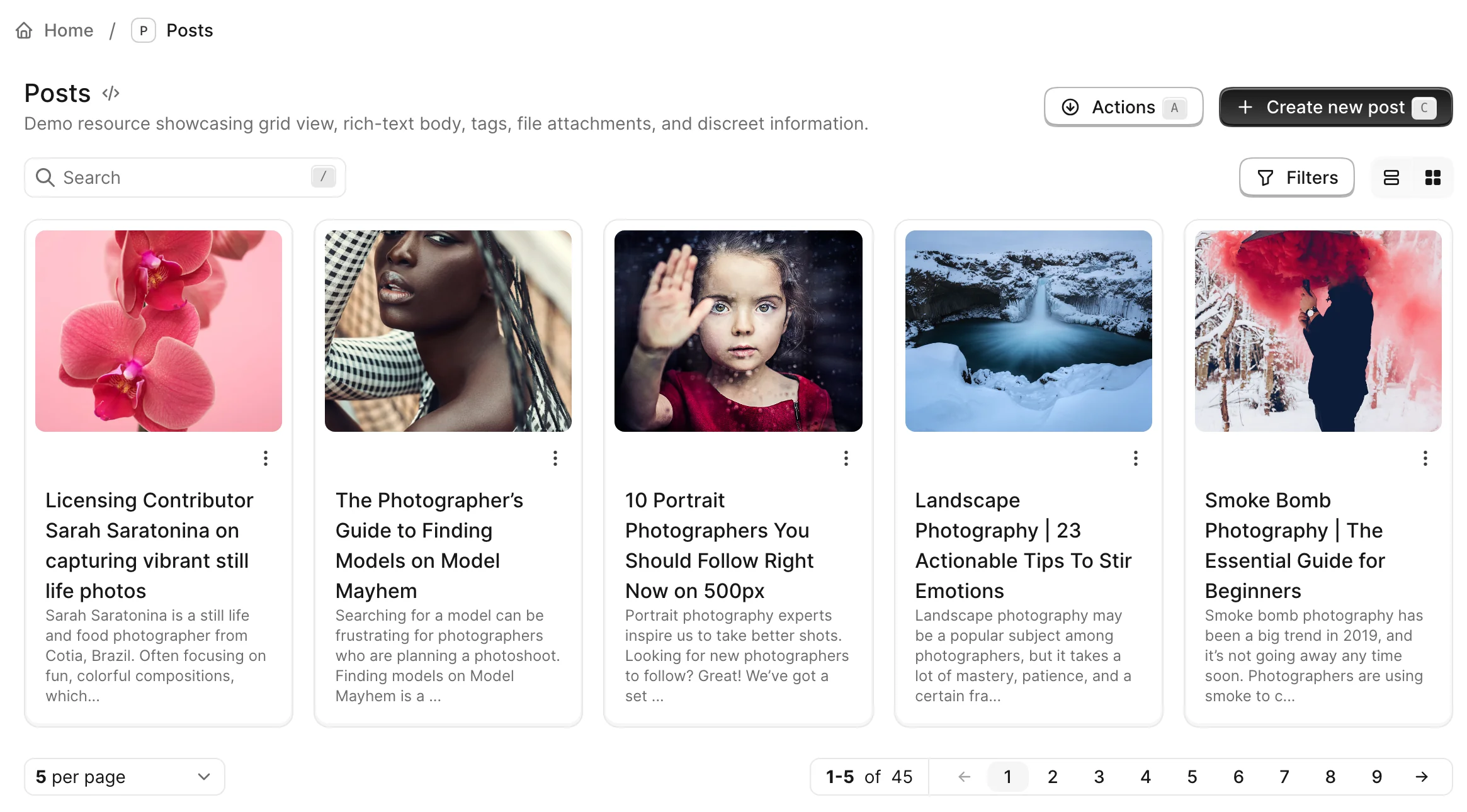
A Proc can pick the view type per request. Within the block you have access to all attributes of Avo::ExecutionContext along with resource and view:
class Avo::Resources::Post < Avo::BaseResource
  self.default_view_type = -> {
    mobile_user = request.user_agent =~ /Mobile/

    mobile_user ? :table : :grid
  }
end- Type: Symbol or Proc
- Default:
:table - Values:
:table,:grid,:map, or a custom view type
-> self.view_types
The view types available on the Index view switcher. Icons on the switcher follow the order in which the values are declared. When only one view type is available, the switcher is not rendered.
class Avo::Resources::City < Avo::BaseResource
  self.view_types = [:table, :grid]
end
A Proc can decide per request. Within the block you have access to all attributes of Avo::ExecutionContext along with resource and record:
class Avo::Resources::City < Avo::BaseResource
  self.view_types = -> { current_user.is_admin? ? [:table, :grid] : :table }
end- Type: Symbol, Array of Symbols, or Proc
- Default:
nil—:table, plus:grid/:mapwhen the resource hasgrid_view/map_viewconfigured - Values:
:table,:grid,:map, or a custom view type - Validation: requesting the
Indexview with aview_typeoutside this list raises an error
-> self.default_sort_column
The column records are sorted by on the Index view.
class Avo::Resources::User < Avo::BaseResource
  self.default_sort_column = :last_name
end- Type: Symbol — any sortable column on the model
- Default:
:created_at - Validation: if the column doesn't exist on the model, Avo falls back to
created_at
INFO
When changing the default sort column, it's recommended to add an index to that column in your database for better query performance.
class AddIndexOnUsersLastName < ActiveRecord::Migration[7.1]
  def change
    add_index :users, :last_name
  end
end-> self.default_sort_direction
The direction records are sorted in on the Index view, applied to the default sort column.
class Avo::Resources::Task < Avo::BaseResource
  self.default_sort_column = :position
  self.default_sort_direction = :asc
end- Type: Symbol
- Default:
:desc - Values:
:ascor:desc
-> self.pagination
Pagination settings for the Index view. On large tables the record count can be inefficient — the :countless type skips it entirely.
# As block:
self.pagination = -> do
  {
    type: :default,
    slots: 9,
  }
end

# Or as hash:
self.pagination = {
  type: :default,
  slots: 9,
}- Type: Hash, or Proc returning a Hash
- Default:
{ type: :default, slots: 9 }
| Key | Values | Default | Behavior |
|---|---|---|---|
type | :default, :countless | :default | :countless skips the record count |
slots | see Pagy docs — control the page links | 9 | Number of page links rendered |
Examples
Default
self.pagination = -> do
  {
    type: :default,
    slots: 9,
  }
end
Countless
self.pagination = -> do
  {
    type: :countless
  }
end
Countless and "pageless"
self.pagination = -> do
  {
    type: :countless,
    slots: 0
  }
end
-> self.index_query
The base query for the Index view. Useful for dropping a model's default_scope when rendering the index:
class Project < ApplicationRecord
  default_scope { order(name: :asc) }
endclass Avo::Resources::Project < Avo::BaseResource
self.index_query = -> { query.unscoped }
end- Type: Proc — receives
queryand returns the modified query
-> self.find_record_method
How Avo fetches one record for the Show and Edit views and any other context where a record is loaded from the database. Used with custom to_param methods, slugs, and similar non-standard identifiers.
class Avo::Resources::Post < Avo::BaseResource
  self.find_record_method = -> {
    id.to_i == 0 ? query.find_by!(slug: id) : query.find(id)
  }
end
The block is evaluated with query, id, params, and model_class available. In batch contexts (bulk actions, for example) id is an Array — return a collection with query.where(...) in that case.
- Type: Proc — receives
query,id,params, andmodel_class; returns the record (or collection whenidis an Array) - Default:
query.find(id). Models using FriendlyId (without a scope) are detected automatically and found by slug.
-> self.record_selector
Whether the selection checkbox is rendered on each row of the Index view. Disable it for resources that will never be selected to reclaim the horizontal space.
class Avo::Resources::Comment < Avo::BaseResource
  self.record_selector = false
end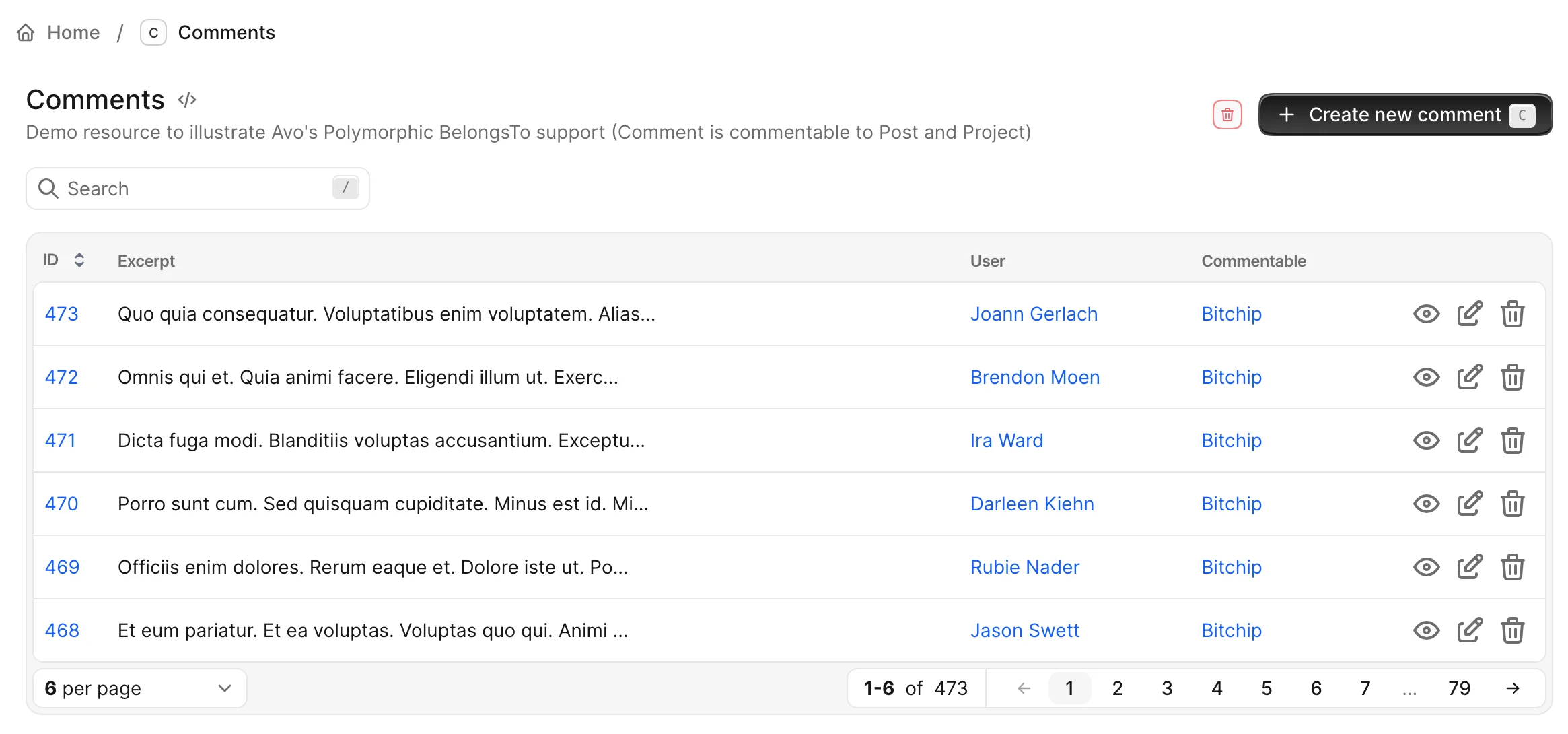
- Type: Boolean
- Default:
true
-> self.keep_filters_panel_open
Whether the filters panel stays open after the user changes a filter value.
class Avo::Resources::Course < Avo::BaseResource
  self.keep_filters_panel_open = true

  def filters
    filter Avo::Filters::CourseCountryFilter
    filter Avo::Filters::CourseCityFilter
  end
end- Type: Boolean
- Default:
false
-> self.link_to_child_resource
For Single Table Inheritance (STI) models. When declared on the parent resource, clicking a record on the Index view redirects to the child resource's record instead of the parent's.
For example, with Sibling and Spouse models inheriting from Person, a user clicking a person on the Person index is redirected to the Sibling or Spouse record.
class Avo::Resources::Person < Avo::BaseResource
  self.link_to_child_resource = true
end- Type: Boolean
- Default:
false
-> self.index_view_loading
Controls when the Index view queries and renders its records. With :lazy, Avo renders the header and controls immediately, then defers the records query to a Turbo Frame request, showing the loading component while the table, grid, or other view type loads.
class Avo::Resources::Post < Avo::BaseResource
  self.index_view_loading = :lazy
end| Value | Behavior |
|---|---|
:eager | The records are queried and rendered with the initial page load. |
:lazy | The shell renders first; the records are fetched in a deferred Turbo Frame. Search, filters, sorting, pagination, and view switches then update inside that frame while the browser URL stays in sync. |
- Type: Symbol
- Default:
:eager - Values:
:eager,:lazy - Scope: applies only to a resource's own
Indexview rendered by the defaultAvo::Views::ResourceIndexComponent. Association indexes, and resources with a custom index component, keep eager loading regardless of this setting.
Forms and saving
-> self.confirm_on_save
Whether Avo asks for confirmation before saving a record. Adds friction to the saving process, helping avoid human error.
class Avo::Resources::Post < Avo::BaseResource
  self.confirm_on_save = true
end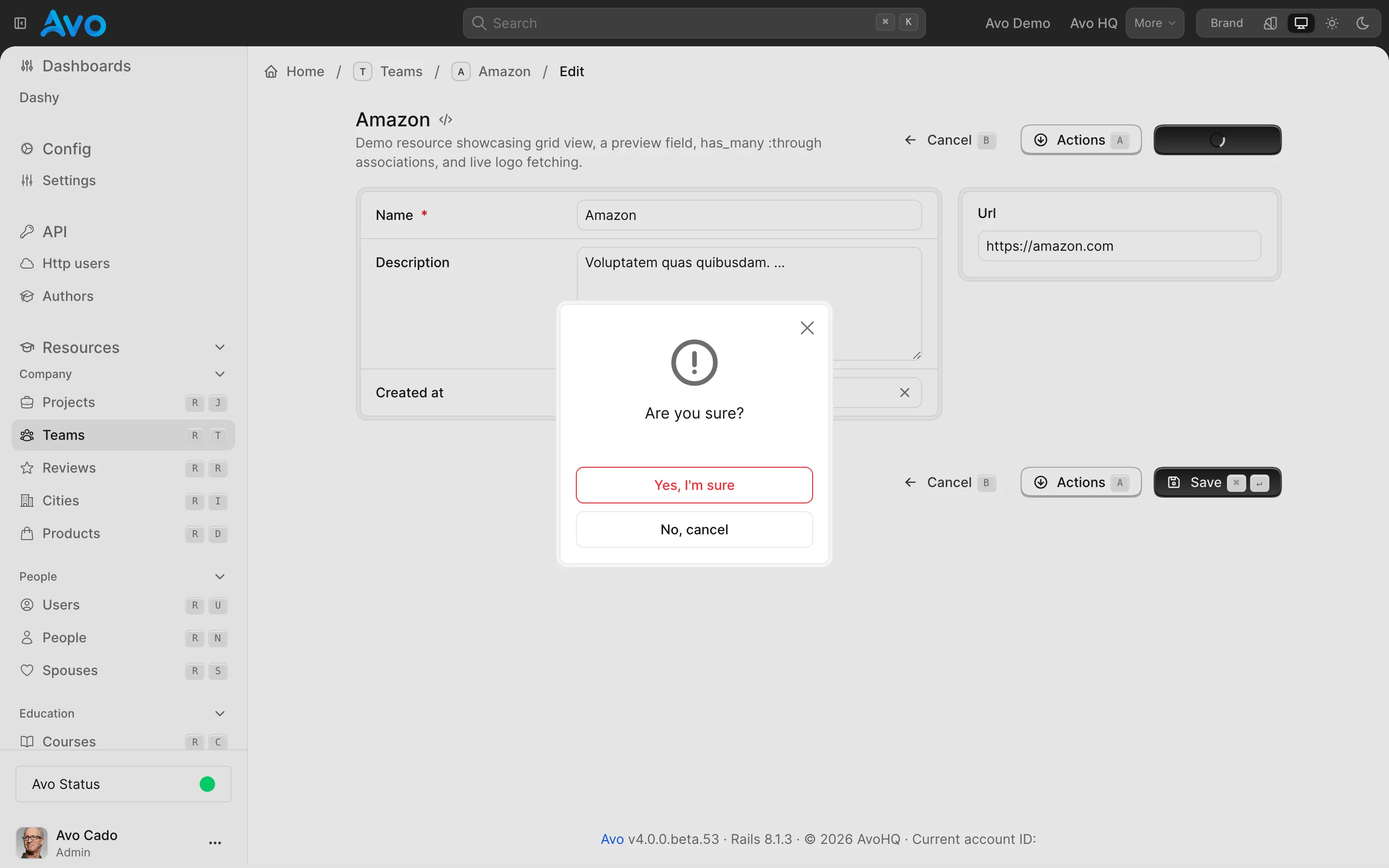
- Type: Boolean
- Default:
false
-> self.after_create_path
Where the user is redirected after creating a record.
class Avo::Resources::Comment < Avo::BaseResource
  self.after_create_path = :index
end- Type: Symbol
- Default:
:show - Values:
:show,:edit, or:index
For more granular control over the redirect or response, use the after_create_path controller method.
-> self.after_update_path
Where the user is redirected after updating a record.
class Avo::Resources::Comment < Avo::BaseResource
  self.after_update_path = :edit
end- Type: Symbol
- Default:
:show - Values:
:show,:edit, or:index
For more granular control over the redirect or response, use the after_update_path and after_destroy_path controller methods.
-> self.devise_password_optional
If you use devise and update your user models (usually User) without passing a password, you will get a validation error. devise_password_optional stops that error by stripping out the password key from params.
class Avo::Resources::User < Avo::BaseResource
  self.devise_password_optional = true
end- Type: Boolean
- Default:
false
-> config.buttons_on_form_footers
Whether the Back and Save buttons are also rendered in the footer of New and Edit forms — useful when forms grow tall. Unlike the other options on this page, this one is set in the initializer and applies to all resources.
# config/initializers/avo.rb
Avo.configure do |config|
  config.buttons_on_form_footers = true
end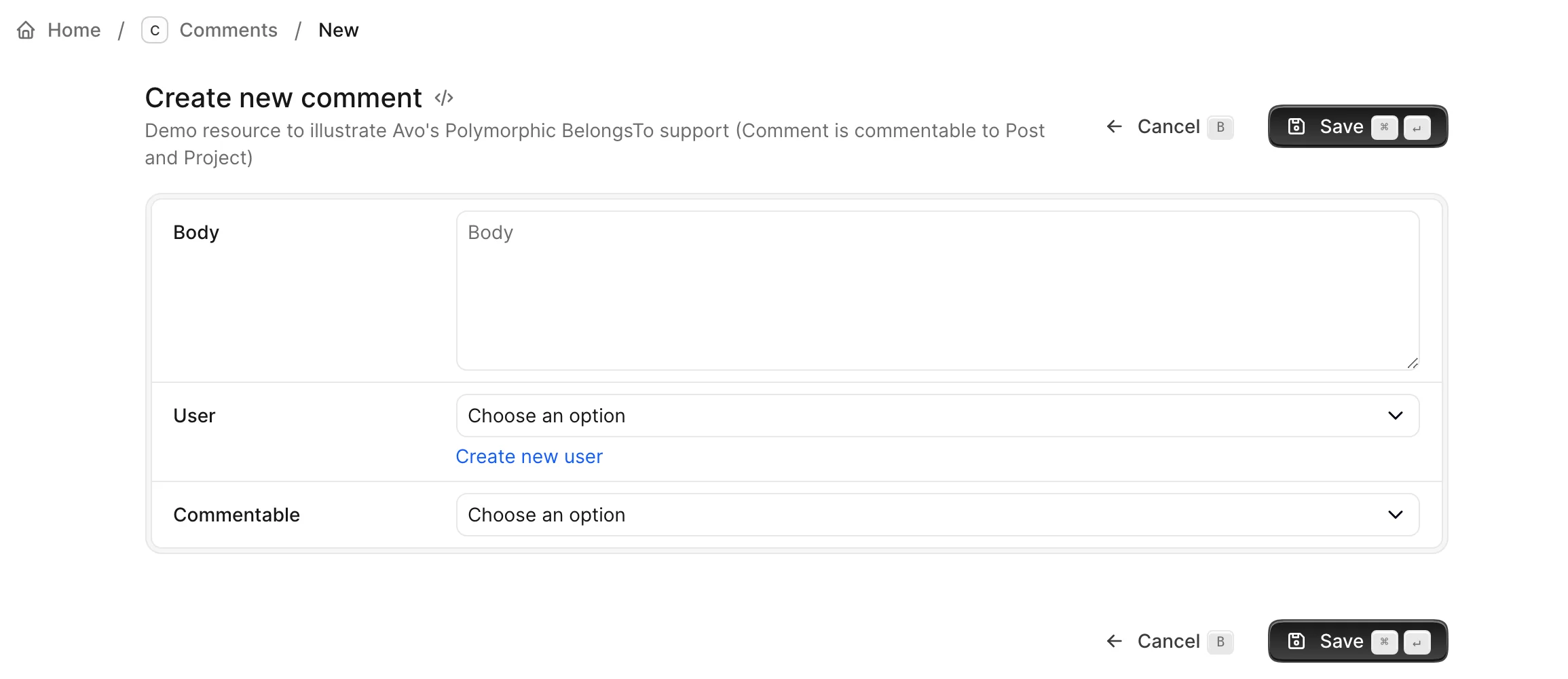
- Type: Boolean
- Default:
false
Navigation
-> self.visible_on_sidebar
Whether the resource appears in the auto-generated sidebar menu.
class Avo::Resources::TeamMembership < Avo::BaseResource
  self.visible_on_sidebar = false
end- Type: Boolean
- Default:
true
WARNING
This option is used in the auto-generated menu, not in the menu editor.
You'll have to use your own logic in the visible block for that.
-> self.hotkey
A keyboard shortcut that jumps to the resource's Index view from anywhere in the admin panel. The binding is used automatically when the resource appears in the sidebar via the auto-generated menu or the menu editor.
class Avo::Resources::Post < Avo::BaseResource
  self.hotkey = "g p"
end- Type: String — @github/hotkey syntax; space-separate keys for sequences (
"g p"= press g then p) - Default:
nil
-> self.external_link
A link to the record's public page outside the Avo interface. When configured, Avo displays an external link button on the record — clicking it takes the user to the returned URL.
The block should return a String URL. It has access to all attributes of Avo::ExecutionContext along with record, so you can use your application's path helpers (e.g. main_app.post_path) or any external URL generator.
class Avo::Resources::Post < Avo::BaseResource
  self.external_link = -> {
    main_app.post_path(record)
  }
end
- Type: Proc returning a String
- Default:
nil
Performance
-> self.includes
Associations to eager load on the Index view — the cure for those nasty n+1 performance issues.
class Avo::Resources::Post < Avo::BaseResource
  self.includes = [:user, :tags]

  # or a very nested scenario
  self.includes = [files_attachments: :blob, users: [:comments, :teams, post: [comments: :user]]]
end
We know, the array notation looks weird, but it works.
- Type: Array — anything ActiveRecord's
includesaccepts - Default:
[]
-> self.single_includes
Works the same as self.includes, but eager loads the associations on the Show and Edit views only.
- Type: Array
- Default:
[]
-> self.attachments
Attachments to eager load on the Index view, similar to how self.includes works for associations.
class Post < ApplicationRecord
  has_one_attached :cover_photo
  has_one_attached :audio
  has_many_attached :attachments
endclass Avo::Resources::Post < Avo::BaseResource
self.attachments = [:cover_photo, :audio, :attachments]
end- Type: Array of Symbols — attachment names
- Default:
[]
-> self.single_attachments
Works the same as self.attachments, but eager loads the attachments on the Show and Edit views only.
- Type: Array of Symbols
- Default:
[]
-> cache_hash
The method Avo uses to compute the cache key for each row. The default implementation looks like this:
def cache_hash(parent_record)
  result = [record, file_hash]

  if parent_record.present?
    result << parent_record
  end

  result
end

def file_hash
  content_to_be_hashed = ""

  file_name = self.class.underscore_name.tr(" ", "_")
  resource_path = Rails.root.join("app", "avo", "resources", "#{file_name}.rb").to_s
  if File.file? resource_path
    content_to_be_hashed += File.read(resource_path)
  end

  # policy file hash
  policy_path = Rails.root.join("app", "policies", "#{file_name.gsub("_resource", "")}_policy.rb").to_s
  if File.file? policy_path
    content_to_be_hashed += File.read(policy_path)
  end

  Digest::MD5.hexdigest(content_to_be_hashed)
end
It's an md5 of the resource file and the policy file (so the cache gets busted when the rules change). The parent_record is added when the resource is displayed as an association, so there's a separate cache record for each association.
Override the method in your resource file when you have special requirements:
class Avo::Resources::User < Avo::BaseResource
  def cache_hash(parent_record)
    result = [record, file_hash, "SOMETHING_NEW"]

    if parent_record.present?
      result << parent_record
    end

    result
  end
endCustomization
-> self.components
The ViewComponent classes rendered for each view. By default, each view renders:
| View | Component |
|---|---|
| Index | Avo::Views::ResourceIndexComponent |
| Show | Avo::Views::ResourceShowComponent |
| New, Edit | Avo::Views::ResourceEditComponent |
Swap any of them for your own classes. Keys must be strings that match the original component class name; values may be classes or strings.
self.components = {
  "Avo::Views::ResourceIndexComponent": Avo::Views::Users::ResourceIndexComponent,
  "Avo::Views::ResourceShowComponent": "Avo::Views::Users::ResourceShowComponent",
  "Avo::Views::ResourceEditComponent": "Avo::Views::Users::ResourceEditComponent",
  "Avo::Index::GridItemComponent": "Avo::Custom::GridItemComponent",
  "Avo::ViewTypes::MapComponent": "Avo::Custom::MapComponent",
  "Avo::ViewTypes::TableComponent": "Avo::Custom::TableComponent",
  "Avo::ViewTypes::GridComponent": "Avo::Custom::GridComponent",
  "Avo::Index::TableRowComponent": "Avo::Custom::TableRowComponent"
}- Type: Hash — original component class name (String key) to replacement component (Class or String)
- Default:
{}
WARNING
The custom view components must ensure that their initializers are configured to receive all the arguments passed during the rendering of a component. You can verify this in our codebase through the following files:
Index -> app/views/avo/base/index.html.erb
Show -> app/views/avo/base/show.html.erb
New -> app/views/avo/base/new.html.erb
Edit -> app/views/avo/base/edit.html.erb
The easiest way to create a compatible component is to eject an existing one with the --scope parameter. For a full walkthrough, see the safely override resource components guide.
-> self.discreet_information
Shows information about records without adding another field.
More information on the discreet information page.
Options documented on their own pages
Some resource options have enough surface to warrant a dedicated page:
| Option | Documented on |
|---|---|
self.search | Search |
self.translation_key | I18n |
self.ordering | Record reordering |
self.grid_view | Grid view |
self.map_view | Map view |
self.avatar | Cover and avatar |
self.cover | Cover and avatar |
self.row_controls_config | Table view API |
self.table_view | Table view API |